Forte Max Manual.pdf - 第29页
© 2023 Nordson Corpo ration 25 4 Recipe Creation 4.1 Overview This section outlines the steps requi red to create both a dual simultaneous recip e and a dual-action recipe in the Canvas dispensing software. The procedure…

ForteMAXDispensingSystemAddendum Installation and Setup
24 © 2023 Nordson Corporation
b.
Select Applicator 2 and perform the following step:
1) Teach Camera to Applicator XY Offsets (Dry)
2
.
c.
Select Applicator 1 and perform the following steps in sequence:
1) Teach All Applicators to Height Sense Z Offset
4
.
? When performing "Teach All Applicators to Height Sense Z Offset," the system
will prompt you to teach Applicator 2 first then Applicator 1, since the Delta Z
motor is on Applicator 1. This sequence is specific to the Forte MAX only.
2) Teach Service Station
5
.
? The Teach Service Station routine may be performed in either V1 or V2 setup. It
does not need to be included in both routines.
3) Teach Purge Location
6
.
4) Teach Scale Location
7
.
d.
Select Applicator 2 and perform the following steps in sequence:
1) Teach Purge Location
6
.
2) Teach Scale Location
7
.
4. After the dry offsets are completed, create the recipe, see Section 4 – Recipe Creation.
5. Verify that the "Current Pitch X" value is within 0.250 mm of the "Desired Pitch X" value. If
not, readjust Valve 2 position. Refer to Step 20 and Step 21 under 3.6 Installing the Slide
Bracket and repeat Step 3b and Step 3d under 3.7 Dry Valve Offsets Procedure.
> Wet offset procedures will be performed after the recipe is created. Refer to the Canvas
Dispensing Software User Guide for instructions.
© 2023 Nordson Corporation 25
4 Recipe Creation
4.1 Overview
This section outlines the steps required to create both a dual simultaneous recipe and a dual-action
recipe in the Canvas dispensing software. The procedures in this section assume the layout has been
defined, the slide bracket has been installed in the appropriate position, and a dry valves offsets
procedure has been performed. Refer to Section 3 – Installation and Setup for detailed information.
This section covers the following topics:
• Theory of Operation
• Dual Simultaneous Dispensing
• Dual Action Dispensing
• Running Production
4.2 Safety First
Operation of the dispensing system involves heat, air pressure, electrical power, mechanical devices, and
the use of hazardous materials. It is essential that every person servicing or operating the dispensing
system fully understands all hazards, risks, and safety precautions. Refer to Section 2 – Safety in this
manual and to the Forte Dispensing System Installation, Operations, and Maintenance Manual for
important safety information.
4.3 Theory of Operation
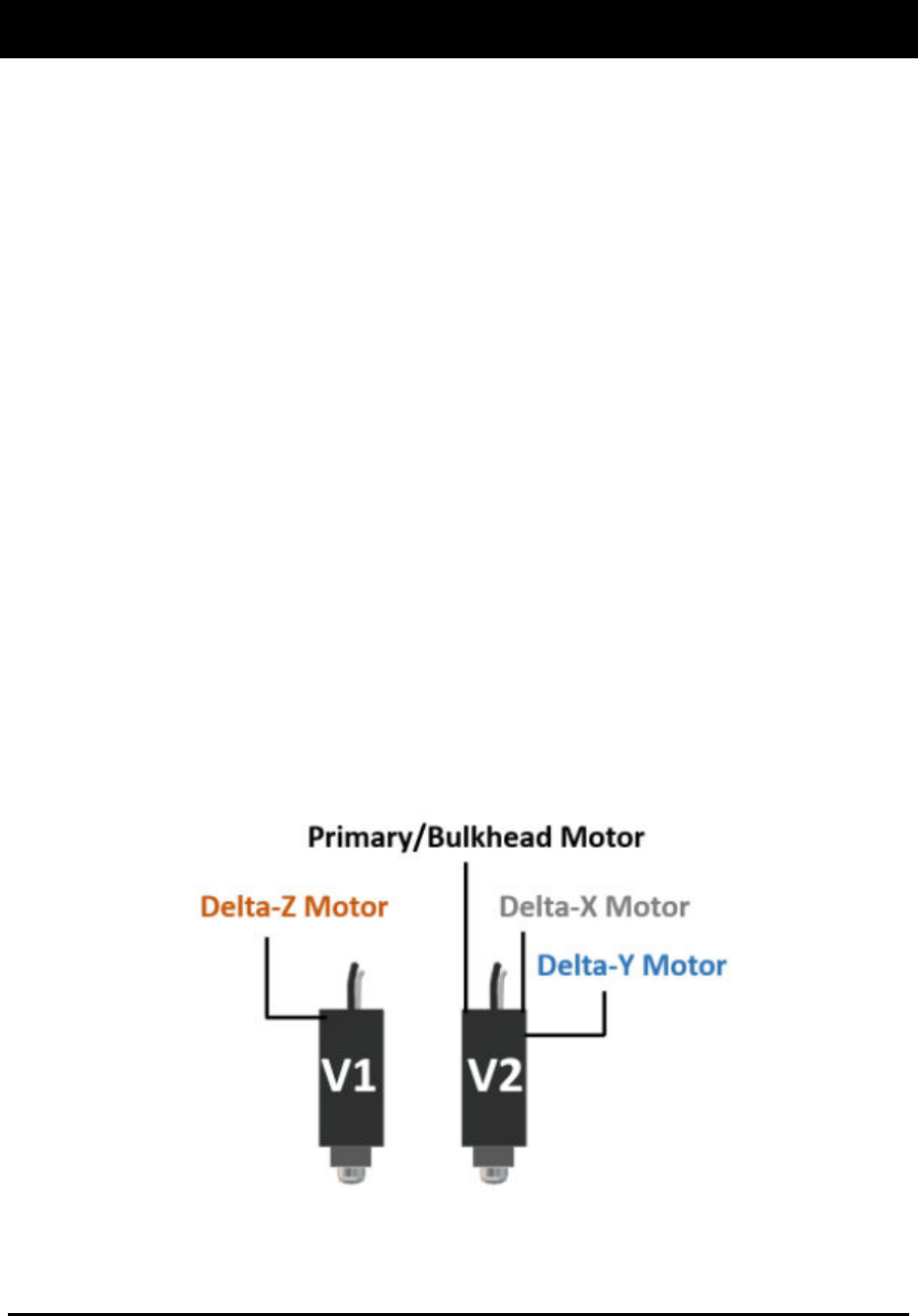
Two valves are mounted on a dual dovetail mounting bracket that is mechanically controlled to provide
X, Y, and Z position correction. Valve 1 (V1) moves up and down (Delta-Z motor) for part height
corrections up to 10 mm. Valve 2 (V2) provides ±2.5 mm of X and Y travel for orientation and translation
corrections (Delta-X motor and Delta-Y motor). Since the Delta XY axis motors for Forte MAX are on V2,
the V1 Z-axis position is automatically adjusted during program execution to compensate for V2 position
changes. Therefore, it is important that V2 has a safe Z height.
Figure 4-1 Theory of Operation
Forte MAX motors can automatically adjust for 250 µm offsets of individual parts within 50 ms or 5 mm/s,
however, this may limit the maximum line speed.
ForteMAXDispensingSystemAddendum Recipe Creation
26 © 2023 Nordson Corporation
4.4 Dual Simultaneous Dispensing
The following steps are required to create a dual simultaneous dispensing recipe:
• Create the recipe
• Create a pattern
• Add dispensing instructions
• Create a Container
• Place the Container
4.4.1 Creating a Recipe for a Multi-up Panel
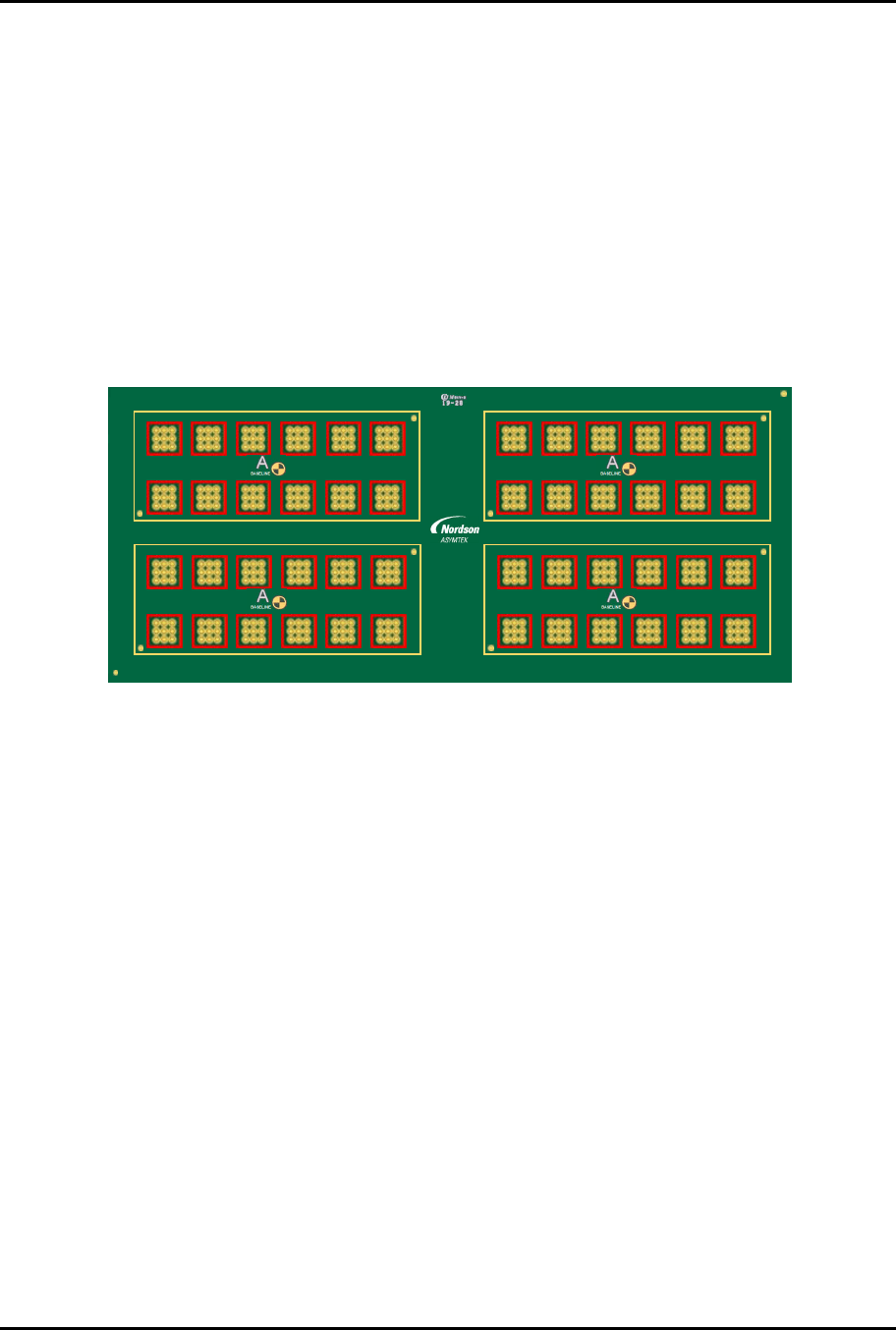
This section outlines the steps required to create the recipe for the multi-up board, layout option 2
(Figure 3-4). The following recipe will dispense a line around all the cells (red squares) shown in
Figure 4-2. For detailed programming information, refer to the Canvas Dispensing Software User Guide.
1 2 3 4 5 6 7 8 9 10 11 12
4
3
2
1
6130139 REV 1
STRAIGHT
B,1
B,2
2,1 2,2 2,3 2,4 2,5 2,6
1,1 1,2 1,3 1,4 1,5 1,6
4,1 4,2 4,3 4,4 4,5 4,6
A2
A1
3,1 3,2 3,3 3,4 3,5 3,6
A2
A1
4,1 4,2 4,3 4,4 4,5 4,6
A2
A1
3,1 3,2 3,3 3,4 3,5 3,6
A2
A1
2,1 2,2 2,3 2,4 2,5 2,6
1,1 1,2 1,3 1,4 1,5 1,6
Figure 4-2 Dual Simultaneous Recipe Requirement