Forte Max Manual.pdf - 第57页
© 2023 Nordson Corpo ration 53 5 Maintenance 5.1 Overview Following a routine maintenance schedule and pro cedures can prevent part deg radation and ensure high quality performance for every prod uction run. ? NOTE This …
ForteMAXDispensingSystemAddendum Recipe Creation
52 © 2023 Nordson Corporation
4.6 Running Production
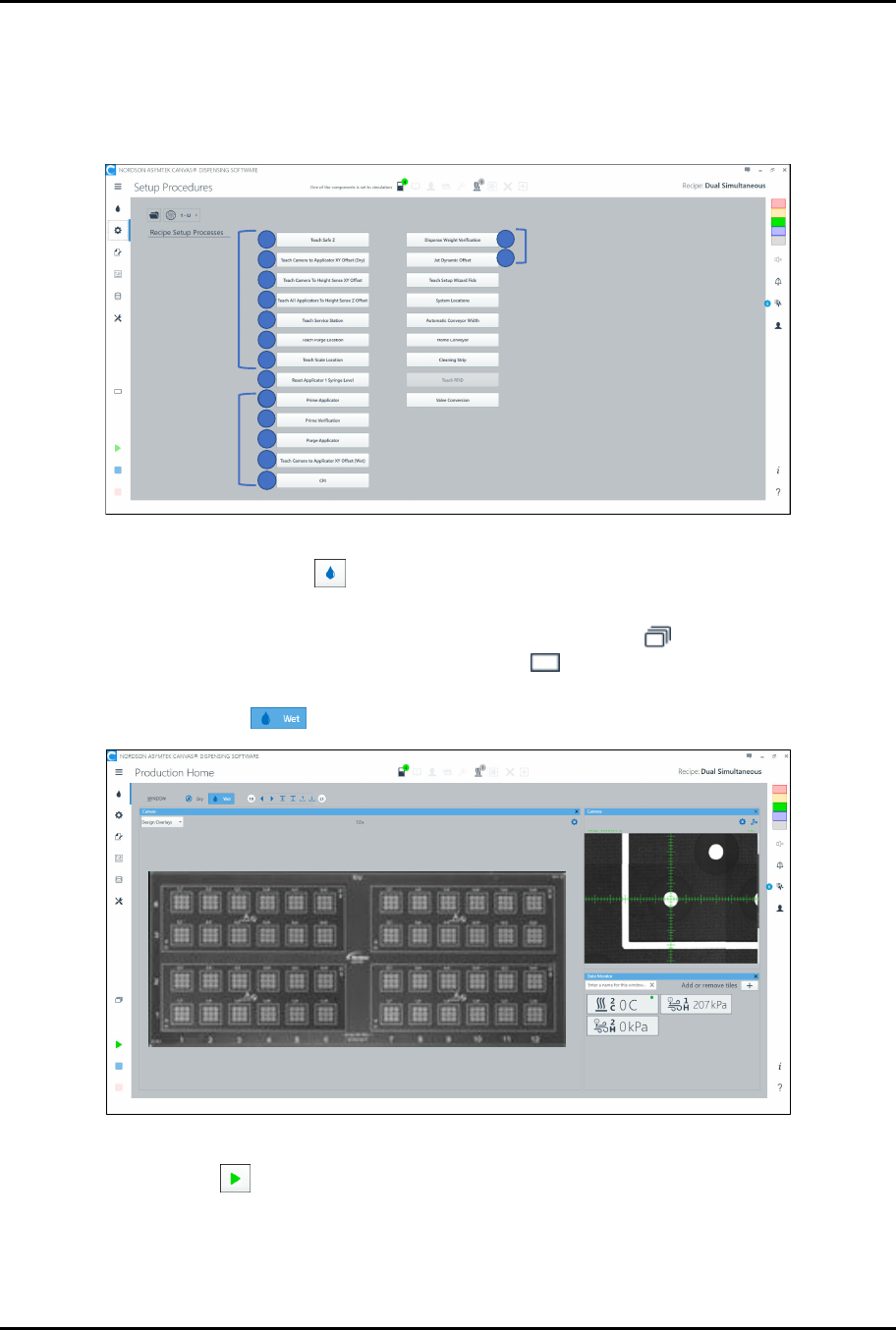
1. Prior to running the recipe, install the dispensing fluid and perform a wet valve offsets
procedure. Refer to the Canvas Dispensing Software User Guide if necessary.
> Wet Valve Offset procedures are shown in Figure 4-55.
1
2
3
4
6
7
5
Wet Offsets
9
10
11
12
13
8
9
14
15
Dry Offsets
Wet Offsets
Figure 4-55 Setup Procedures
2. Select the Production button on the Navigation Panel to open the Production Home
screen (Figure 4-56).
3. Make sure you are in Production Mode. The Production Mode icon should appear at the
left of the screen. If the system is in Setup Mode , click the mode icon to change to
Production Mode.
4. Verify that Wet mode is selected.
Figure 4-56 Production Home Screen
5. Select Run to run the recipe.
> You can monitor the production run through the data monitors. If a monitor button is
red, attention is required.
> Some monitor tiles, such as heaters, have an ON/OFF indicator.

© 2023 Nordson Corporation 53
5 Maintenance
5.1 Overview
Following a routine maintenance schedule and procedures can prevent part degradation and ensure high
quality performance for every production run.
?
NOTE
This section applies to the Forte Max Dispensing System only. Refer to the Forte
Dispensing System Installation, Operations, and Maintenance Manual for complete
system maintenance instructions.
This section covers the following topics:
• Lubricating the Forte MAX Bracket
5.2 Safety First
Operation of the dispensing system involves heat, air pressure, electrical power, mechanical devices, and
the use of hazardous materials. It is essential that every person servicing or operating the dispensing
system fully understands all hazards, risks, and safety precautions. Refer to Section 2 – Safety in this
manual and to the Forte Dispensing System Installation, Operations, and Maintenance Manual for
important safety information.
ForteMAXDispensingSystemAddendum Maintenance
54 © 2023 Nordson Corporation
5.3 Lubricating the Forte MAX Bracket
The Forte MAX bracket should be lubricated every six (6) months.
Tools and Materials Needed:
• Forte MAX Grease Kit (Item 181)*
• Torque Wrench 1.3 Nm (12 in-lbs) (Customer Supplied)
*The Forte Max Grease Kit contains the following grease: ISOFLEX, TOPAS NCA 52, MICROLUBE GL 262, and Super Lube
Synthetic Grease with PTFE
WARNING!
Refer to the applicable SDS for important safety information pertaining to the
greases used in this procedure.
To lubricate the Forte MAX bracket:
1. Lower the Delta Z all the way down in the Canvas dispensing software.
2. Close the Canvas dispensing software.
3. Perform a service shutdown, see 2.11 Service Shutdown.
WARNING!
Failure to shut down the power and pneumatic pressure can result in severe injury
to personnel or damage to the dispensing system.
4. Open the dispensing system hatch and remove both valves. Refer to the applicable valve
manual for removal.
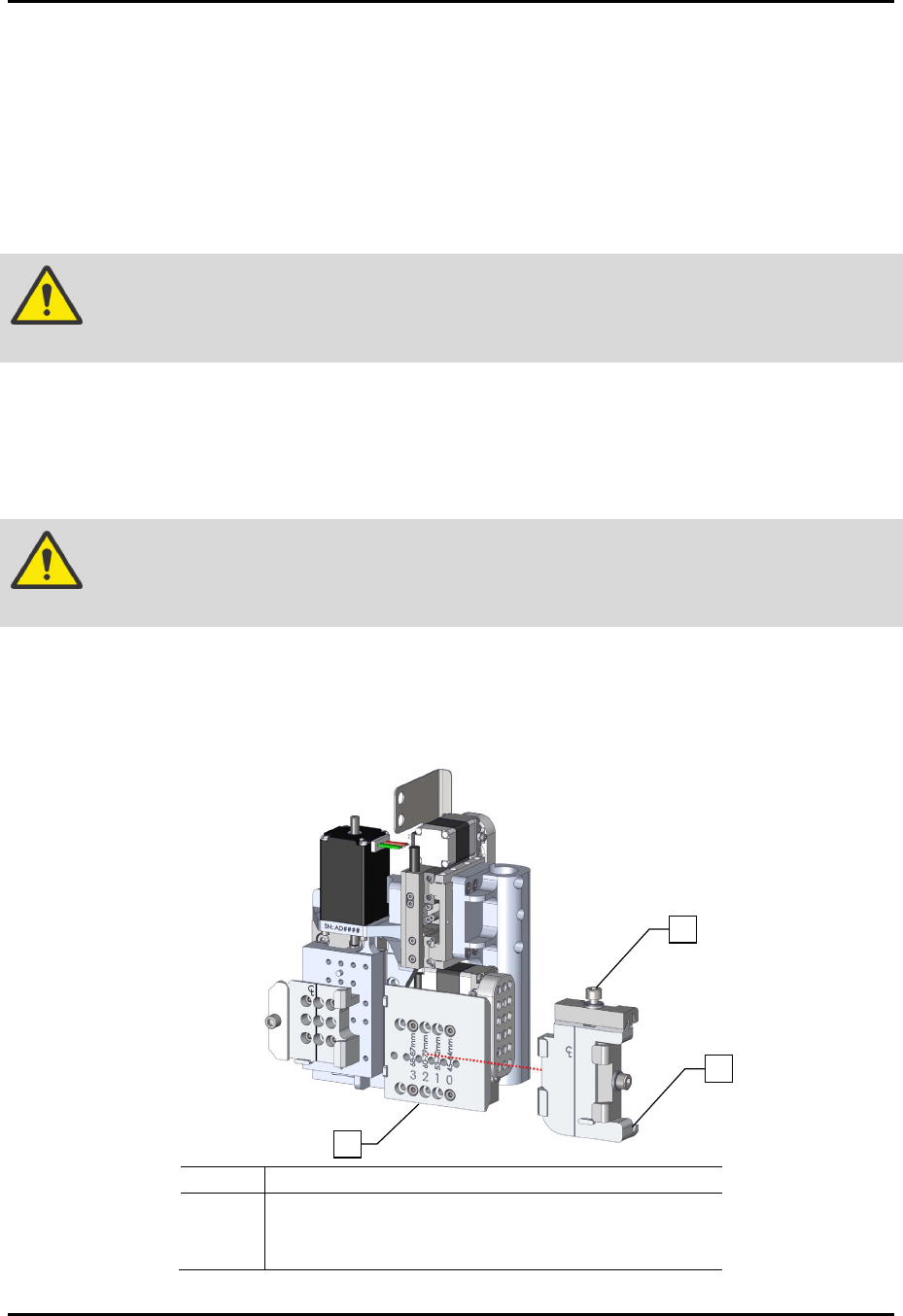
5. Loosen the dovetail mounting screw (Figure 5-1).
6. Remove the right dovetail assembly by sliding it to the right.
Item
Desc
riptio
n
1 Dovetail Mounting Screw
2 Right Dovetail Assembly
3 Standard Slide Bracket
Figure 5-1 Removing the Right Dovetail
1
2
3