Forte Max Manual.pdf - 第44页
ForteMAXDispensingSystemAddendum Recipe Creation 40 © 2023 Nordson Corpo ration 4.5 Dual Action Dis pensing When creating a dual action reci pe, consider an approach that sa ves c ycle time through the reduction of a…
ForteMAXDispensingSystemAddendum Recipe Creation
© 2023 Nordson Corporation 39
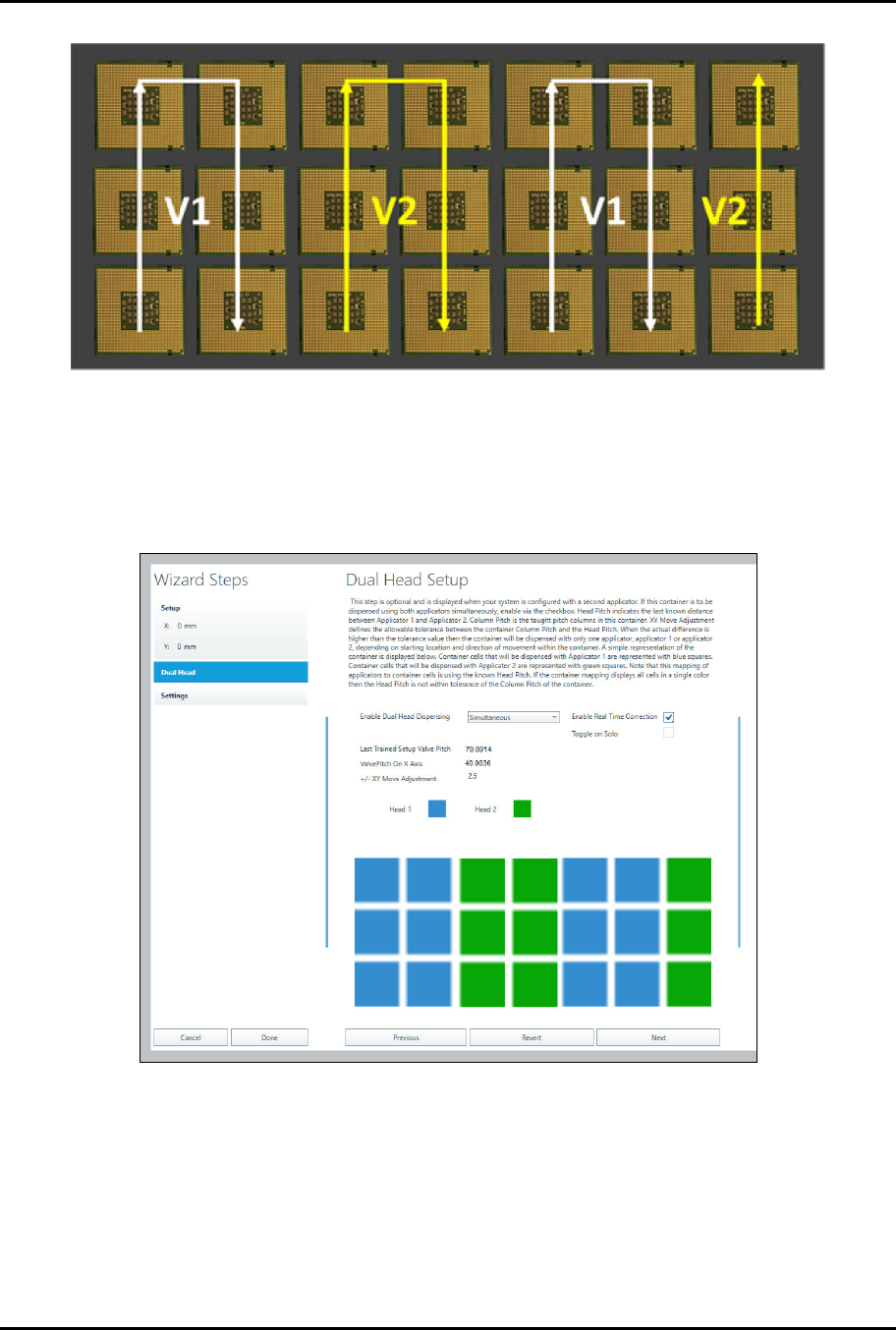
Figure 4-28 Serpentine by Columns
c.
Click on Next.
d.
Select Simultaneous and Enable Real Time Correction (Figure 4-29).
> The Head 1 (blue) and Head 2 (green) boxes indicate Valve 1 and Valve 2
dispense locations and should appear as shown in Figure 4-29).
Figure 4-29 Dual Head Setup
e.
Click on Done.
> A Do "Container Name" instruction will appear in the Recipe Tree.
ForteMAXDispensingSystemAddendum Recipe Creation
40 © 2023 Nordson Corporation
4.5 Dual Action Dispensing
When creating a dual action recipe, consider an approach that saves cycle time through the reduction of
applicator travel and applicator toggles. It is recommended to dispense all the lines and dots assigned to
one applicator first. Then dispense all the lines or dots associated with the second applicator.
?
NOTE
The following procedure assumes that the layout has been defined, the slide bracket has
been installed in the appropriate position, and a dry valves offsets procedure has been
performed. Refer to Section 3 – Installation and Setup for detailed information.
The following steps are required to create a dual-action dispensing recipe:
• Create the recipe
• Create a pattern
• Add dispensing instructions
• Create a container
• Place the container
For detailed programming information, refer to the Canvas Dispensing Software User Guide.
4.5.1 Creating a Recipe for a Multi-Up Panel
This section outlines the steps required to create a recipe for the multi-up board, layout option 2
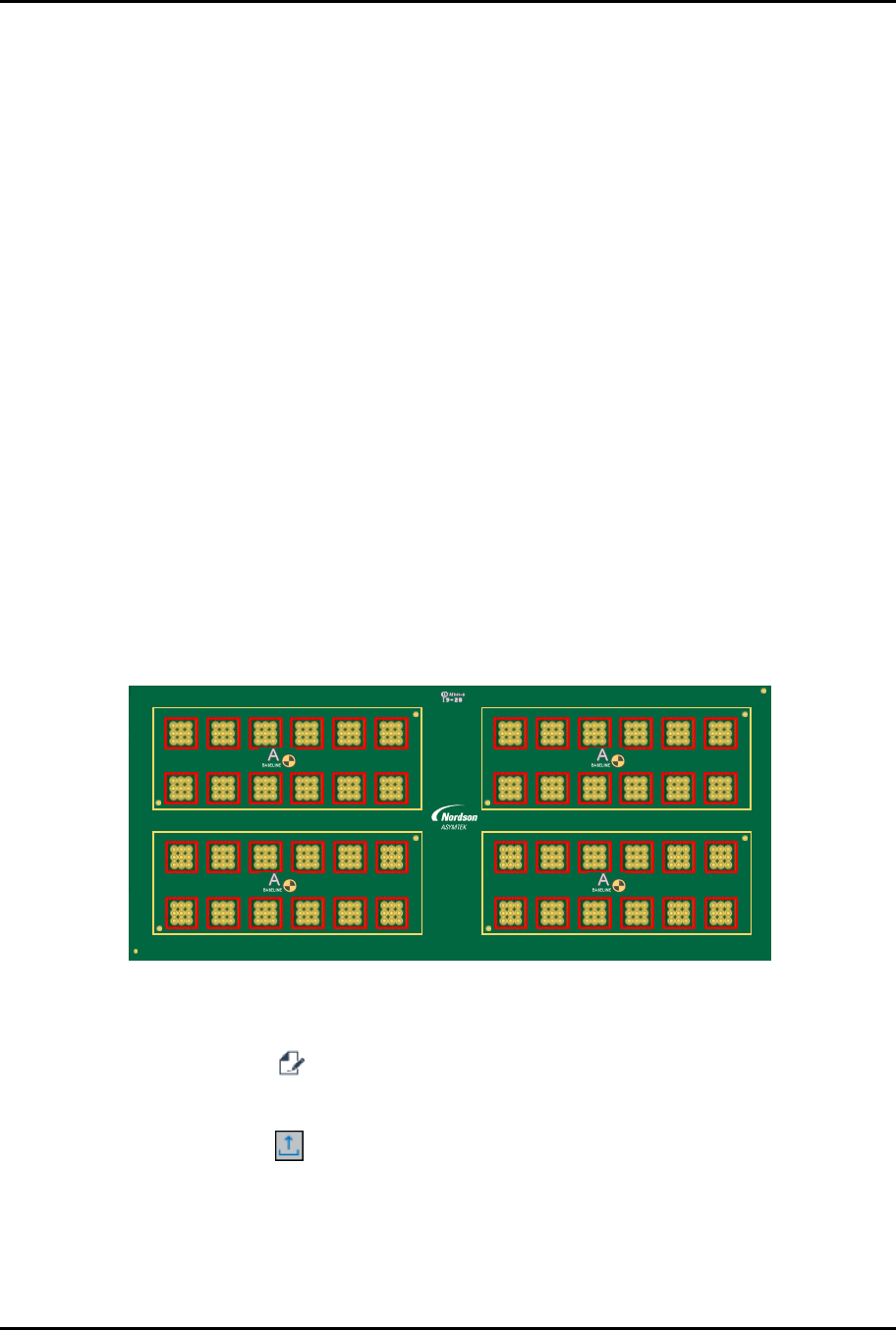
(Figure 3-4). Valve 1 will dispense four (4) lines around each cell (red squares). Valve 2 will dispense
nine (9) dots inside each cell (Figure 4-30). The lines will be dispensed first using an IntelliJet followed by
the DV-8000 valve dispensing dots.
Ensure the system is configured for the appropriate valves. Refer to the Canvas Dispensing Software
User Guide if necessary.
1 2 3 4 5 6 7 8 9 10 11 12
4
3
2
1
6130139 REV 1
STRAIGHT
B,1
B,2
2,1 2,2 2,3 2,4 2,5 2,6
1,1 1,2 1,3 1,4 1,5 1,6
4,1 4,2 4,3 4,4 4,5 4,6
A2
A1
3,1 3,2 3,3 3,4 3,5 3,6
A2
A1
4,1 4,2 4,3 4,4 4,5 4,6
A2
A1
3,1 3,2 3,3 3,4 3,5 3,6
A2
A1
2,1 2,2 2,3 2,4 2,5 2,6
1,1 1,2 1,3 1,4 1,5 1,6
Figure 4-30 Dual-Action Recipe Requirement
To create the recipe:
1. Select the Recipe button to access the Recipe Editor.
2. Place the substrate on the conveyor.
3. Click on the Load button on the toolbar.
> The substrate will be lifted off the conveyor and clamped into place. The substrate
should be evenly clamped and level so that the board does not move when
programming.
ForteMAXDispensingSystemAddendum Recipe Creation
© 2023 Nordson Corporation 41
4. Adjust the clamping mechanism as necessary to achieve a level dispensing plane.
?
NOTE
The dispensing sequence MUST be taught with the part raised and clamped as
necessary. Failing to load the substrate in this manner results in the camera
being out of focus.
5. Select Recipe > New from the menu bar.
6. Enter the recipe name and click on OK.
7. When prompted, teach the workpiece origin.
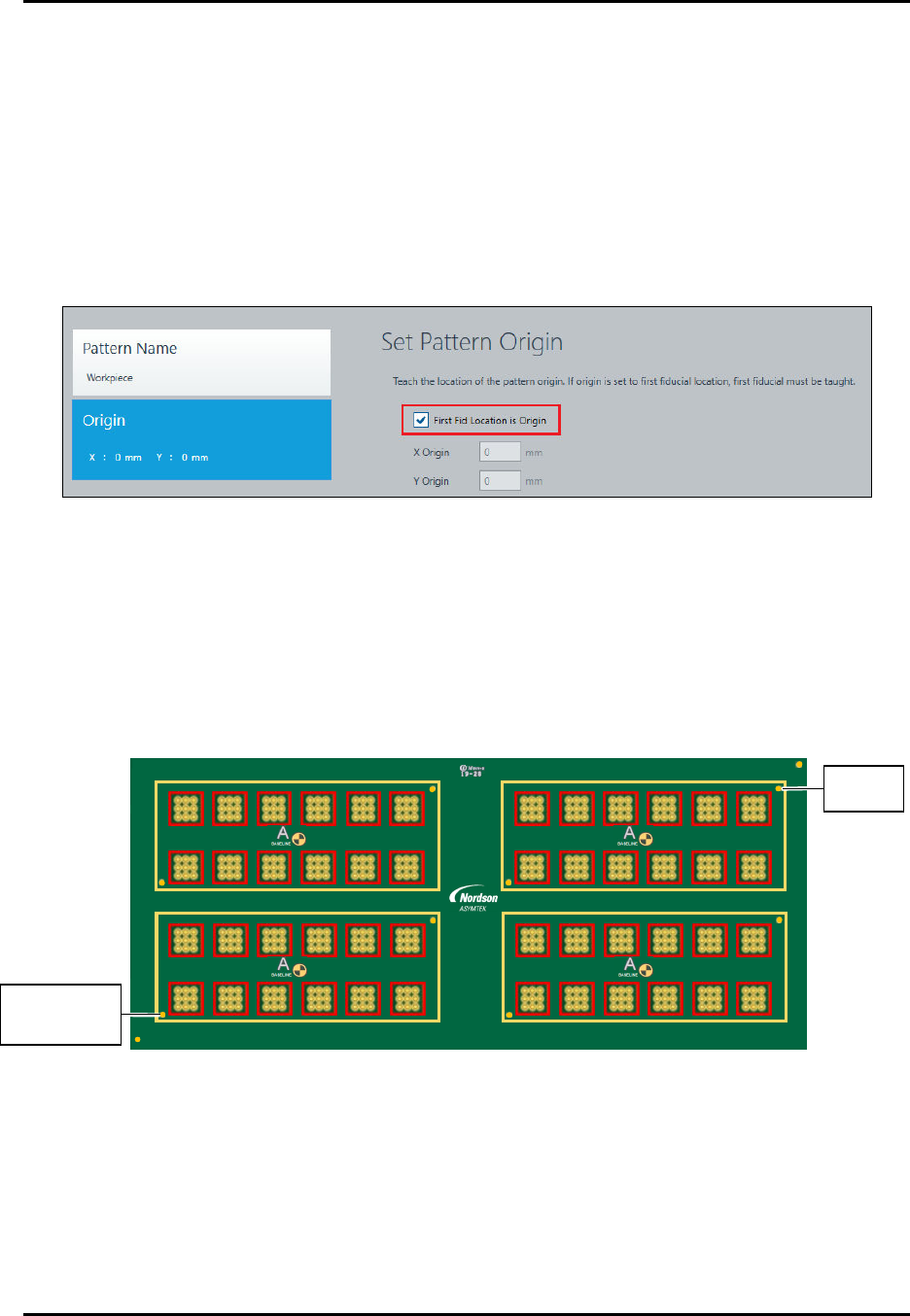
8. Select First Fid Location is Origin (Figure 4-31).
Figure 4-31 Set Workpiece Origin
9. Click on Next.
> You will be prompted to set the fiducial properties and teach fiducials.
> In this example, two fiducials will be used (Figure 4-32).
10. Follow the prompts to define two circle fiducials. Refer to the Canvas Dispensing Software
User Guide if necessary.
11. Click on Done when finished.
1 2 3 4 5 6 7 8 9 10 11 12
2
1
6130139 REV 1
STRAIGHT
B,1
B,2
2,1 2,2 2,3 2,4 2,5 2,6
1,1 1,2 1,3 1,4 1,5 1,6
4,1 4,2 4,3 4,4 4,5 4,6
A2
A1
3,1 3,2 3,3 3,4 3,5 3,6
A2
A1
4
3
4,1 4,2 4,3 4,4 4,5 4,6
A2
A1
3,1 3,2 3,3 3,4 3,5 3,6
A2
A1
2,1 2,2 2,3 2,4 2,5 2,6
1,1 1,2 1,3 1,4 1,5 1,6
Figure 4-32 Workpiece Origin and Workpiece Fiducials
W
o
r
k
p
i
e
c
e
O
r
i
g
i
n
and Workpiece
F
i
d
u
c
i
a
l
1
W
o
r
k
p
i
e
c
e
F
i
d
u
c
i
a
l
2