00197004-04_UM_X-Serie-S_EN.pdf - 第247页
User manual SIPLACE X-Series 4 Setting up and commissioning From software version 706.1 SP1 Version 10/2014 4.3 Setting up the machine 247 4 Fig. 4.3 - 4 Machine feet (example of SIPLACE X2 S / X3 S / X4 S shown) 4 (1) O…
4 Setting up and commissioning User manual SIPLACE X-Series
4.3 Setting up the machine From software version 706.1 SP1 Version 10/2014
246
4
With the fork-lift, raise the machine approximately 35 cm. This prevents the risk of any injuries
to your feet if the machine feet are unintentionally lowered.
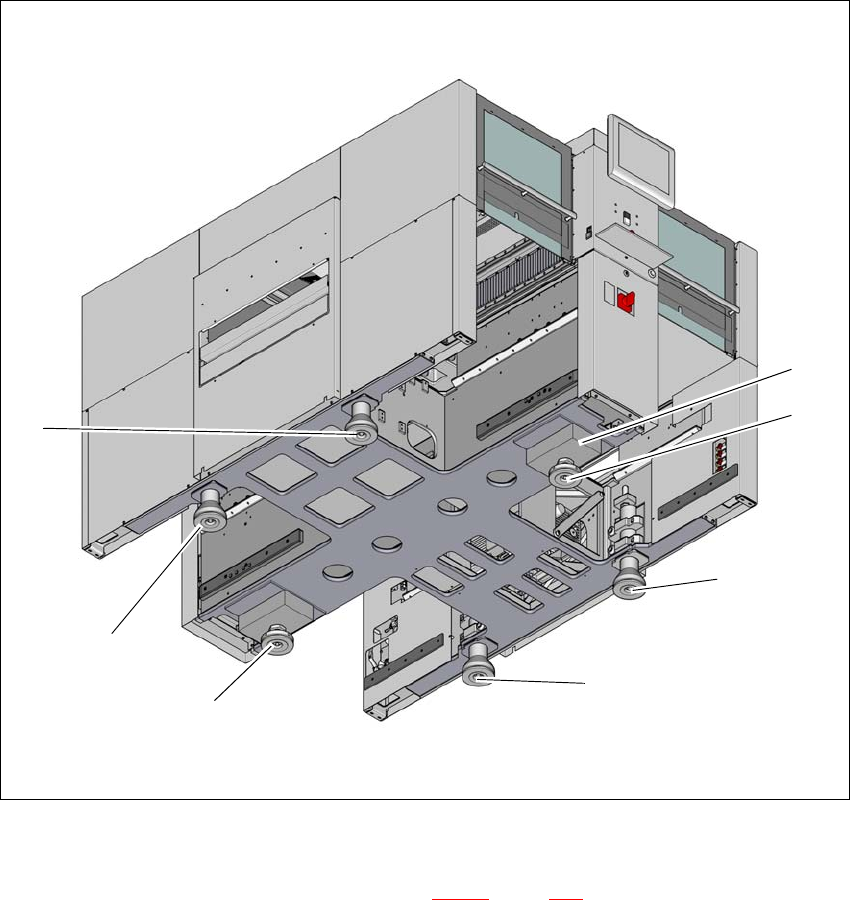
The machine stands on 6 feet.
– 4 outer machine feet (item 1 in fig. 4.3 - 4
, page 247 )
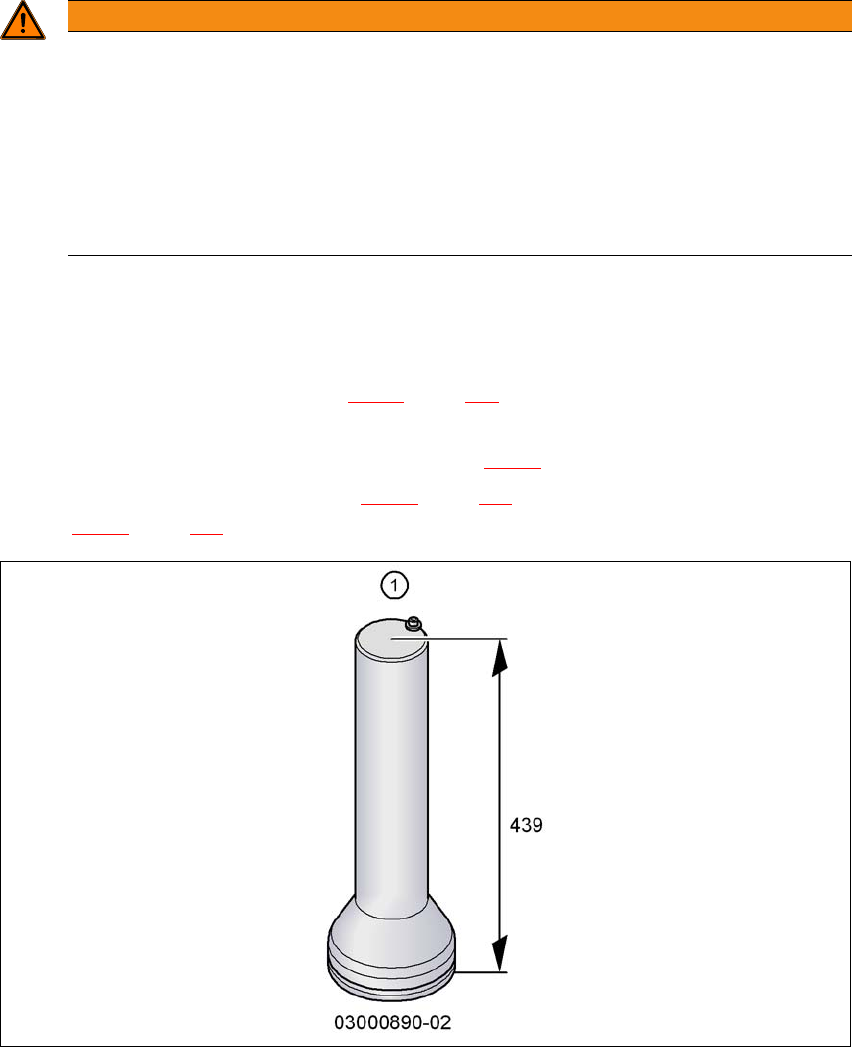
– Outer machine feet for the PCB conveyor heights 900,930 and 950 mm, length
439 mm, Item no. 03000890-02 (item 1 in fig. 4.3 - 3
).
– 2 middle machine feet (item 2 in fig. 4.3 - 4
, page 247) with 2 spacers (item 3 and item 4 in
fig. 4.3 - 4
, page 247) for height adjustment, where necessary.
4
Fig. 4.3 - 3 Outer machine feet - two versions (dimensions in millimeters)
WARNING
Risk of damage due to one-sided loading!
One-sided loading of the machine feet e.g. from tilting the machine, can lead to deforma-
tion of the machine feet.
Make sure that the forks are evenly loaded when you lift the machine.
Use a firm support layer between the forks and the machine.
Enlist the help of a second person to watch while you lift the machine and make sure
that the machine does not tip over to one side.
User manual SIPLACE X-Series 4 Setting up and commissioning
From software version 706.1 SP1 Version 10/2014 4.3 Setting up the machine
247
4
Fig. 4.3 - 4 Machine feet (example of SIPLACE X2 S / X3 S / X4 S shown)
4
(1) Outer machine foot, 4 x, 2 versions (see fig. 4.3 - 3, page 246 )
(2) Middle machine foot, 2 x
(3) Spacer on the side of the power supply unit
(2)
(2)
(1)
(1)
(1)
(1)
(3)
4 Setting up and commissioning User manual SIPLACE X-Series
4.3 Setting up the machine From software version 706.1 SP1 Version 10/2014
248
4.3.6.1 Presetting the height of the middle machine feet
The middle machine feet are preset first of all. The spacer must be screwed to the correct position
on the underside of the machine: this will vary according to the height of the machine.
Setting a board conveyor height of 900 mm 4
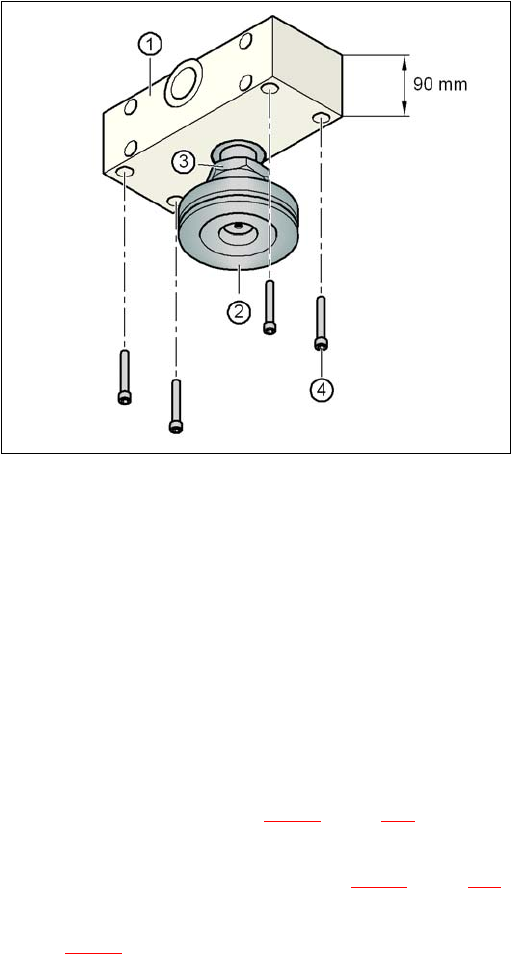
You do need a spacer for a board conveyor height of 900 mm.
Make sure that the 90 mm side of the spacer is vertically aligned and the hole for the middle
machine foot indicates downwards.
4
4
4
4
4
4
4
4
4
4
4
4
Fig. 4.3 - 5 Aligning the spacer for a conveyor height of 900 mm
4
(1) Spacer height of 90 mm
(2) Middle machine foot
(3) Lock nut M24
(4) Hexagon socket head screw M12x80, 4x
Screw the thread of the middle machine foot into the hole provided on the underside of the
spacer.
Align the two spacers on the machine underside as follows:
– The spacer opening on the pneumatic unit side points in the direction of board conveyor
travel (see item 4 in fig. 4.3 - 4
, page 247).
– The spacer opening on the power supply side points in the opposite direction to that of
conveyor travel (see item 3 in fig. 4.3 - 4
, page 247).
Fasten each of the two spacers with four hexagon socket-head screws M12x80 (see item 4
in fig. 4.3 - 5
). Use the screwdriver bit of size 10 mm.