00197004-04_UM_X-Serie-S_EN.pdf - 第302页
5 Working with the machine User manual SIPLACE X-Series 5.10 Setting up the feeder modules From software version 706.1 SP1 Version 10/2014 302 5.10 Setting up the feeder modules 5.10.1 Notes on hand ling feeder modules F…
User manual SIPLACE X-Series 5 Working with the machine
From software version 706.1 SP1 Version 10/2014 5.9 Carrying out a sight check
301
5
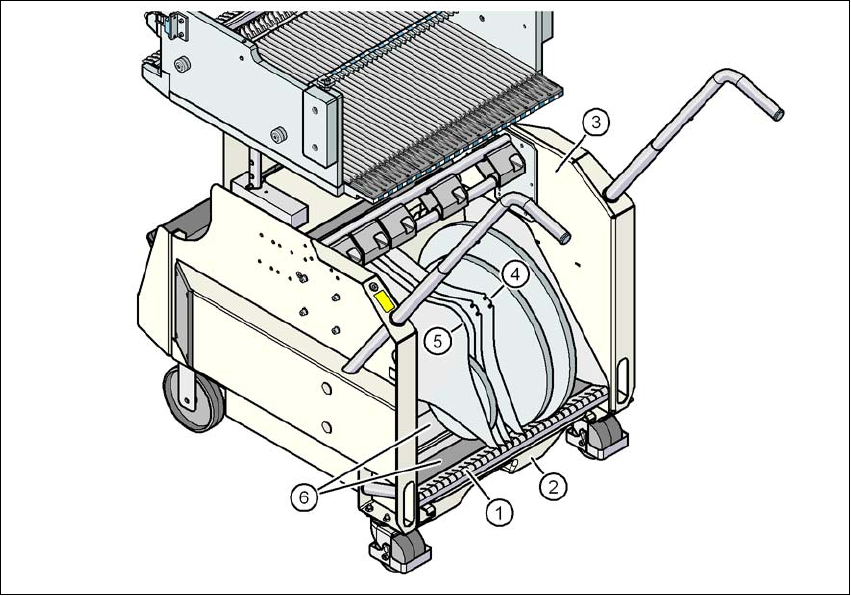
Fig. 5.9 - 3 Separating plates in the tape container
(1) Guide rail for the separating plates
(2) Waste tape container
(3) Tape container
(4) Position of the separating plate if spindles are used
(5) Position of the separating plate if no spindles are used
(6) Sliding support for tape reels
5 Working with the machine User manual SIPLACE X-Series
5.10 Setting up the feeder modules From software version 706.1 SP1 Version 10/2014
302
5.10 Setting up the feeder modules
5.10.1 Notes on handling feeder modules
Feeder modules are precision devices. You should therefore handle the feeder modules with care.
Avoid bumping feeder modules into obstacles.
Do not drop the feeder modules.
Always use suitable tools for preventive maintenance.
5.10.2 Removing X feeder modules from the changeover table
5
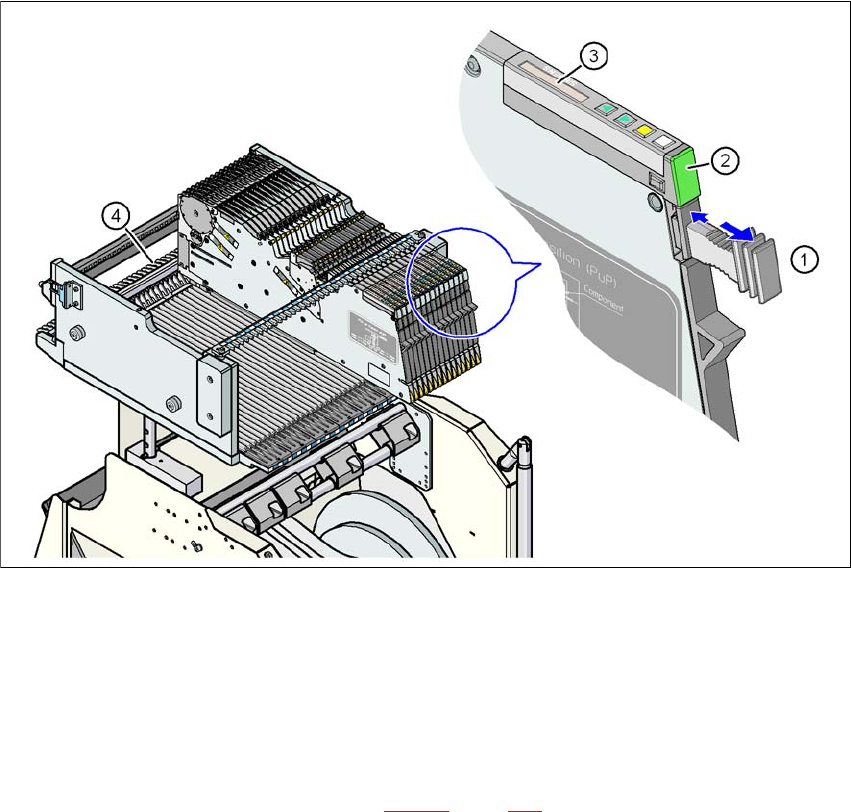
Fig. 5.10 - 1 Removing X feeder modules from the changeover table
(1) Removal handle
(2) Status display
(3) LCD display
(4) Latch for locking the X feeder modules
5
On standby, the status display (item 2 in fig. 5.10 - 1, page 302) lights up green if the X-axis feeder
module is contained in the current setup. If the feeder module is not contained in the current setup,
the status display remains off.

User manual SIPLACE X-Series 5 Working with the machine
From software version 706.1 SP1 Version 10/2014 5.10 Setting up the feeder modules
303
The X feeder module is locked in position in the changeover table by a latch, and cannot be pulled
out. The procedure for removing feeder modules from the changeover table is as follows:
Press the removal handle (item 1 in fig. 5.10 - 1, page 302). The removal handle jumps out
and the status display goes out.
Wait approximately 1 second until the lock (item 4 in fig. 5.10 - 1, page 302) releases the
feeder module.
Use the removal handle to pull the feeder module out of the changeover table. If you wait lon-
ger than 5 seconds, the feeder module will be locked once more. The status display
lights up red and the message (item 3 in fig. 5.10 - 1
, page 302) "Handle --->>" appears on
the LCD display.
Engage the removal handle once more. If the X feeder module is contained in the current
setup, the status display lights up green and the track number and increment are appear on
the LCD display once more.
Press the removal handle again (item 1 in fig. 5.10 - 1, page 302) and now pull the feeder
module out of the changeover table.