00197004-04_UM_X-Serie-S_EN.pdf - 第327页
User manual SIPLACE X-Series 5 Working with the machine From software version 706.1 SP1 Version 10/2014 5.15 Docking the component trolley in or out 327 5 Fig. 5.15 - 4 X-Series component trolley - swivel handles down (1…
5 Working with the machine User manual SIPLACE X-Series
5.15 Docking the component trolley in or out From software version 706.1 SP1 Version 10/2014
326
5
5
Carefully push the component trolley into machine as far as the stop.
5
Press the button on the respective machine location until the trolley is completely docked in.
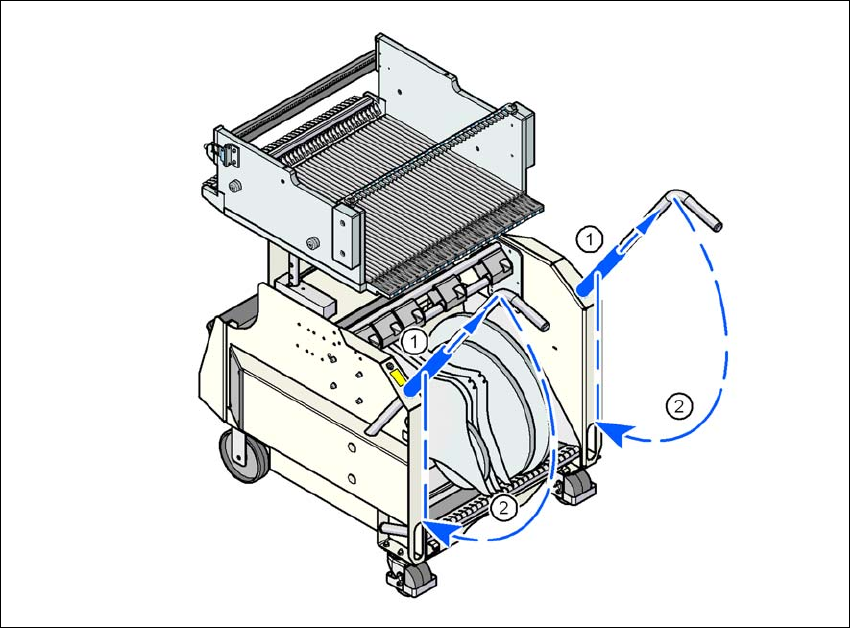
Push the sleeve (item 1 in fig. 5.15 - 4, page 327) on both handles up and swivel the handle
down (item 2 in fig. 5.15 - 4
, page 327).
PLEASE NOTE
Cut tapes flush
If you do not cut tapes off flush at the front end of the X feeder modules, the emptied
tapes will not enter the empty tape duct.
Cut the tapes off flush, before you dock the component trolley into place.
CAUTION
Position of placement head!
Check that the placement head is outside the range of the component trolley.
PLEASE NOTE
Docking only possible if protective cover is closed
Close the protective covers.
User manual SIPLACE X-Series 5 Working with the machine
From software version 706.1 SP1 Version 10/2014 5.15 Docking the component trolley in or out
327
5
Fig. 5.15 - 4 X-Series component trolley - swivel handles down
(1) Push sleeve up
(2) Fold handle down
5 Working with the machine User manual SIPLACE X-Series
5.15 Docking the component trolley in or out From software version 706.1 SP1 Version 10/2014
328