00192662-01.pdf - 第178页
4 Placement Functions User Manual SIPLACE F 5/F5 HM 4.3 Feeders Software version SR .407.xx 01/2001 US Edition 178 4.3.5.6 Feed tray This allow s you t o define the level containing the waffle pack tray to be made a vail…

User Manual SIPLACE F5/F5 HM 4 Placement Functions
Software version SR.407.xx 01/2001 US Edition 4.3 Feeders
177
4.3.5.2 Quit refill position
Å Click on the Quit refill position button.
The waffle pack trays specified in the setup are moved to, checked and aligned.
4.3.5.3 WPC refilled
As soon as the waffle pack trays which have been identified as being "empty" have been refilled
with components, this must be confirmed, so that the placement head can again access these
trays. This is done using the "WPC refilled" function. 4
Å Click on the WPC refilled button.
This confirms that the waffle pack trays have been refilled.
All the waffle pack trays which have been identified as being "empty" are now regarded as
"full". Placement continues with components from these waffle pack trays.
4.3.5.4 WPC reference run
This function causes the lift of the waffle pack changer to carry out a reference run. 4
NOTE
The waffle pack changer must not be in the refill position when this function is carried out. 4
Å Click on the Stop processing PCB function in the Mode menu.
The current placement operation is halted.
Å Click on the WPC reference run button.
First, any waffle pack tray which has been moved out will be returned to its level. The reference
run is then performed.
4.3.5.5 Transport position
To allow the waffle pack changer to be transported safely, the lift of the waffle pack changer must
be moved to a defined transport position. 4
NOTE
The waffle pack changer must not be in the refill position when this function is carried out. 4
Å Click on the Stop processing PCB function in the Mode menu.
The current placement operation is halted.
Å Click on the Transport position button.
The lift moves to the defined safety/transport position.
4 Placement Functions User Manual SIPLACE F5/F5 HM
4.3 Feeders Software version SR.407.xx 01/2001 US Edition
178
4.3.5.6 Feed tray
This allows you to define the level containing the waffle pack tray to be made available for place-
ment. 4
NOTE
The waffle pack changer must not be in the refill position when this function is carried out. 4
Å Click on the Feed tray button.
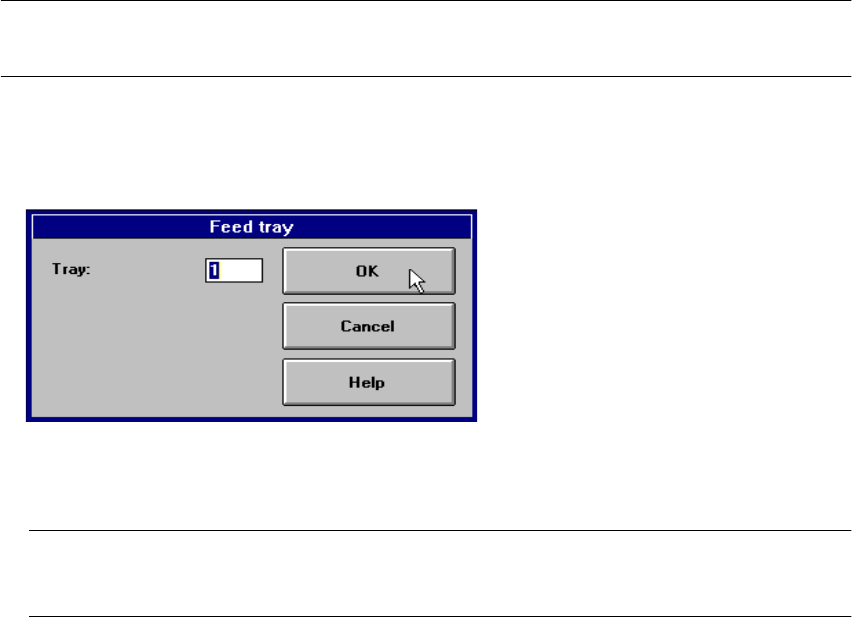
The following dialog box is displayed.
4
Å In the text box, enter the number of the required level and confirm your entry with OK. The waf-
fle pack changer moves the waffle pack tray from the selected level to the pick-up position.
NOTE
If a waffle pack tray is already in the pick-up position, it is first moved to its defined level. 4
User Manual SIPLACE F5/F5 HM 5 Single Functions
Software version SR.407.xx 01/2001 US Edition 5.1 General comments
179
5 Single Functions
5.1 General comments
Gantry functions and transport functions are known as single functions. They are used to set up
and test the machines and to carry out particular actions following a machine shutdown caused
by an error.
Single functions can be used to control various function modules in a defined manner.
WARNING
Single functions may only be executed by appropriately qualified and trained personnel, since
improper handling can result in personal injury/damage to the machine.
5.2 Single functions, Gantry
NOTE
The travel functions of the x or y axis can only be carried out when the machine cover is closed.
To execute this function, press the start button.
As a rule, the gantry only travel slowly. 5
5
Å Click on the icon in the toolbar in the Main view (or choose the option SF gantry 1
from the View menu).
The user interface is switched to the "Revolver head functions" view (see Figs. 5.2 - 1
and
5.2 - 2
).
5
5
5.2.1 "Revolver head functions" screen
The revolver head functions can be used to control all functions relating to the Collect&Place
head. 5