00192662-01.pdf - 第186页
5 Single Functions User Manual SIPLACE F5/F5 HM 5.2 Single functions, Gantry Software version SR.407.x x 01/2001 US E dition 186 Å In the te xt box, e nter the nu mber of the req uired noz zle and confi rm your en try w …
User Manual SIPLACE F5/F5 HM 5 Single Functions
Software version SR.407.xx 01/2001 US Edition 5.2 Single functions, Gantry
185
5.2.2.1 Functions
In the "IC-head functions" screen, the functions described below are available to help you test the
Collect&Place head. 5
– Vacuum test
– Return nozzle
– Pick up nozzle
– IC-head functions
The functions are triggered by clicking the appropriate button. 5
Vacuum/offset test 5
This function carries out a vacuum test and an offset test for the nozzle currently on the IC head.5
Å Click on the Vacuum test button.
The vacuum and the height of the current nozzle are tested.
The result of the vacuum test is displayed.
Return 5
This function returns the nozzle currently on the IC head to the nozzle changer. The number of the
current nozzle is displayed. 5
Å Click on the Return button.
The nozzle is returned to the nozzle changer.
Pick up... 5
This function picks up a specific nozzle from the nozzle changer. 5
Å Click the Pick up... button.
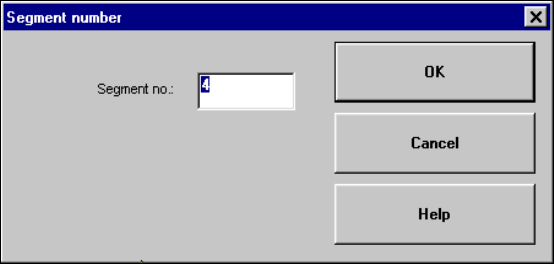
The dialog box shown below is displayed.
5

5 Single Functions User Manual SIPLACE F5/F5 HM
5.2 Single functions, Gantry Software version SR.407.xx 01/2001 US Edition
186
Å In the text box, enter the number of the required nozzle and confirm your entry with OK. The
corresponding nozzle is picked up from the nozzle changer.
NOTE
If a different nozzle is still on the IC head, this is first automatically returned to the nozzle changer.5
Head reference run 5
This function starts a reference run for the z and d axes, i.e. they both move to their reference
points. 5
Å Click on the Head reference run button.
The axes perform a reference run.
Turn D-axis 5
This function is used to test the d-axis. 5
Å Click on the Turn D-axis button.
The D-axis is turned once through 90
0
.
Unclamp 5
This function unclamps the z-axis. All other functions are locked while the z axis is unclamped. 5
Å Click the Unclamp button.
The z-axis is unclamped and a dialog box opens indicating this status.
Å Click on OK in the dialog box when the axis is to be clamped again.
Clamping is reactivated and the dialog box is closed. All functions are available again.
On/Off ("Vacuum" field) 5
This function allows the vacuum at the nozzle to be checked by switching it on and off. 5
Å Click on the On or Off button in the "Vacuum" field.
The vacuum is switched on or off.
On/Off ("Forced air" field) 5
This function allows the forced air at the nozzle to be checked by switching it on and off. 5
Å Click on the On or Off button in the "Forced air" field.
The forced air is switched on or off.
5
User Manual SIPLACE F5/F5 HM 5 Single Functions
Software version SR.407.xx 01/2001 US Edition 5.2 Single functions, Gantry
187
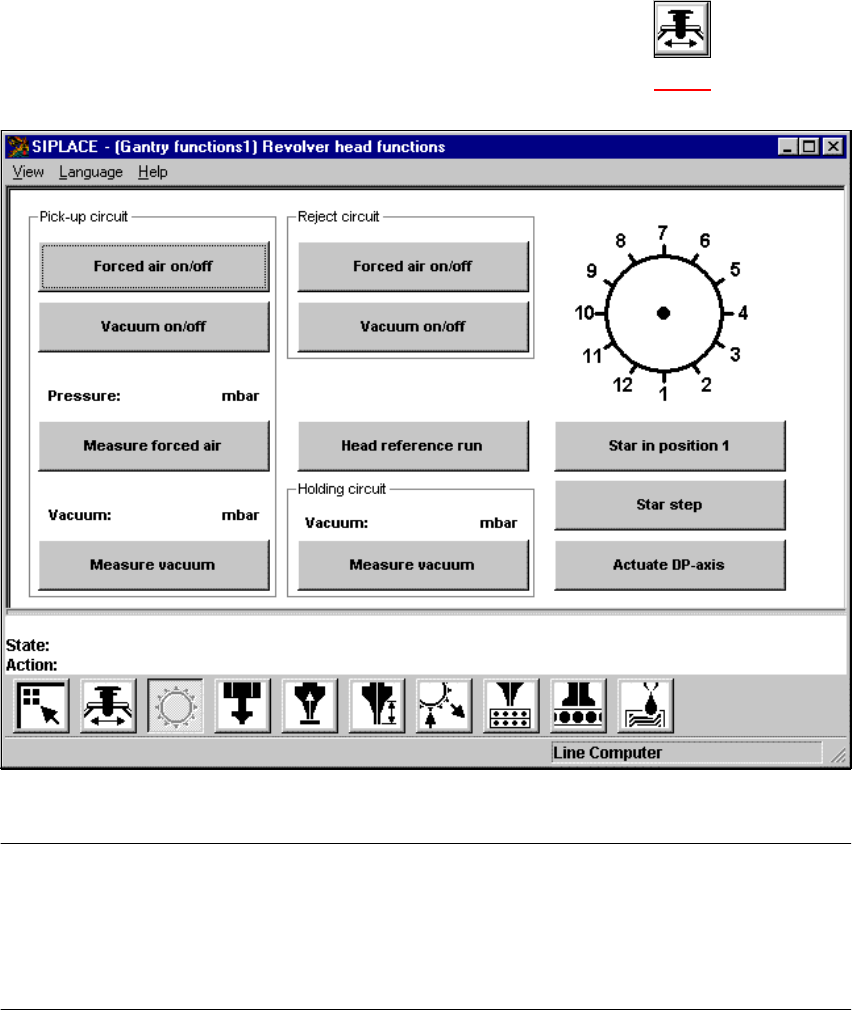
5.2.3 "Gantry functions" screen
Å In the current screen for the single functions for Gantry, click the symbol .
The user interface is switched to the "Gantry functions" screen (see Fig. 5.2 - 4
).
5
Fig. 5.2 - 4 "Gantry functions" screen
NOTE
All travel functions of the main axes (x and y) must be started using the start button.
A message appears in the status field on the screen which asks you to "Please press the start
button".
If the machine covers are not closed, the message "Close cover" will appear in the status field. 5
5