00192662-01.pdf - 第423页
User Manual SIPLAC E F5/F5 HM 8 Error In formation Software version SR.407.xx 01/2001 US Edition 8.3 Clearing errors 423 8.3 Clearing errors Once a n error h as be en eli minated, it mus t be cle ared. This is not n eces…
8 Error Information User Manual SIPLACE F5/F5 HM
8.2 Calling error information Software version SR.407.xx 01/2001 US Edition
422
8.2.2.2 Inserting or editing comments on errors
In all the error information views you are able to enter comments which you can then subsequently
edit if necessary. In this way, you can, for example, document the operations which you have per-
formed.
If a comment has been created in a view, this is indicated by the presence of a paper clip icon. 8
8
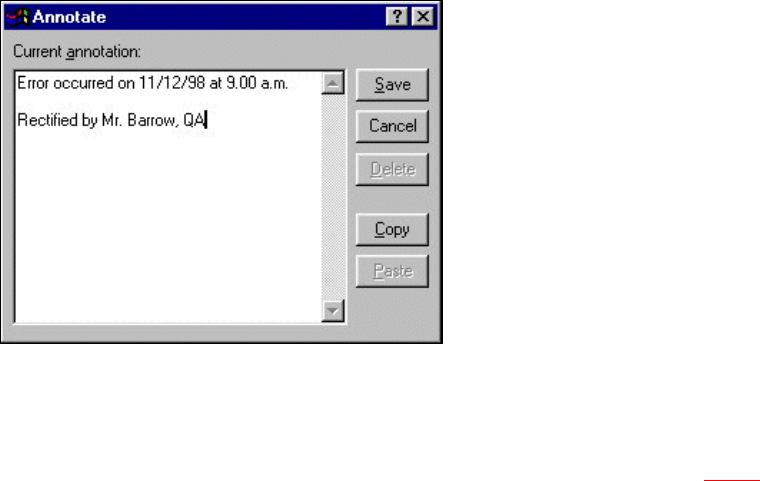
Inserting a comment
Å Click the Annotate button in the view in question.
The following dialog box is opened.
8
Å Enter the text of your comment in the edit field.
Å Click the Save button to confirm your input.
The dialog box is closed.
The paper clip icon is now displayed in the current help system view (see section 8.2 - 3
).
Click this icon if you want to open a window in which you can edit this comment.
Deleting a comment
Å Click the paper clip symbol in the appropriate view.
The dialog box is opened with the stored comment.
Å Click the Delete button.
The dialog box is closed. The paper clip icon is no longer displayed in the current view.

User Manual SIPLACE F5/F5 HM 8 Error Information
Software version SR.407.xx 01/2001 US Edition 8.3 Clearing errors
423
8.3 Clearing errors
Once an error has been eliminated, it must be cleared. This is not necessary in the case of errors
which cause a machine stoppage since they are automatically cleared when assembly is re-
sumed. 8
Once cleared, the error message is no longer displayed in the status bar. However, it is still en-
tered in the error table for the corresponding error type (see example in Fig. 8.2 - 2
). 8
8
Å After eliminating the current error, click the Clear error button in main view. The error message
is removed from the status bar and assembly can be continued.
8 Error Information User Manual SIPLACE F5/F5 HM
8.3 Clearing errors Software version SR.407.xx 01/2001 US Edition
424