00192662-01.pdf - 第548页
11 Station extensions /Hardware User Manua l SIPLACE F5/F5 HM 11.12 Nozzle changer for the 6-segment C ollect&Place head Software version SR.407.xx 01/2001 US E dition 548 CAUTION 11 The magaz ines mus t not be fille…

User Manual SIPLACE F5/F5 HM 11 Station extensions /Hardware
Software version SR.407.xx 01/2001 US Edition 11.12 Nozzle changer for the 6-segment Collect&Place head
547
PLEASE NOTE 11
Special magazines are available upon request, and are given a special identification. Please con-
tact Siemens PL EA 1E to discuss. 11
Picking up a nozzle 11
– The Collect&Place head Z-axis moves down.
– The locking plate (item 3 in Fig. 11.1 - 2
) opens and releases the nozzles.
– The nozzle is picked up from the sleeve of the Collect&Place head.
– The Z-axis moves up.
Returning a nozzle 11
– The locking plate (item 3 in Fig. 11.1 - 2) opens and releases the nozzles.
– The Collect&Place head Z-axis moves down and releases the nozzle.
– The locking plate closes.
– The Collect&Place head Z-axis moves up.
Rejecting defective nozzles 11
– At the reject device (item 2 in Fig. 11.1 - 1), the Collect&Place head Z-axis moves down 14 mm,
and thus feeds the defective nozzle into the hole in the reject device.
– The Z-axis moves up again, and the nozzle is removed from the sleeve by spring wires.
– The nozzle drops into the collecting tray of the empty tape track (item 3 in Fig. 11.1 - 1
).
11.12.4 Notes on operation
Å When you fill a magazine with a certain nozzle type for the first time, mark the magazine with
an adhesive label.
PLEASE NOTE 11
Fill the magazines off the machine, and always replace complete magazines. 11
Å Open the locking plate, and insert the nozzles into the nozzle holders.
Å Close the locking plate so that the nozzles cannot drop out of the magazines.
11 Station extensions /Hardware User Manual SIPLACE F5/F5 HM
11.12 Nozzle changer for the 6-segment Collect&Place head Software version SR.407.xx 01/2001 US Edition
548
CAUTION 11
The magazines must not be filled until all the nozzles on the Collect&Place head have been
returned to their magazines. 11
Å See the UNIX line computer user manual for instructions on programming the nozzle changer
on the line computer.
PLEASE NOTE 11
Å Be careful not to drop components onto the magazines, since they could cause the locking
plate to jam.
Å Also avoid dropping components onto free feeder locations, since the components will stick to
the magnetic bar. The work flow may be interrupted if the feeders are not placed on the com-
ponent feeder table correctly. You should therefore regularly clean the magazines and free
locations.
User Manual SIPLACE F5/F5 HM 11 Station extensions /Hardware
Software version SR.407.xx 01/2001 US Edition 11.12 Nozzle changer for the 6-segment Collect&Place head
549
11.12.5 Emptying the reject bin
The capacity of the reject bin is approximately 50 nozzles of the 7xx/9xx nozzle type and approx-
imately 5 nozzles of the 8xx nozzle type. The reject bin must be regularly emptied in order to pre-
vent faults during the placement sequence. 11
11
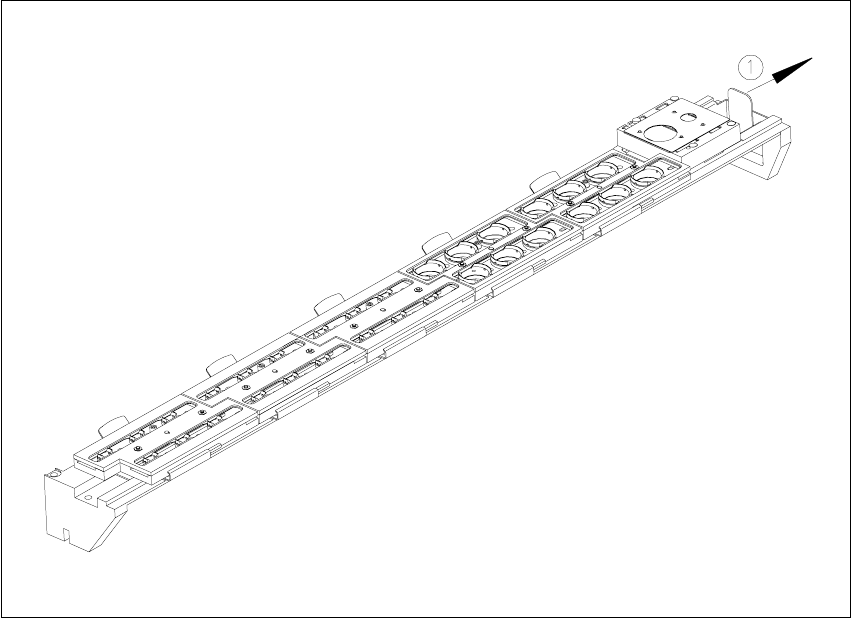
Fig. 11.12 - 3 Emptying the reject bin
(1) Remove the reject bin
11
Å Pull the reject bin out of its retainer in the direction indicated by the arrow, and lift the bin out
of its holder.
Å To return the reject bin, push it back into the retainer.