DFD6361-Maintenance.pdf - 第212页
B-140 Procedur es for setting monitor val ue of clean air pr essure for spi nner ato mizing nozz le (Continue d) St e p N o . Do This 1 Press the <F6> button on the MA IN MENU screen [screen 0.0] . - P ASSW ORD scr…
B-139
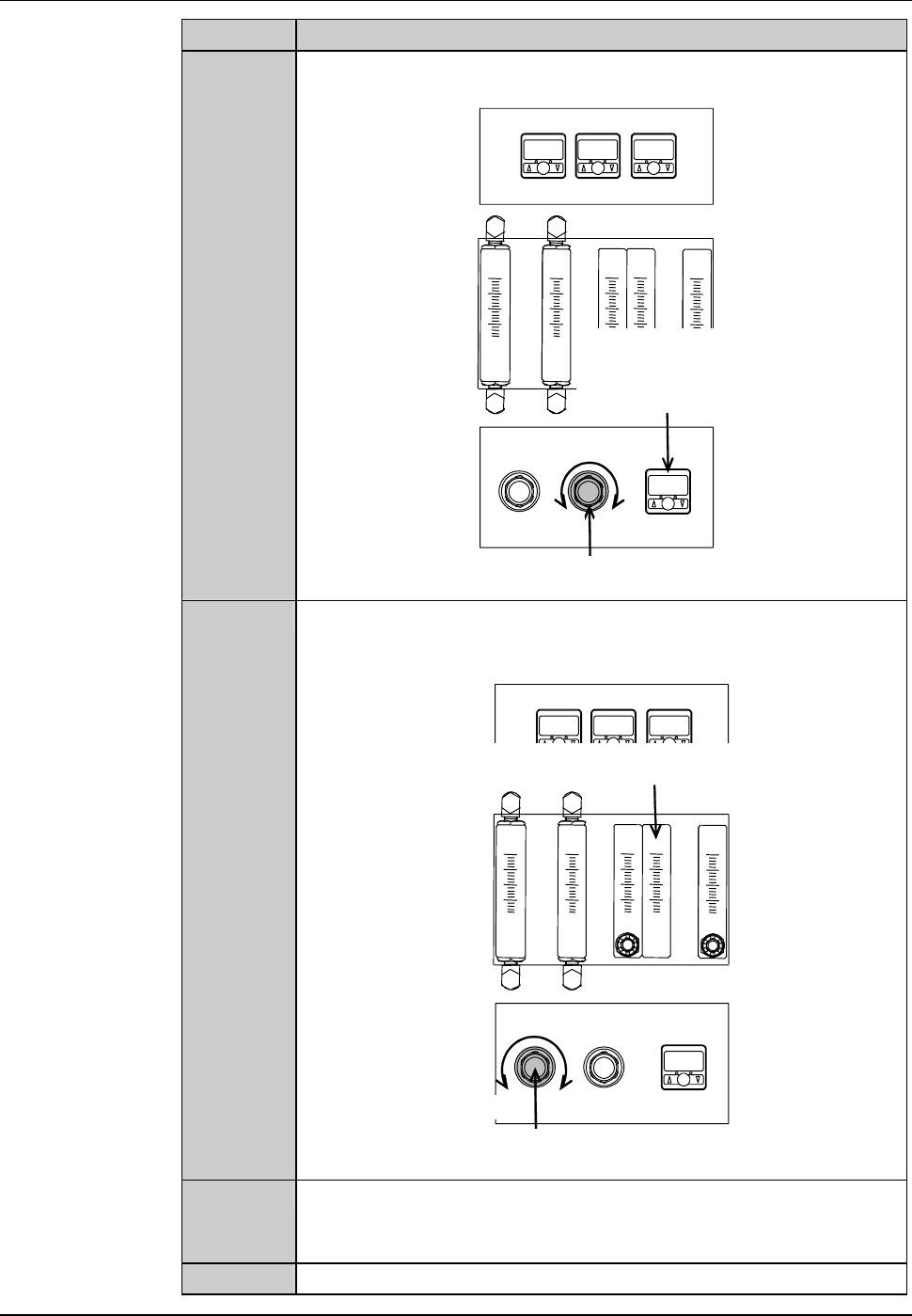
Procedures for adjusting utilities of spinner atomizing nozzle (Continued)
Step No. Do This
3
While checking the puressure gauge of clean air, turn the
adjustment knob to adjust the pressure to approximately 0.4MPa.
ÿ
Increase
Decrease
Air pressure adjustment knob for spinner atomizing
nozzle clean air [Optional accessory]
Air pressure sensor for
spinner atomizing nozzle
clean air
[Optional accessory]
4
While checking the flowmeter of cleaning water, turn the
adjustment knob to adjust the flow rate to approximately
200 ml/min.
Increase
Decrease
Spinner atomizing nozzle cleaning water
flowmeter [Optional accessory]
Spinner atomizing nozzle cleaning water
adjustment knob [Optional accessory]
5
Using the I/O CHECK screen, stop discharge of the mixed fluid
of clean air and cleaning water from the spinner atomizing
nozzle.
6
Reinstall the cover [U].
B-140
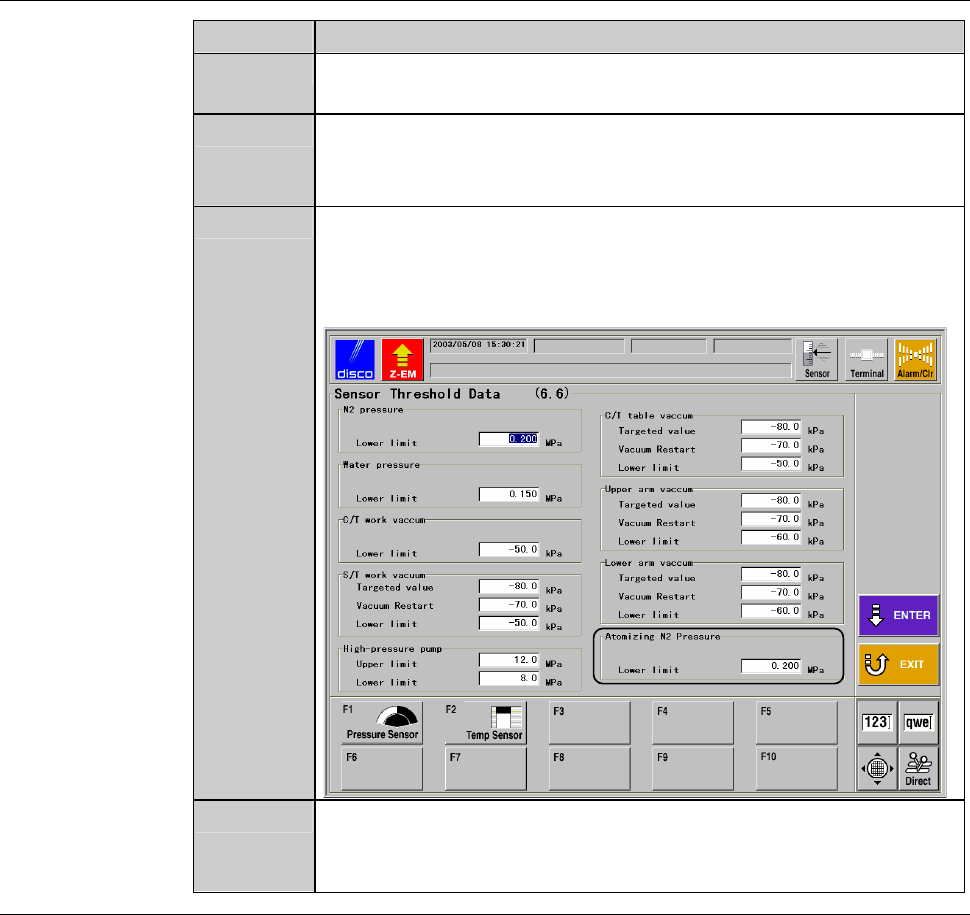
Procedures for setting monitor value of clean air pressure for spinner atomizing nozzle
(Continued)
Step No. Do This
1
Press the <F6> button on the MAIN MENU screen [screen 0.0].
- PASSWORD screen is called up.
2
Type the user password and press the <ENTER> button.
- The MACHINE MAINTENANCE screen [screen 6.0] is called
up.
3
Press the <F6> button on the MACHINE MAINTENANCE
screen [screen 6.0].
- The SENSOR THRESHOLD DATA screen [screen 6.6] is
called up.
4
Set "0.200MPa" as the lower limit of atomizing clean air (N
2
)
pressure, and then press the <ENTER> button.
- The machine updates the data.
C-1
C. ENGINEERING MAINTENANCE
OPERATIONS
Contents of this chapter
This chapter describes the maintenance works required for the proper machine
operation, the methods of inspecting the operation of each axis or sensor and
the methods of setting up the user-customized machine function.
Note that some engineering maintenance tasks have to be carried out with the
interlock feature disabled by the maintenance switch.
Before performing maintenance, the maintenance personnel must have a good
understanding of the safety precautions.
Section No. Title Contents
1 Calling up
ENGINEERING
MAINTENANCE Screen
- Procedures for calling up the
ENGINEERING
MAINTENANCE screen
- Details of the ENGINEERING
MAINTENANCE screen
2 Wheel Mount/Flange
Conditioning
- Movements in the conditioning
- Conditioning procedure
3 Axis Operation Check - The ways of abnormality check
by operating each axis
individually
4 Sensor/Solenoid Valve
Check
- The ways of abnormality check
by individually operating each
sensor and solenoid valve
- The ways to check each axis
sensor status
5 Customizing Setting - The ways to customize the
various machine functions to suit
individual user requirements
6 Device Data Maintenance - Deletion/moving/renaming of
the device data
- Deletion/renaming of the
directory
- Change the setting values of the
device data in one directory by
one operation