Infinity EX Transportation.pdf - 第10页
INFINITY EX TRANSPORT ATION MAJOR RE LOCATION 31.1 0 Technical Reference Manual Chapter Issue 3 Jan 04 Figure 31-5 Front T ransit Bracket and Camera T ransit Bracket Plan V iew on Front T ransit Bracket P rinthead Carria…
INFINITY
EX
TRANSPORTATION
MAJOR RELOCATION
Chapter Issue 3 Jan 04 Technical Reference Manual 31.9
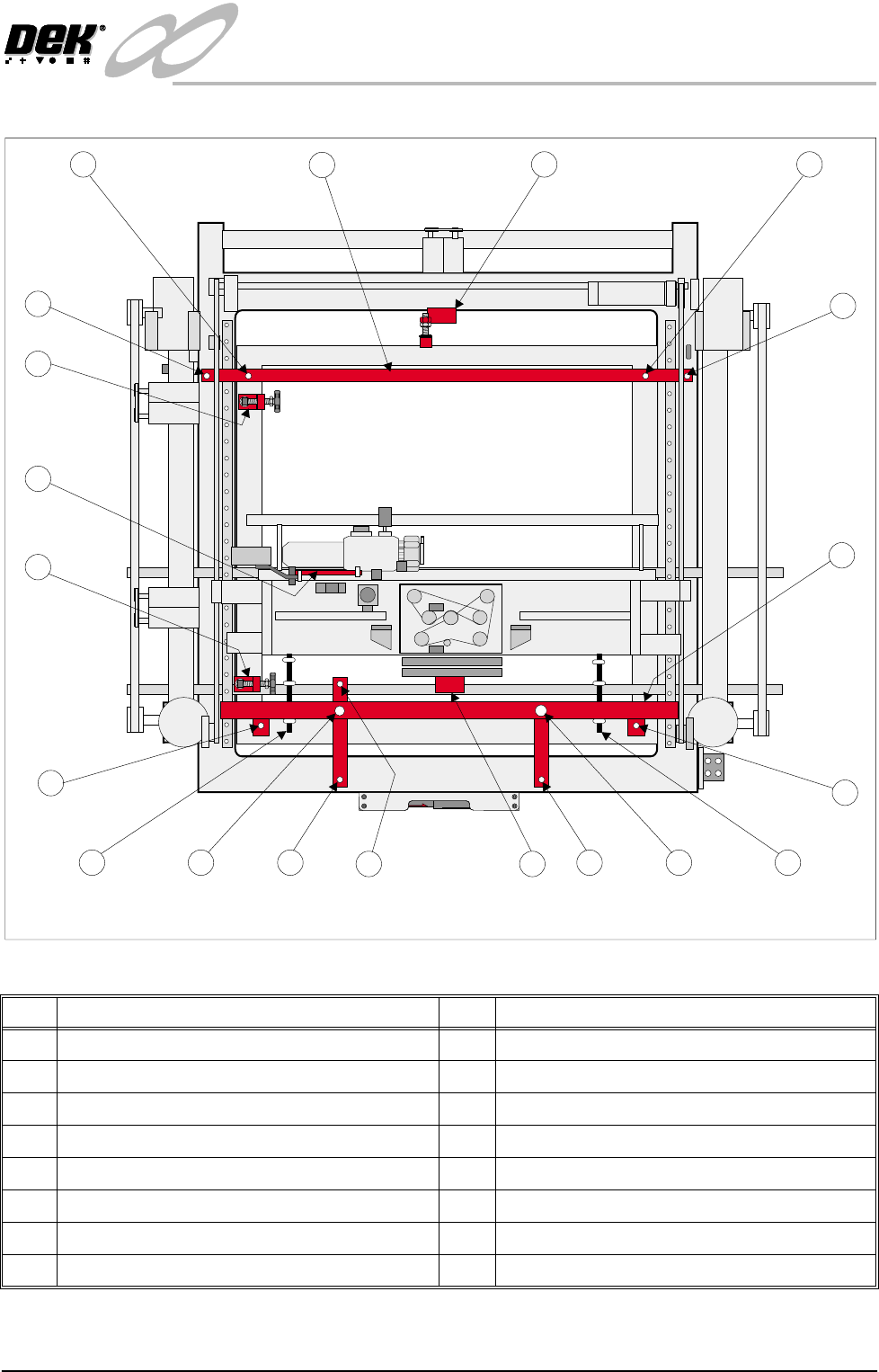
Figure 31-4 Transit Brackets Machine Location
No Description No Description
1 Front Transit Bracket 3 Paste Dispense Transit Bracket
1a Screen Chase Studs (2 positions) 4 X Rear Chase Restrainer Bracket
1b Print Carriage Studs (2 positions) 5 Rear Transit Bracket
1c Printhead Lift Studs (2 positions) 5a Printhead Casting Fixing Screws (2 positions)
1d Printhead Casting Fixing Screws (2 positions) 5b Screen Chase Studs (2 positions)
1e Squeegee Mount Support Bracket 6 Y Axis Chase Restrainer Bracket
1f Camera Carriage Fixing Screw 7 Printhead Safety Prop
2 X Front Chase Restrainer Bracket
1
1a
1b
1c
1a
1b 1c
2
3
5a
5b
6
4
5a
5b
5
Plan View of Machine
1d
1d
1f
1e
INFINITY
EX
TRANSPORTATION
MAJOR RELOCATION
31.10 Technical Reference Manual Chapter Issue 3 Jan 04
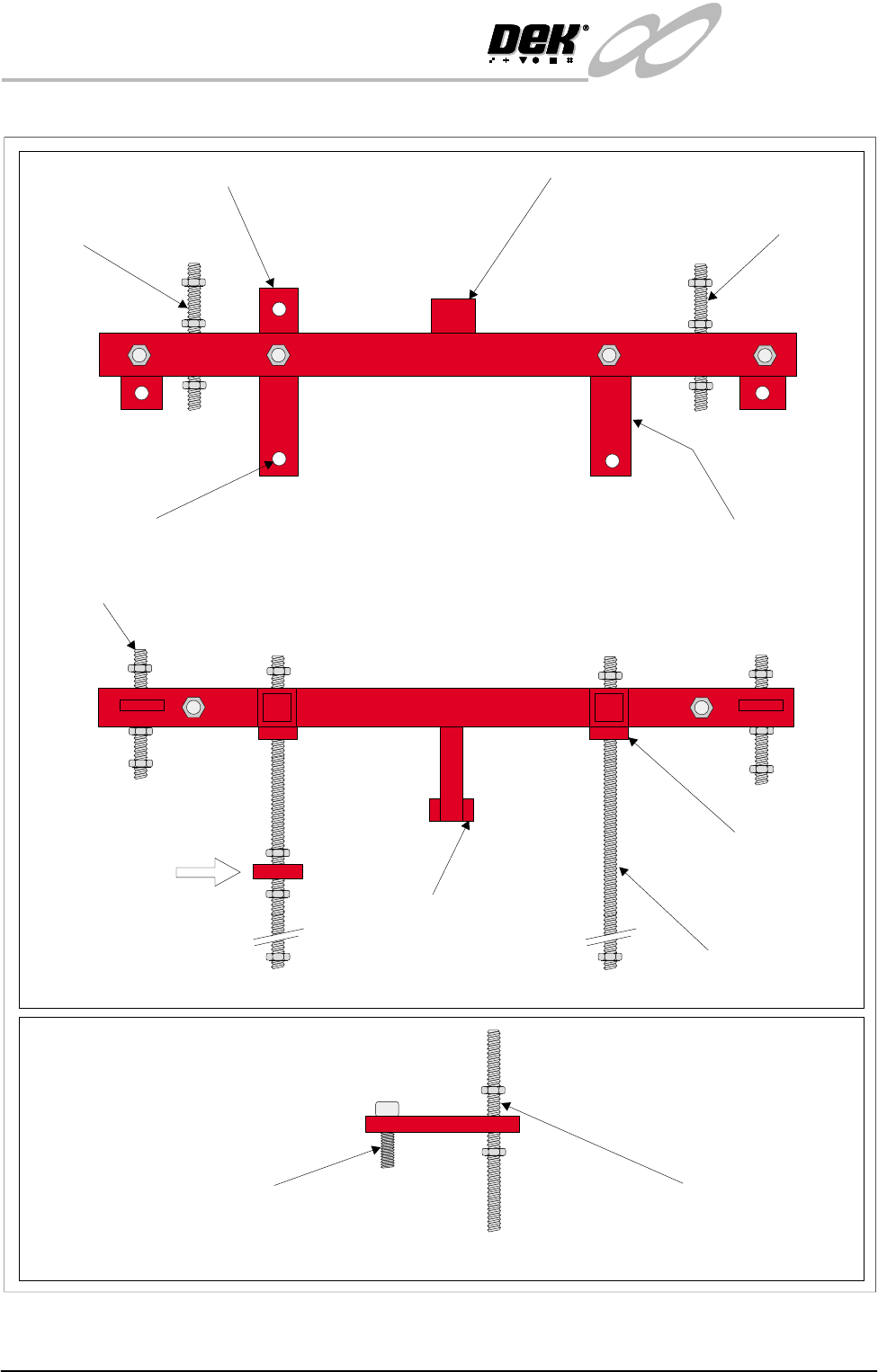
Figure 31-5 Front Transit Bracket and Camera Transit Bracket
Plan View on Front Transit Bracket
Printhead Carriage
Stud
Camera Carriage Transit Bracket Squeegee Mounting Bracket
Transit Bracket
Mounting Feet (2 positions)
Printhead Carriage
Stud
Transit Bracket
Fixing Screws (2 positions)
Front View on Front Transit Bracket
Side View on Camera Carriage Transit Bracket
(View on Arrow A)
A
Camera Carriage Securing Screw LH Printhead Lift Stud
Printhead Lift Stud
(2 positions)
Squeegee Mounts
Support Bracket
Transit Bracket
Mounting Feet
(2 positions)
Screen Chase Studs, Front (2 positions)

INFINITY
EX
TRANSPORTATION
MAJOR RELOCATION
Chapter Issue 3 Jan 04 Technical Reference Manual 31.11
Rear Transit Bracket NOTE
For guidance, when fitting the rear transit bracket, refer to the following figures:
• Transit Brackets Machine Location
• Rear Transit Bracket
1. Position the rear transit bracket across the print carriage guide rails.
2. Locate the two rear transit bracket fixing screws (Item 5a) into the printhead
casting. Secure the transit bracket to the printhead.
3. Locate the screen chase studs (Item 5b) into the chase, hand tighten only.
Camera Carriage
Transit Bracket
NOTE
For guidance, when fitting the camera carriage transit bracket, refer to the
following figures:
• Transit Brackets Machine Location
• Front transit Bracket Stud Locations
1. Move the camera to its limit, ie fully left.
2. Move the camera carriage forward by hand so to position the transit bracket
over the camera carriage and timing belt, align with the hole provided in the
camera carriage.
3. Position the bracket so that it just comes into contact with the timing belt with
the bracket horizontal.
4. Secure the bracket to the stud with nuts and washers.
5. Secure the bracket to the carriage using the screw and washer (Item 1f), do
not overtighten.
NOTE
The camera carriage bracket fits over the timing belt to clamp the belt,
preventing camera movement.
Paste Dispense
Transit Bracket
NOTE
For guidance, when fitting the paste dispense transit bracket, refer to the
following figures:
• Transit Brackets Machine Location
• Front transit Bracket Stud Locations
• Paste Dispense Transit Bracket
1. Fit the transit bracket to the paste dispenser bracket and paste dispenser
sensor bracket, secure in place with the two fixing screws and washers and a
single nut.
2. Final tightening of all the nuts can now be done, leaving the four chase studs
(Items 1a & 5b) until last (see Chase Lifting below). When all the nuts are
secure, adjust the nuts on the chase studs to lift the chase off its support
rollers, secure the nuts.
3. Refit the squeegee assembly pressure housing cover plate.