Infinity EX Transportation.pdf - 第21页
INFINITY EX TRANS PORTATION MAJOR RELO CATION Chapter Issue 3 J an 04 Technical Reference Manual 31.21 • T ouchscreen Cable (M16PL01) - T ouch RS-232 3. Unclip the cable conduit from behind the MMI arm. 4. Carefully remo…
INFINITY
EX
TRANSPORTATION
MAJOR RELOCATION
31.20 Technical Reference Manual Chapter Issue 3 Jan 04
arm.
12.Unfasten the keyboard from the velcro securing strips and remove the
keyboard and cable from the machine.
13.Lift off the MMI assembly, tube and keyboard tray from the MMI arm.
14.Slide the machine right hand access panel off of the MMI arm.
15.Disconnect the MMI arm earth cable from the machine upper frame earth
point.
16.Loosen and remove the M12 nyloc nut, M12 plain washer, large stainless
steel spacer and smaller friction washer from the mounting bracket pivot
post.
17.Lift off the MMI arm from the pivot post.
18.Refit the right hand corner access panel to the machine.
Removal of 15″
MMI Assembly
The following procedure details how to remove the MMI assembly from the
machine.
NOTE
Ensure that the machine is switched OFF at the mains isolator.
1. Unfasten the machine front right corner access panel, by releasing the three
quick release fasteners. Unplug the E Stop connector from the back of the
corner panel and disconnect the System button at plug 8PL114. Release the
ESD cable by pulling the cable spade connector from the capacitor fixing
point.
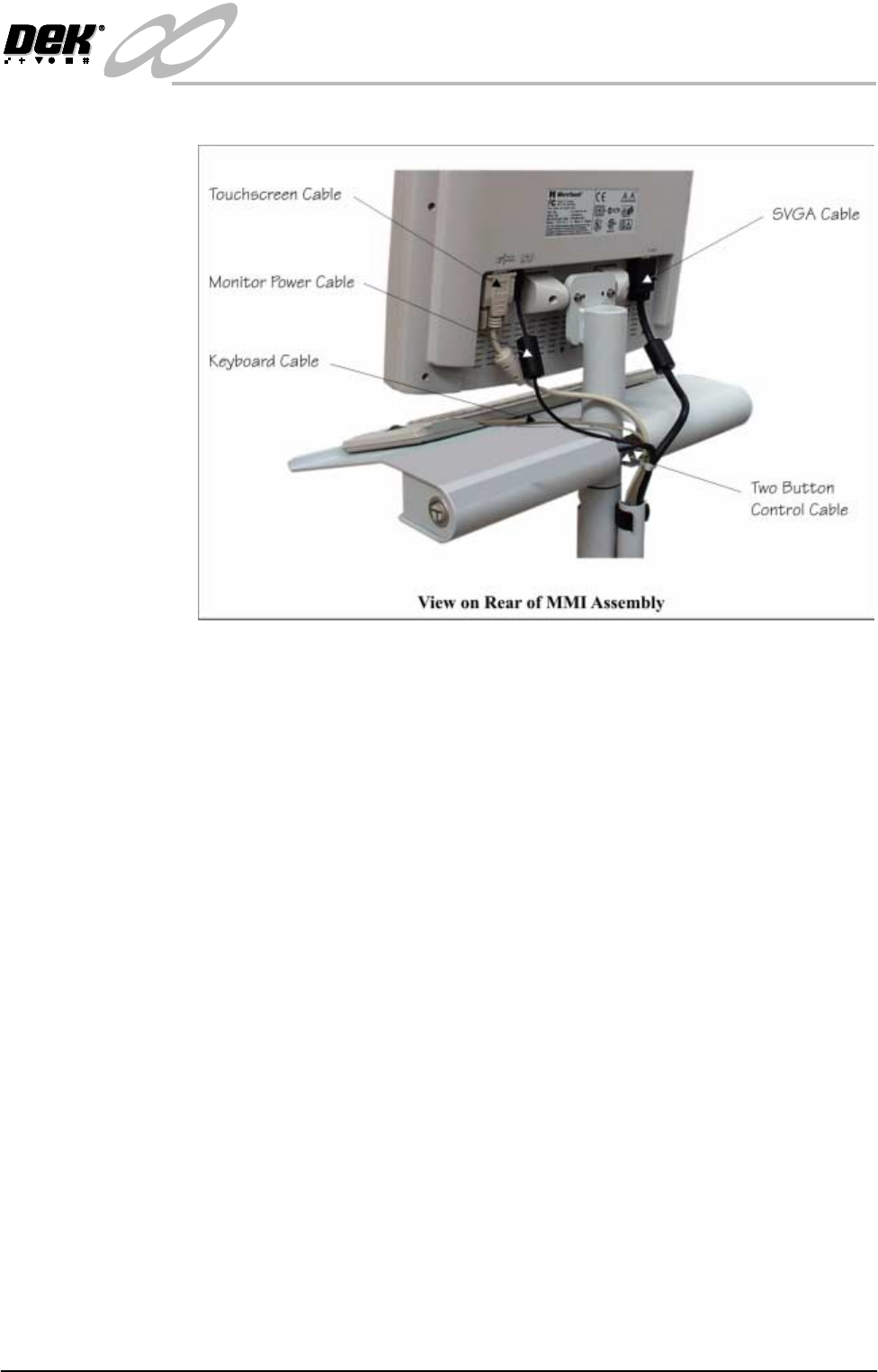
2. At the rear of the monitor, remove the following connections on the rear of
the monitor:
• Monitor Power Cable - Power DC-IN
• SVGA Cable (M16PL02) - Display Input
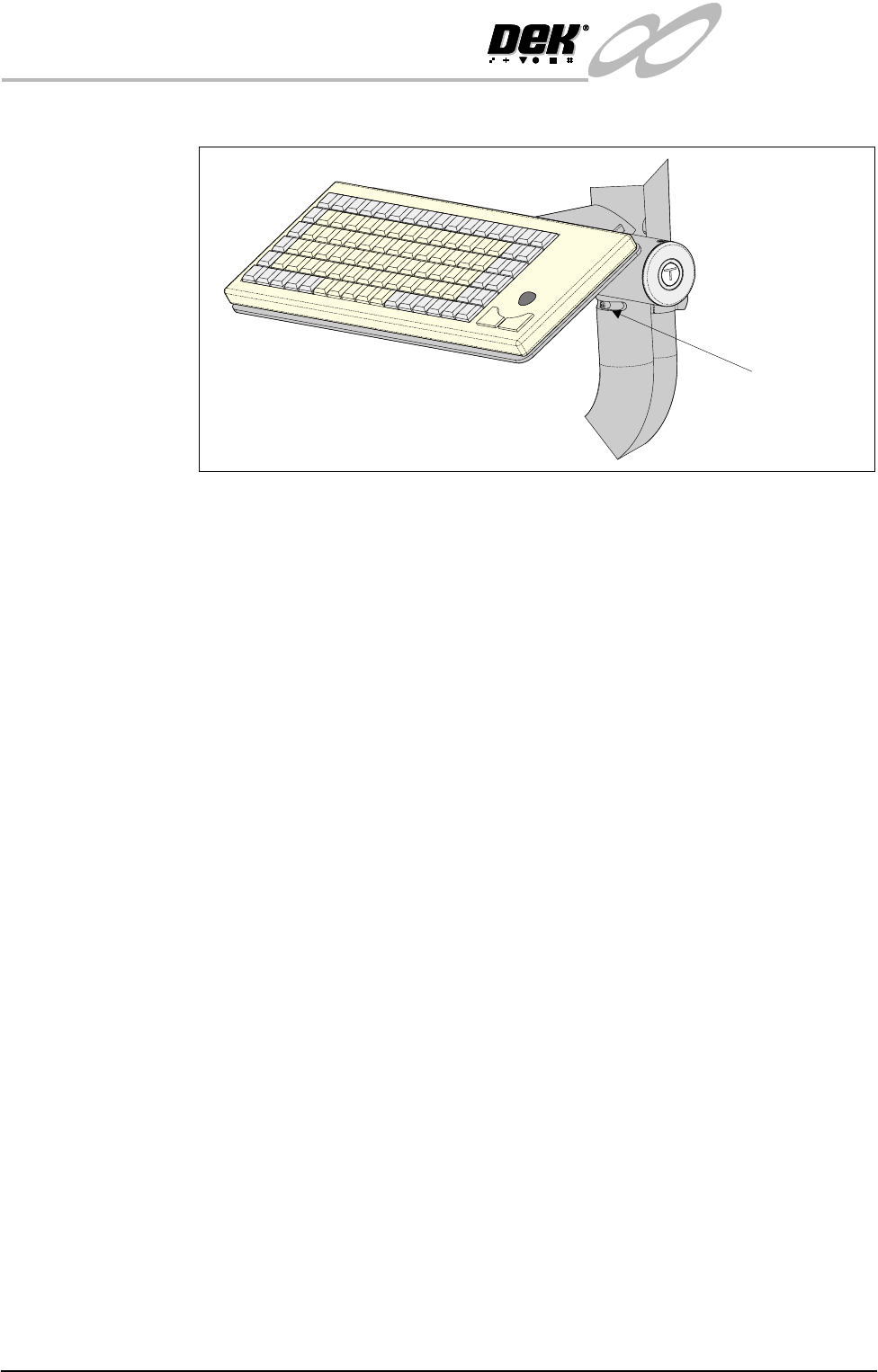
End Stop Pin
INFINITY
EX
TRANSPORTATION
MAJOR RELOCATION
Chapter Issue 3 Jan 04 Technical Reference Manual 31.21
• Touchscreen Cable (M16PL01) - Touch RS-232
3. Unclip the cable conduit from behind the MMI arm.
4. Carefully remove the following cables from the cable conduit utilizing the
slot in the conduit:
• Monitor Power Supply Cable
• SVGA Cable
• Touchscreen Cable
• Keyboard Cable
• Two Button Control
5. Gain access to bracket (Pt No 156875) located on the right hand side of the
lower frame.
6. Disconnect the cables from the MMI to the following connectors fitted to the
bracket:
• Two Button Control (14PL08) - 14SK08
• SVGA Cable (14SK04) - 14PL04
• Touchscreen (14SK02) - 14PL02
• Keyboard Mouse (14PL06) - 14SK06
• Keyboard (14PL05) - 14SK05 if Product Barcode Reader not fitted
NOTE
For machines with the product barcode disconnect the mini-DIN socket from
14PL05 from the keyboard. Disconnect the scanner mini-DIN plug from
14SK05 to the machine PC.
7. Remove the disconnected MMI cables from the machine.
INFINITY
EX
TRANSPORTATION
MAJOR RELOCATION
31.22 Technical Reference Manual Chapter Issue 3 Jan 04
8. Coil the monitor power supply cable and secure with tape within the
machine.
9. Remove the end stop pin from the slot below the keyboard in the lower MMI
arm.
10.Unfasten the keyboard from the velcro securing strips and remove the
keyboard and cable from the machine.
11.Lift off the MMI assembly, tube and keyboard tray from the MMI arm.
12.Slide the machine right hand access panel off of the MMI arm.
13.Disconnect the MMI arm earth cable from the machine upper frame earth
point.
14.Loosen and remove the M12 nyloc nut, M12 plain washer, large stainless
steel spacer and smaller friction washer from the mounting bracket pivot
post.
15.Lift off the MMI arm from the pivot post.
16.Refit the right hand corner access panel to the machine.
Transportation If the machine is to be relocated to another site it is recommended that it is
encased in its original delivery crate, or if not available a crate may be obtained
from DEK Printing Machines Ltd.
If the machine is to be transported by sea freight, packing advice should be
sought from specialist freight companies.
WARNING
MACHINE LIFTING. TO PREVENT SERIOUS INJURY TO
PERSONNEL, DURING LIFTING AND TRANSPORTATION
OPERATIONS, ENSURE THE MACHINE IS LIFTED AND
TRANSPORTED IN ACCORDANCE WITH INSTRUCTIONS
DETAILED IN THIS SECTION.
CAUTION
MACHINE DAMAGE. Damage to the machine will occur if the machine
is lifted:
• Using lifting strops
• From the sides
The machine may be lifted using a fork-lift truck or similar machine that meets
the following criteria:
• 54 inch (1372 mm) long forks.
• Fork span > 27 inches (686 mm) and <36 inches (914 mm).
• Lifting capability of 2000kg.
1. Locate the forks under the machine base (preferably from the rear) so the
weight of the machine is taken evenly on the front and rear cross members
(Machine on Forklift figure refers).
2. Raise the machine, remove the four mounting feet and place the machine on
the base of the delivery crate.
3. Fit the four studs, nuts and washers to secure the machine to the crate base