Infinity EX Transportation.pdf - 第67页
INFINITY EX TRANS PORTATION FOREIGN MACHINE INTERFA CE Chapter Issue 3 J an 04 Technical Reference Manual 31.67 Figur e 31-17 Multi-Interface Unit M01SK1 Signal lines to and from the DEK machine from the upline machine. …

INFINITY
EX
TRANSPORTATION
FOREIGN MACHINE INTERFACE
31.66 Technical Reference Manual Chapter Issue 3 Jan 04
Multi-Interface
Unit
The DEK Multi-Interface Unit (MIU) is a communications interface that allows
DEK Printing Machines to communicate with upline and downline board han-
dlers.
It simplifies the set up of the communications link between machines of different
manufacture by providing preprogrammed and programmable connections to
suit the interface protocol types commonly found within the board processing
industry.
The onboard, switch selectable, interface types are detailed later in this section.
Up to 16 interfaces can be specified for upline and downline handlers. The
upline machine can be of a different interface type to the downline machine.
Power supplies of +24V, +12V, +5V and 0V power the communications devices
of the upline and downline machines. Input signals to the MIU are opto-isolated.
Relay or open collector output driver signals are available for the MIU outputs.
A patching area routes patching link connections direct from upline to downline
as specified by any given protocol requirement.
The RS232 link is used for carrying out self tests on the MIU only and has no
function on the machine.
INFINITY
EX
TRANSPORTATION
FOREIGN MACHINE INTERFACE
Chapter Issue 3 Jan 04 Technical Reference Manual 31.67
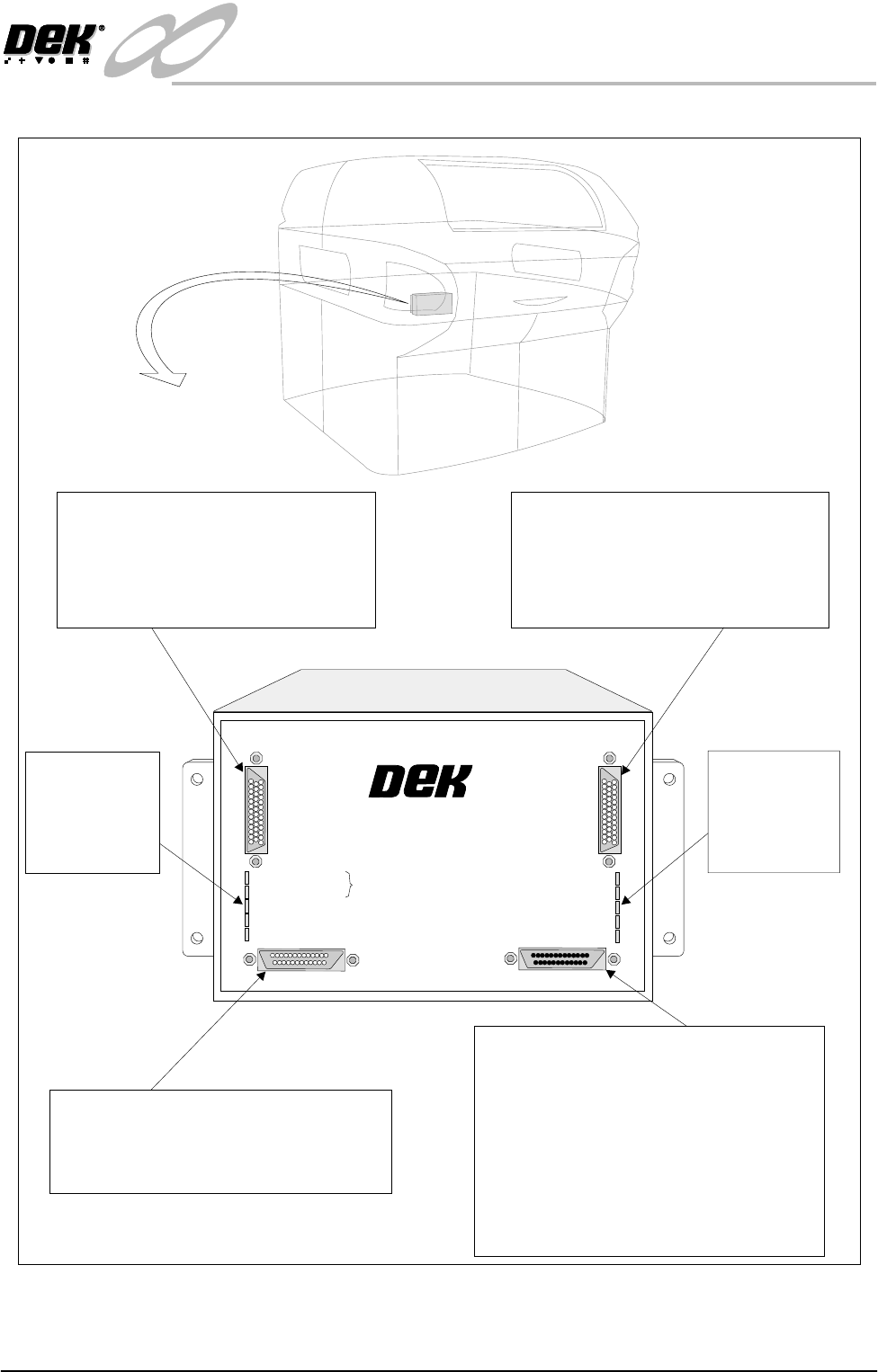
Figure 31-17 Multi-Interface Unit
M01SK1
Signal lines to and from the DEK machine
from the upline machine.
Inputs: Opto-isolated.
Outputs: Open collector output driver.
Relay switched.
M01SK2
Signal lines to and from the DEK machine
from the downline machine.
Inputs: Opto-isolated.
Outputs: Open collector output driver.
Relay switched.
M01SK3
The RS232 link is used for carrying out self
tests on the MIU only and has no function
on the DEK machine.
M01PL1
Power supplies.
Comms connections to the DEK machine
Inputs to the DEK machine from interface -
1. Downline Ready
2. Upline Ready
3. Downline Available
Outputs from the DEK machine to interface -
1. Send Downline
2. Send Upline
3. DEK Available
LED Bank LD2
Shows the
integrity of
the derived
supplies
LED Bank LD1
Indicates the
sequence of
events during
board transfers
+24V
+24V (E-STOP)
+12V
+5V
DOWNLINE READY
RS 232
DOWNLINE
UPLINE
DEK MACHINE
UPLINE READY
DOWNLINE AVAILABLE
SEND DOWNLINE
SEND UPLINE
DEK M/CN AVAILABLE
MULTI-INTERFACE UNIT
FROM
DEK
MACHINE
INFINITY
EX
TRANSPORTATION
FOREIGN MACHINE INTERFACE
31.68 Technical Reference Manual Chapter Issue 3 Jan 04
MIU Card Layout
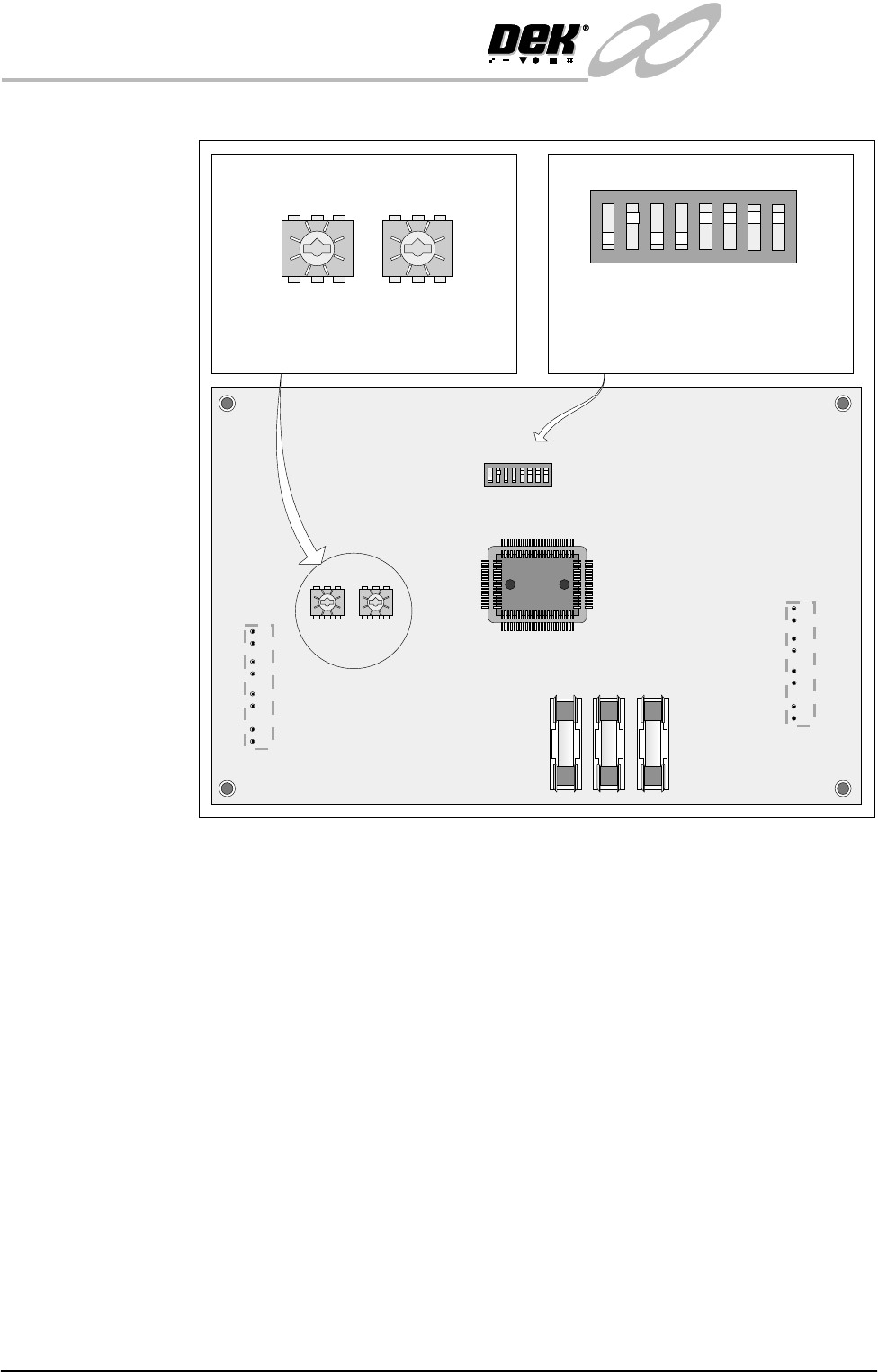
Figure 31-18 MIU Card Layout
Card Access To gain access to the three selector switches proceed as follows:
1. Remove connections to the MIU.
2. Remove the MIU from the bracket by releasing the four screws.
3. Remove the six MIU back plate screws.
12345678
ON
0
8
2E
6A
C 4
0
8
2E
6A
C 4
ON
12345678
0
8
2E
6A
C 4
0
8
2E
6A
C 4
SW2 SW3
IC8
SW1
FS1 FS2 FS3
LD1
LD2
SW2 - Upline interface select switch
SW3 - Downline interface select switch
SW1 - RS232 function select switch
The setting of this switch is for carrying
out self tests on the MIU only and has
no affect on the DEK machine.
SW2 SW3
SW1