Infinity EX Transportation.pdf - 第24页
INFINITY EX TRANSPORT ATION MAJOR RE LOCATION 31.2 4 Technical Reference Manual Chapter Issue 3 Jan 04 • 54 inch (1372 mm) long forks. • Fork span > 27 inches (686 mm) and <36 inches (914 mm). • Lifting capability …
INFINITY
EX
TRANSPORTATION
MAJOR RELOCATION
Chapter Issue 3 Jan 04 Technical Reference Manual 31.23
and secure the lid and sides of the crate with screws.
4. Wrap the loose items and pack separately. The machine is now ready for
transportation.
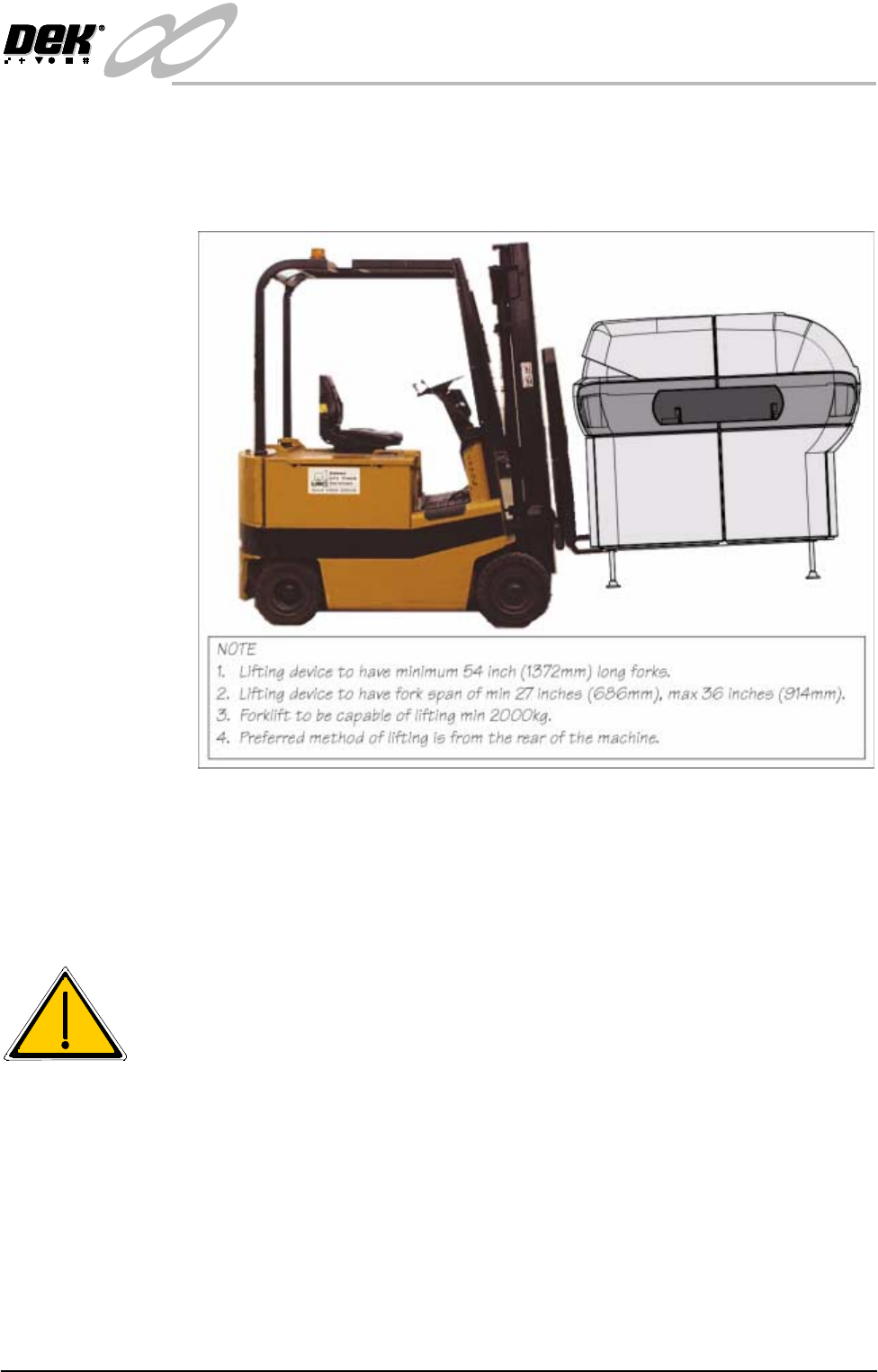
Figure 31-7 Machine on Forklift
Unpacking 1. Unscrew the delivery crate securing screws and remove the lid and sides of
the delivery crate.
2. Remove the four nuts and washers securing the machine to the transportation
box base using a 36mm spanner (wrench).
WARNING
MACHINE LIFTING. TO PREVENT SERIOUS INJURY TO
PERSONNEL, DURING LIFTING AND TRANSPORTATION
OPERATIONS, ENSURE THE MACHINE IS LIFTED AND
TRANSPORTED IN ACCORDANCE WITH INSTRUCTIONS
DETAILED IN THIS SECTION.
CAUTION
MACHINE DAMAGE. Damage to the machine will occur if the machine
is lifted:
• Using lifting strops
• From the sides
The machine may be lifted using a fork-lift truck or similar machine that meets
the following criteria:
INFINITY
EX
TRANSPORTATION
MAJOR RELOCATION
31.24 Technical Reference Manual Chapter Issue 3 Jan 04
• 54 inch (1372 mm) long forks.
• Fork span > 27 inches (686 mm) and <36 inches (914 mm).
• Lifting capability of 2000kg.
3. Locate the arms under the machine base (preferably from the rear) so that the
weight of the machine is taken evenly on the front and rear frame cross
members only (Machine on Forklift figure refers).
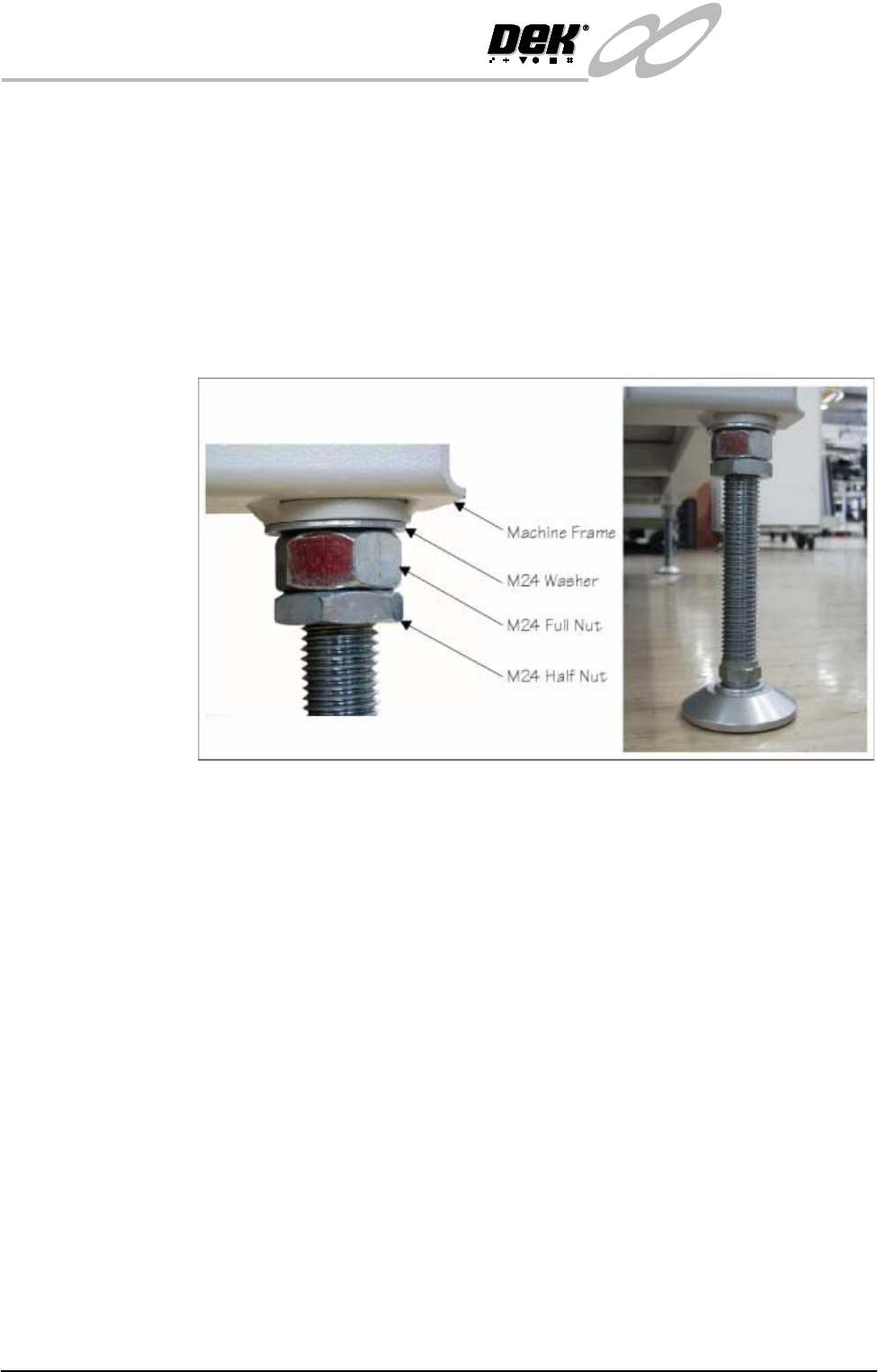
4. Fit the four mounting feet, as detailed in the figure below. Adjust the height
of each to approximately the same height, secure in place by tightening the
nuts.
The machine is now ready for transportation to its designated area.
Transit Bracket
Removal
Procedure
CAUTION
SCREEN ACTUATOR BRACKETS. Extreme care must be taken when
installing or removing the screen actuator brackets as the chase is spring
loaded against the screen actuator ends in the X Forward, X Rear and Y
Axis Positions. Impact force may damage the actuators.
NOTE
For guidance, when removing the transit brackets, refer to the following figures:
• Transit Brackets machine Location
• Front Transit Bracket and Camera Transit Brackets
• Front Transit Bracket Stud Locations
• X and Y Chase Restrainer Brackets
1. Remove the squeegee assembly pressure housing cover plate to gain access
to the squeegee timing belts. Wind the rear squeegee mounting up (front
timing belt) to the home position. Repeat for the front squeegee mount using
the rear timing belt.
2. From the front transit bracket, release the studs securing the following
assemblies:
a. On the print carriage securing studs (Items 1b), loosen the nuts and

INFINITY
EX
TRANSPORTATION
MAJOR RELOCATION
Chapter Issue 3 Jan 04 Technical Reference Manual 31.25
washers either side of the transit bracket, loosen the nuts securing the studs
to the carriage, unscrew the studs from the printhead carriage.
b. On the screen chase securing studs (Items 1a), remove the nuts and
washers on both sides of the bracket and remove the studs to release the
screen chase.
c. On the printhead lift securing studs (Items 1c), loosen the nuts and washers
on both sides of the bracket, loosen the nuts and washers securing the stud
to the machine frame, unscrew the studs from the machine frame.
d. On the transit bracket, remove the two fixing screws (Items 1d) that secure
the transit bracket to the printhead casting.
3. From the camera carriage transit bracket securing the camera carriage to the
left hand stud of the printhead lift stud, loosen the nuts and washers from
both sides of the bracket securing the bracket to the stud, remove the screw
securing the bracket to the camera carriage. Carefully remove the main front
transit bracket from the machine.
4. From the rear transit bracket securing the rear of the screen chase to the
printhead (Items 5a), loosen the nuts and washers either side of the bracket,
loosen the nuts and washers to release the screen chase (Items 5b). Carefully
remove the rear transit bracket from the machine.
5. From the paste dispense transit bracket, remove the two screws from the
sensor bracket and paste dispenser, remove the transit bracket (Item 3).
6. On the two X axis chase restrainer brackets, release the locknuts by turning
them in an anti-clockwise direction. Slowly turn the black knobs in an anti-
clockwise direction until the actuators have made contact with the chase
striker plates. Continue to turn the knobs until the threads have withdrawn
enough to allow access to the lower cap head screws.
7. On the Y axis chase restrainer bracket, release the locknut. Slowly undo the
cap head screw until the actuator has made contact with the chase striker
plate. Continue to undo the cap head screw until the bracket can be easily
removed from the Y axis actuator.