Infinity EX Transportation.pdf - 第35页
INFINITY EX TRANS PORTATION MAJOR RELO CATION Chapter Issue 3 J an 04 Technical Reference Manual 31.35 2. Whilst fully supporting the left hand auxiliary con ve yor , attach the con ve yor to the machine lo we r frame at…
INFINITY
EX
TRANSPORTATION
MAJOR RELOCATION
31.34 Technical Reference Manual Chapter Issue 3 Jan 04
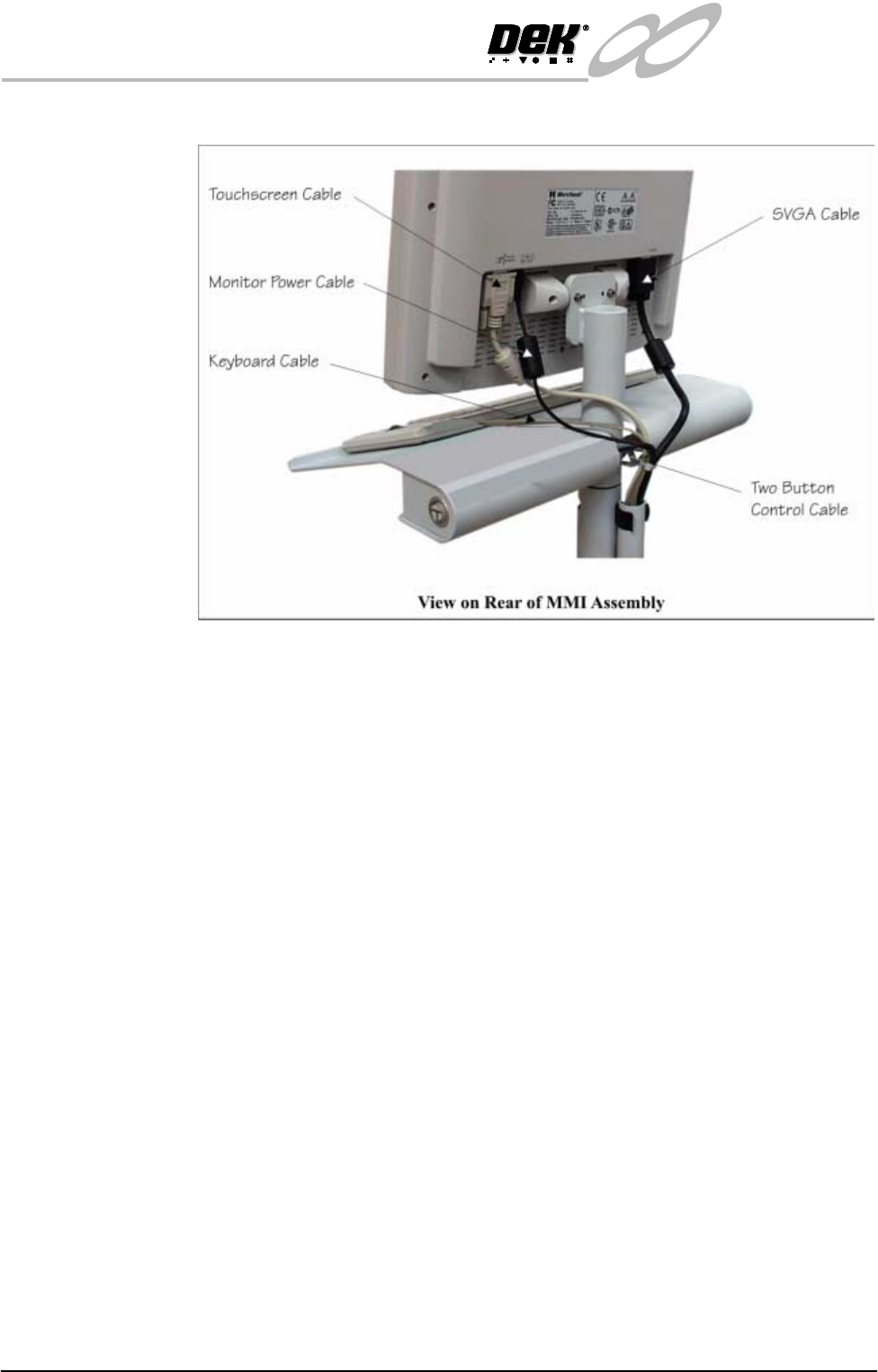
• Touchscreen Cable - Touch RS-232
12.Gain access to bracket (Pt No 156875) located on the right hand side of the
lower frame.
13.Connect the cables from the MMI to the following connectors fitted to the
bracket:
• Two Button Control (14PL08) - 14SK08
• SVGA Cable (14SK04) - 14PL04
• Touchscreen (14SK02) - 14PL02
• Keyboard Mouse (14PL06) - SK06
• Keyboard (14PL05) - 14SK05 (if Product Barcode Reader not fitted)
NOTE
For machines with the product barcode use the extension cable Pt No 0-
604027-01 to convert the scanner DIN plug to a mini-DIN socket and
connect to 14PL05 from the keyboard. Connect the scanner mini-DIN plug
to 14SK05 to the machine PC.
14.Lay the MMI cables in a neat order and cable tie in position, leaving enough
slack for the MMI to rotate freely.
15.Connect the System button loom to connector 8PL114. Refit the E Stop
connector to the E Stop and ESD cable to the capacitor fixing point.
16.Refit the right hand corner access panel to the machine and fasten using the
three quick release fasteners.
17.Fit the MMI arm earth cable to the machine upper frame earth point.
Fitting of Auxiliary
Conveyors (HTC
Option)
To fit the left hand auxiliary conveyor, carry out the following procedure:
1. Remove the left hand machine side covers.
INFINITY
EX
TRANSPORTATION
MAJOR RELOCATION
Chapter Issue 3 Jan 04 Technical Reference Manual 31.35
2. Whilst fully supporting the left hand auxiliary conveyor, attach the conveyor
to the machine lower frame attachment points using eight M5 bolts. DO
NOT fully tighten the bolts at this stage.
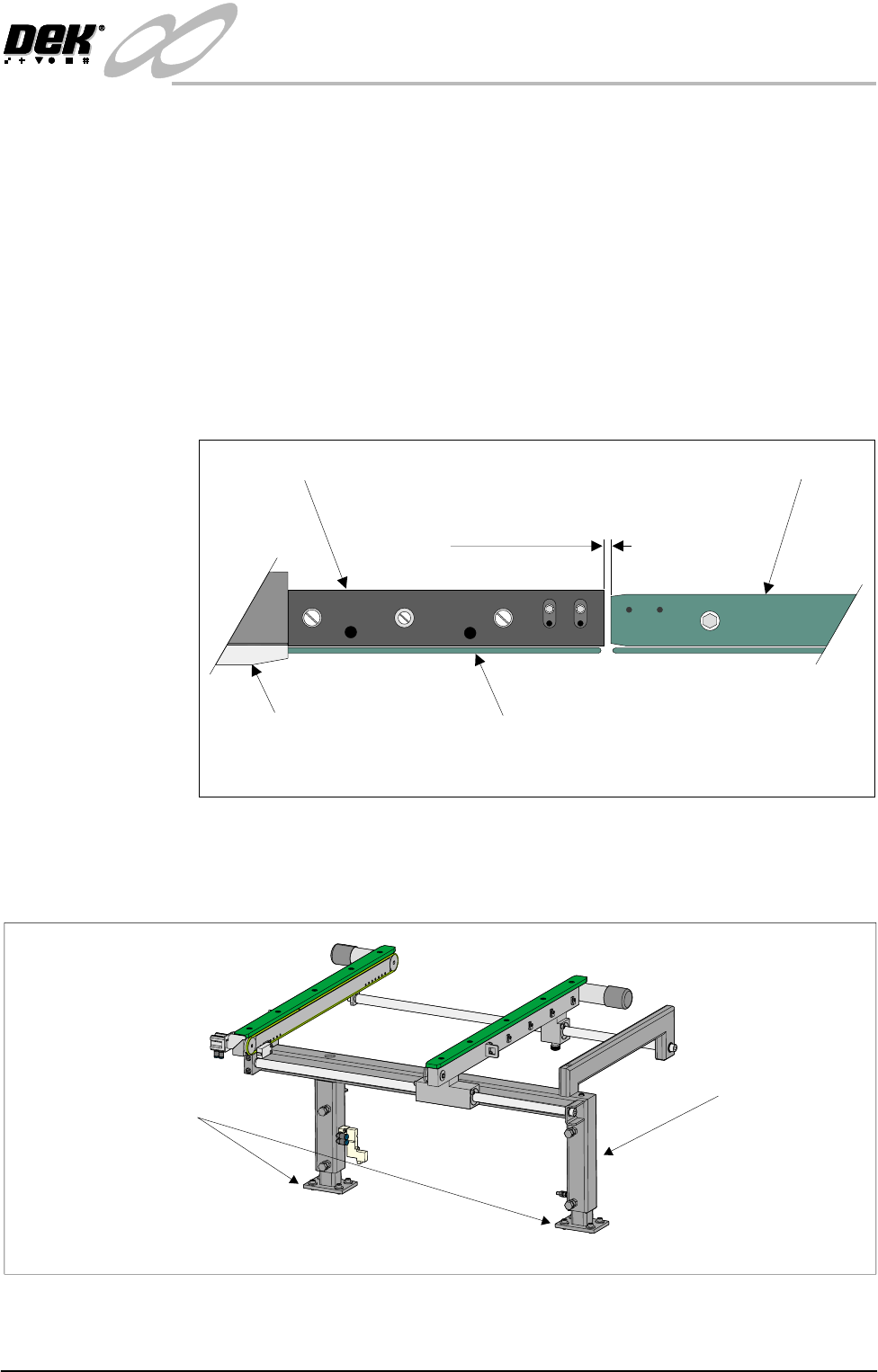
3. Carry out the following procedure to check the gap between the left hand
auxiliary conveyor rails and the print station rails:
a. Disconnect the two 4mm pneumatic pipe connections to the conveyor
board stop.
b. Loosen and remove the two M5 cap head screws securing the board stop
bracket to the conveyor and remove the bracket and board stop.
c. Using feeler gauges or a 3mm allen key, ensure that the gap between the
print station and the left hand auxiliary conveyor (in two positions) is 3.0
± 0.5mm.
d. If adjustment is required, carefully adjust the position of the conveyor to
obtain the 3.0±0.5mm gap.
e. Tighten the M5 securing bolts fitted in Step 2.
f. Refit the board stop and bracket to the auxiliary conveyor using the two
M5 caphead screws removed in Step 3b. DO NOT fully tighten the
screws.
Board Clamp
Board Transport Rail
Auxiliary Conveyor
Print Station
Plan View on Print Station and Auxiliary Rails
5157438
3.0mm +/- 0.5mm
Rear View of Left Auxiliary Conveyor
Left Hand Auxiliary
Conveyor Frame
Conveyor Frame to
Machine Main Frame
(4 bolts in 2 positions)
INFINITY
EX
TRANSPORTATION
MAJOR RELOCATION
31.36 Technical Reference Manual Chapter Issue 3 Jan 04
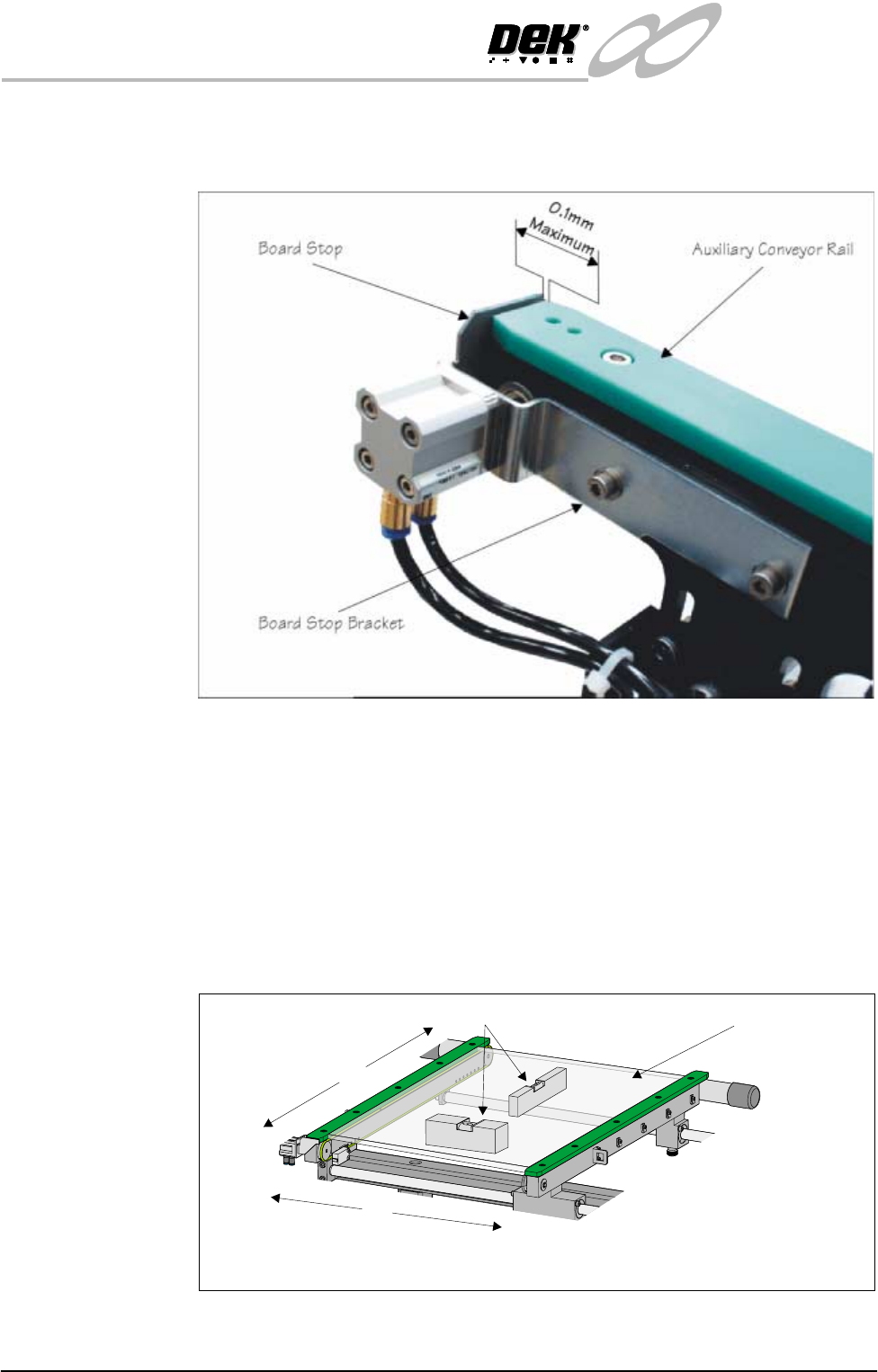
g. Using a feeler gauges check the gap between the auxiliary conveyor rail
and the inner face of board stop is a maximum of 0.1mm . Adjust the gap
as necessary by repositioning the board stop bracket.
h. Tighten the screws fitted 3f and recheck the gap.
4. Carry out the following procedure to check and if required adjust the left
hand auxiliary conveyor levelling:
a. Adjust the left hand auxiliary conveyor rail width to approximately
250mm.
b. Place a Board Clamp Setting Plate Pt No 140403 onto the auxiliary
conveyor transport belts.
c. Place a spirit level on top of the setting plate and check the levelness of
the conveyor in the X and Y planes.
d. If adjustment in the X plane is required, carry out Steps 4e - 4h.
X
Y
Board Clamp
Setting Plate
View on Auxiliary Conveyor
Spirit Level