Infinity EX Transportation.pdf - 第8页
INFINITY EX TRANSPORT ATION MAJOR RE LOCATION 31.8 Technical Reference Manu al Chapter Is sue 3 Jan 04 7. Machines f itted with ECU co ve rs - re mov e the front left ha nd side ECU pla te (adjacent to the paste dispense…

INFINITY
EX
TRANSPORTATION
MAJOR RELOCATION
Chapter Issue 3 Jan 04 Technical Reference Manual 31.7
MAJOR RELOCATION
Introduction This procedure is to be utilized when the machine is being relocated on the
following occasions:
• Machine relocation to another site outside the original factory.
• If the machine has to experience any substantive shocks or vibration.
Machine
Preparations
Prior to a major relocation it is recommended the following is carried out:
• Machine capability check (see Machine Performance).
• Check the shock watches are in position (Figure Shock Watch Locations
refers) and untriggered (displays a red arrow). To reset units use a pin
through the access hole.
Installation
Procedure
Prior to installing transit brackets to the machine ensure the following:
CAUTION
SCREEN ACTUATOR BRACKETS. Extreme care must be taken when
installing or removing the screen actuator brackets as the chase is spring
loaded against the screen actuator ends in the X Forward, X Rear and Y
Axis Positions. Impact force may damage the actuators.
1. With power applied to the machine:
a. Home the moving rail.
b. Home the X and Y screen actuators.
c. Home the paste dispenser (if fitted).
2. Remove the squeegee drip tray.
3. Remove the under screen cleaner.
NOTE
If required, raise printhead for access when removing underscreen cleaner.
Front Transit
Bracket
NOTE
For guidance, when fitting the front transit bracket, refer to the following figures:
• Transit Brackets Machine Location
• Front Transit Bracket and Camera Transit Bracket (with table)
• Front Transit Bracket Stud Locations
1. Check that the camera transit bracket is fitted to the main transit bracket, ie
on the left hand stud of the printhead lift stud. Check that all nuts and
washers are fitted to all the bracket studs.
2. With power still applied to the machine, jog the print carriage forward until
the front and rear squeegee mounts are over the squeegee mount support
bracket (Item 1e).
3. Switch OFF and disconnect the machine electrical power.
4. Disconnect the air supply.
5. Lightly grease the four chase rollers.
6. Position the front transit bracket across the print carriage guide rails.

INFINITY
EX
TRANSPORTATION
MAJOR RELOCATION
31.8 Technical Reference Manual Chapter Issue 3 Jan 04
7. Machines fitted with ECU covers - remove the front left hand side ECU plate
(adjacent to the paste dispense unit).
8. Locate and screw the printhead lift studs (Item 1c) into the machine frame
and secure in place using locknuts and washers (2 in number). Secure the
studs to the bracket with nuts and washers (2 in number).
9. Move the chase forward by hand and temporarily hold in position. Ensure
the screen chase is not in contact with the head lift studs. Locate the chase
studs (Item 1a) into the chase, hand tighten only.
10.Remove the squeegee assembly pressure housing cover plate to gain access
to the squeegee timing belts.
Wind the rear squeegee mounting down (front timing belt) so that the mount
comes to rest on the support bracket (Item 1e). Repeat for the front squeegee
mount using the rear timing belt.
11.Locate and screw the print carriage studs (Item 1b) into the threaded holes
of the print carriage front face and secure in place using the nuts and washers.
Secure the studs to the transit bracket with the nuts and washers.
12. Locate the two fixing screws (Item 1d) which secures the front transit bracket
to the printhead casting. Secure the transit bracket to the printhead.
INFINITY
EX
TRANSPORTATION
MAJOR RELOCATION
Chapter Issue 3 Jan 04 Technical Reference Manual 31.9
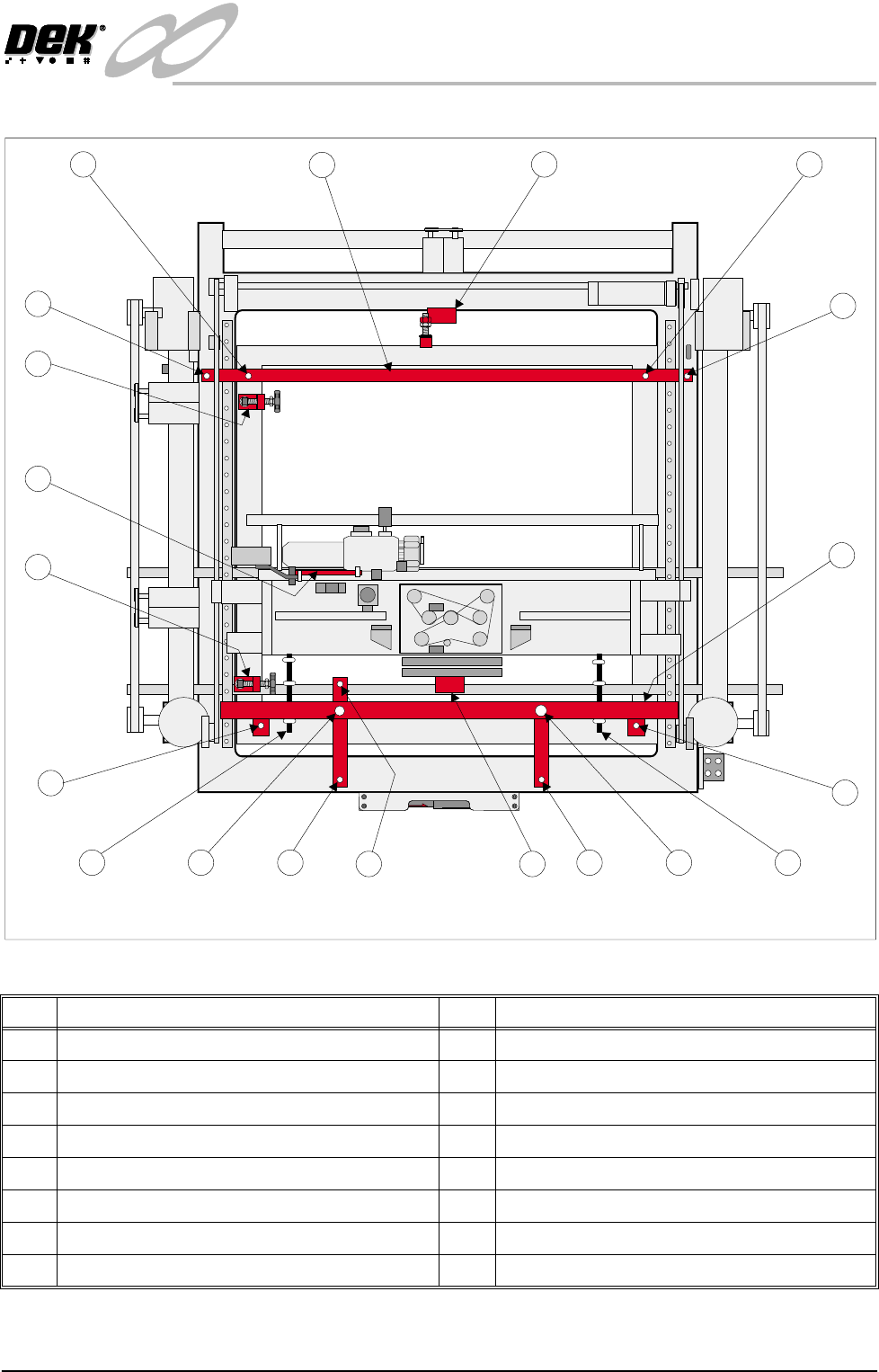
Figure 31-4 Transit Brackets Machine Location
No Description No Description
1 Front Transit Bracket 3 Paste Dispense Transit Bracket
1a Screen Chase Studs (2 positions) 4 X Rear Chase Restrainer Bracket
1b Print Carriage Studs (2 positions) 5 Rear Transit Bracket
1c Printhead Lift Studs (2 positions) 5a Printhead Casting Fixing Screws (2 positions)
1d Printhead Casting Fixing Screws (2 positions) 5b Screen Chase Studs (2 positions)
1e Squeegee Mount Support Bracket 6 Y Axis Chase Restrainer Bracket
1f Camera Carriage Fixing Screw 7 Printhead Safety Prop
2 X Front Chase Restrainer Bracket
1
1a
1b
1c
1a
1b 1c
2
3
5a
5b
6
4
5a
5b
5
Plan View of Machine
1d
1d
1f
1e