Infinity EX Transportation.pdf - 第11页
INFINITY EX TRANS PORTATION MAJOR RELO CATION Chapter Issue 3 J an 04 Technical Reference Manual 31.11 Rear Transit Brac ket NO TE F or guidance, w hen f itting the r ear transi t brac ket, r efer to t he followi ng figu…
INFINITY
EX
TRANSPORTATION
MAJOR RELOCATION
31.10 Technical Reference Manual Chapter Issue 3 Jan 04
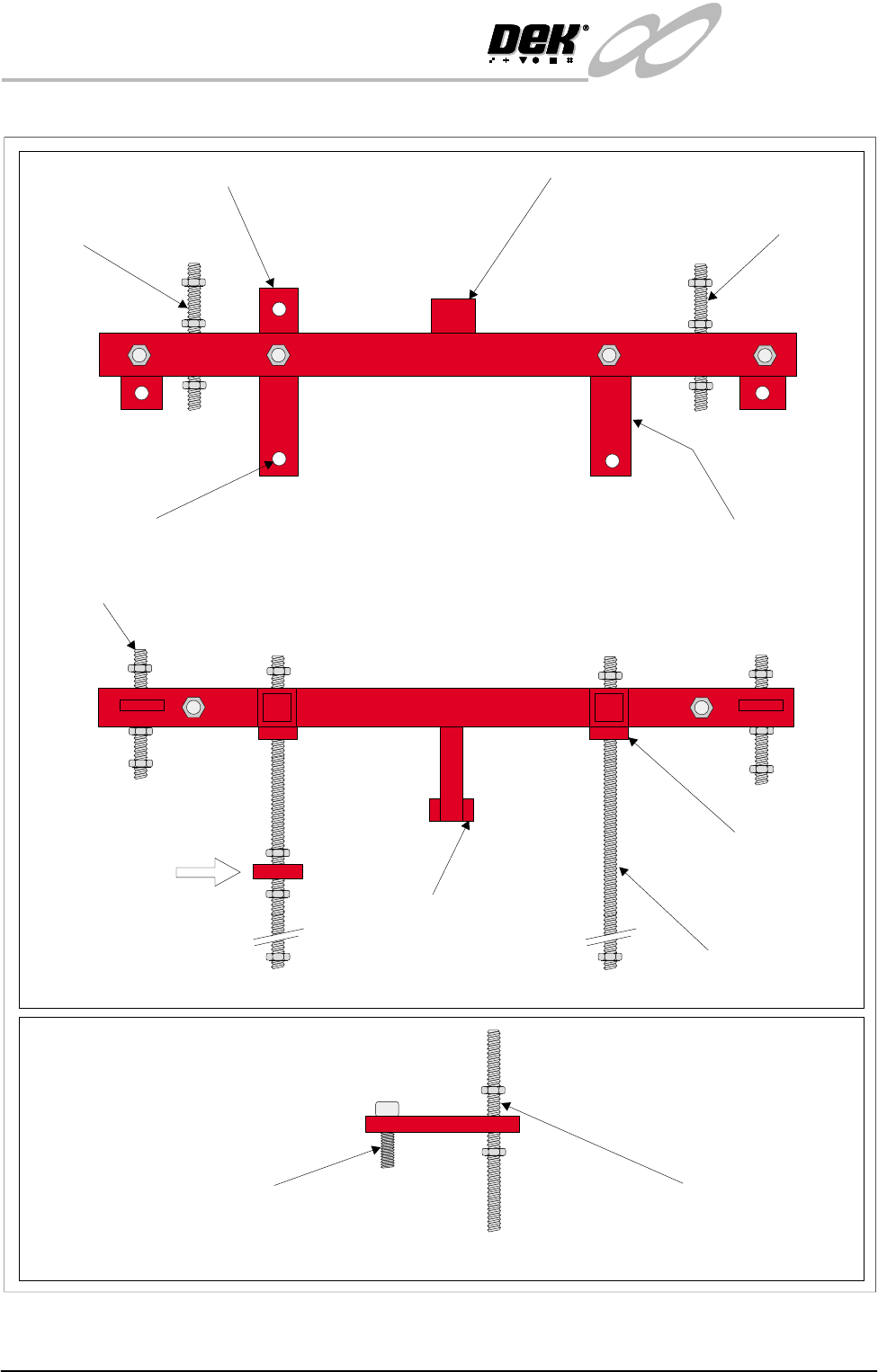
Figure 31-5 Front Transit Bracket and Camera Transit Bracket
Plan View on Front Transit Bracket
Printhead Carriage
Stud
Camera Carriage Transit Bracket Squeegee Mounting Bracket
Transit Bracket
Mounting Feet (2 positions)
Printhead Carriage
Stud
Transit Bracket
Fixing Screws (2 positions)
Front View on Front Transit Bracket
Side View on Camera Carriage Transit Bracket
(View on Arrow A)
A
Camera Carriage Securing Screw LH Printhead Lift Stud
Printhead Lift Stud
(2 positions)
Squeegee Mounts
Support Bracket
Transit Bracket
Mounting Feet
(2 positions)
Screen Chase Studs, Front (2 positions)

INFINITY
EX
TRANSPORTATION
MAJOR RELOCATION
Chapter Issue 3 Jan 04 Technical Reference Manual 31.11
Rear Transit Bracket NOTE
For guidance, when fitting the rear transit bracket, refer to the following figures:
• Transit Brackets Machine Location
• Rear Transit Bracket
1. Position the rear transit bracket across the print carriage guide rails.
2. Locate the two rear transit bracket fixing screws (Item 5a) into the printhead
casting. Secure the transit bracket to the printhead.
3. Locate the screen chase studs (Item 5b) into the chase, hand tighten only.
Camera Carriage
Transit Bracket
NOTE
For guidance, when fitting the camera carriage transit bracket, refer to the
following figures:
• Transit Brackets Machine Location
• Front transit Bracket Stud Locations
1. Move the camera to its limit, ie fully left.
2. Move the camera carriage forward by hand so to position the transit bracket
over the camera carriage and timing belt, align with the hole provided in the
camera carriage.
3. Position the bracket so that it just comes into contact with the timing belt with
the bracket horizontal.
4. Secure the bracket to the stud with nuts and washers.
5. Secure the bracket to the carriage using the screw and washer (Item 1f), do
not overtighten.
NOTE
The camera carriage bracket fits over the timing belt to clamp the belt,
preventing camera movement.
Paste Dispense
Transit Bracket
NOTE
For guidance, when fitting the paste dispense transit bracket, refer to the
following figures:
• Transit Brackets Machine Location
• Front transit Bracket Stud Locations
• Paste Dispense Transit Bracket
1. Fit the transit bracket to the paste dispenser bracket and paste dispenser
sensor bracket, secure in place with the two fixing screws and washers and a
single nut.
2. Final tightening of all the nuts can now be done, leaving the four chase studs
(Items 1a & 5b) until last (see Chase Lifting below). When all the nuts are
secure, adjust the nuts on the chase studs to lift the chase off its support
rollers, secure the nuts.
3. Refit the squeegee assembly pressure housing cover plate.

INFINITY
EX
TRANSPORTATION
MAJOR RELOCATION
31.12 Technical Reference Manual Chapter Issue 3 Jan 04
NOTE
After installation of the transit brackets it is advisable to apply grease to all
the visible linear guide rails.
Chase Lifting NOTE
For guidance, when fitting the front and rear transit brackets screen chase studs,
refer to the following figures:
• Transit Brackets Machine Location
• Front transit Bracket Stud Locations
1. Back off the three chase actuators by hand until a 6mm gap exists between
the plunger and the chase plate.
2. Gently wind down the top four nuts on the front and rear brackets (Items 1a
and 5b) to take the weight of the chase, just enough so that the rollers turn
freely.
3. Wind the top nuts half a turn each and check that the roller nearest to each
stud is free to move. If not, alternate between each stud the half turn to ensure
the chase is raised evenly to clear the rollers.
CAUTION
CHASE DISTORTION. Do not raise the chase fully as this may result in
damage and distortion to the chase assembly.
4. Fully tighten the lower nuts on Items 1a and 5b and check that the rollers are
still free to rotate, adjust the top nut if required.
X Axis Chase
Restrainer Brackets
NOTE
For guidance, when fitting the X axis chase restrainer brackets, refer to the
following figures:
• X and Y Axis Chase Restrainer Brackets
• X and Y Axis Chase Restrainer Positions
1. Wind the hand wheels on the both of the X axis chase restrainer brackets in
an anti-clockwise direction until the lower cap head screws are accessible.
2. Position the two X axis chase restrainer brackets on the chase.
3. Screw the 6mm cap head bolts until the brackets are fixed firmly in place.
4. Turn the hand wheels on each bracket clockwise by hand until the X axis
actuators are no longer in contact with the chase (approx. 6mm gap).
5. Tighten the locknuts.
Y Axis Chase
Restrainer Bracket
NOTE
For guidance, when fitting the Y axis chase restrainer brackets, refer to the
following figures:
• X and Y Axis Chase Restrainer Brackets
• X and Y Axis Chase Restrainer Positions
1. Slide the 'C' shape of the Y axis chase restrainer bracket over the end of the
Y axis chase actuator.