Infinity EX Transportation.pdf - 第68页
INFINITY EX TRANSPORT ATION FOREIGN MAC HINE INTERFACE 31.6 8 Technical Reference Manual Chapter Issue 3 Jan 04 MIU Card Layout Figur e 31-18 MIU Card Lay out Card Access T o gain access to the three selector switches pr…
INFINITY
EX
TRANSPORTATION
FOREIGN MACHINE INTERFACE
Chapter Issue 3 Jan 04 Technical Reference Manual 31.67
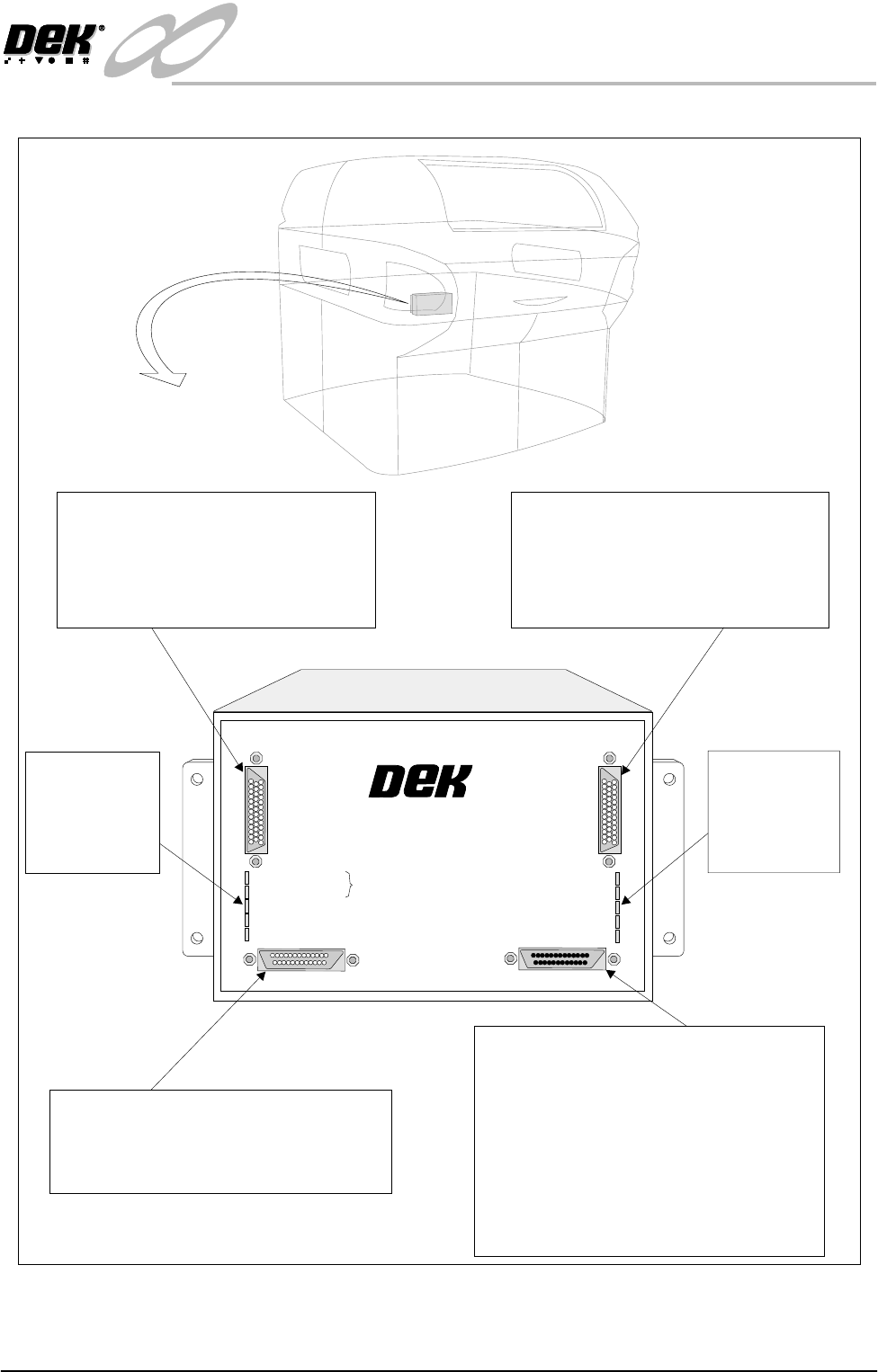
Figure 31-17 Multi-Interface Unit
M01SK1
Signal lines to and from the DEK machine
from the upline machine.
Inputs: Opto-isolated.
Outputs: Open collector output driver.
Relay switched.
M01SK2
Signal lines to and from the DEK machine
from the downline machine.
Inputs: Opto-isolated.
Outputs: Open collector output driver.
Relay switched.
M01SK3
The RS232 link is used for carrying out self
tests on the MIU only and has no function
on the DEK machine.
M01PL1
Power supplies.
Comms connections to the DEK machine
Inputs to the DEK machine from interface -
1. Downline Ready
2. Upline Ready
3. Downline Available
Outputs from the DEK machine to interface -
1. Send Downline
2. Send Upline
3. DEK Available
LED Bank LD2
Shows the
integrity of
the derived
supplies
LED Bank LD1
Indicates the
sequence of
events during
board transfers
+24V
+24V (E-STOP)
+12V
+5V
DOWNLINE READY
RS 232
DOWNLINE
UPLINE
DEK MACHINE
UPLINE READY
DOWNLINE AVAILABLE
SEND DOWNLINE
SEND UPLINE
DEK M/CN AVAILABLE
MULTI-INTERFACE UNIT
FROM
DEK
MACHINE
INFINITY
EX
TRANSPORTATION
FOREIGN MACHINE INTERFACE
31.68 Technical Reference Manual Chapter Issue 3 Jan 04
MIU Card Layout
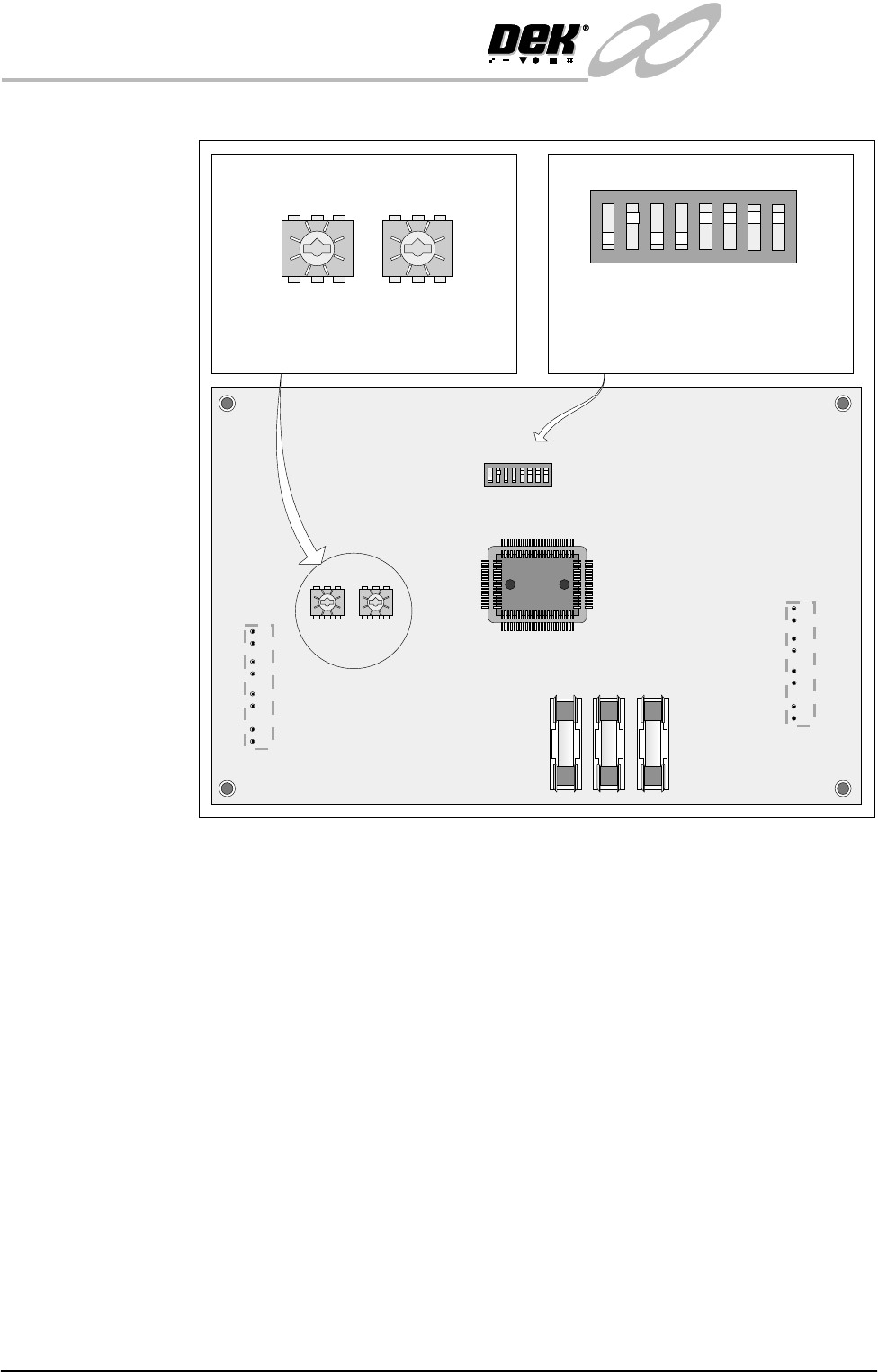
Figure 31-18 MIU Card Layout
Card Access To gain access to the three selector switches proceed as follows:
1. Remove connections to the MIU.
2. Remove the MIU from the bracket by releasing the four screws.
3. Remove the six MIU back plate screws.
12345678
ON
0
8
2E
6A
C 4
0
8
2E
6A
C 4
ON
12345678
0
8
2E
6A
C 4
0
8
2E
6A
C 4
SW2 SW3
IC8
SW1
FS1 FS2 FS3
LD1
LD2
SW2 - Upline interface select switch
SW3 - Downline interface select switch
SW1 - RS232 function select switch
The setting of this switch is for carrying
out self tests on the MIU only and has
no affect on the DEK machine.
SW2 SW3
SW1
INFINITY
EX
TRANSPORTATION
FOREIGN MACHINE INTERFACE
Chapter Issue 3 Jan 04 Technical Reference Manual 31.69
Part Numbers & Settings
NOTE
DEK do not supply Dynapert, Philips or Europlacer interface cables.
FMI Cables With the cables supplied, connect the upline and downline machines to the
screen printer MIU box connections. Cables should be routed down behind the
rear access panel.
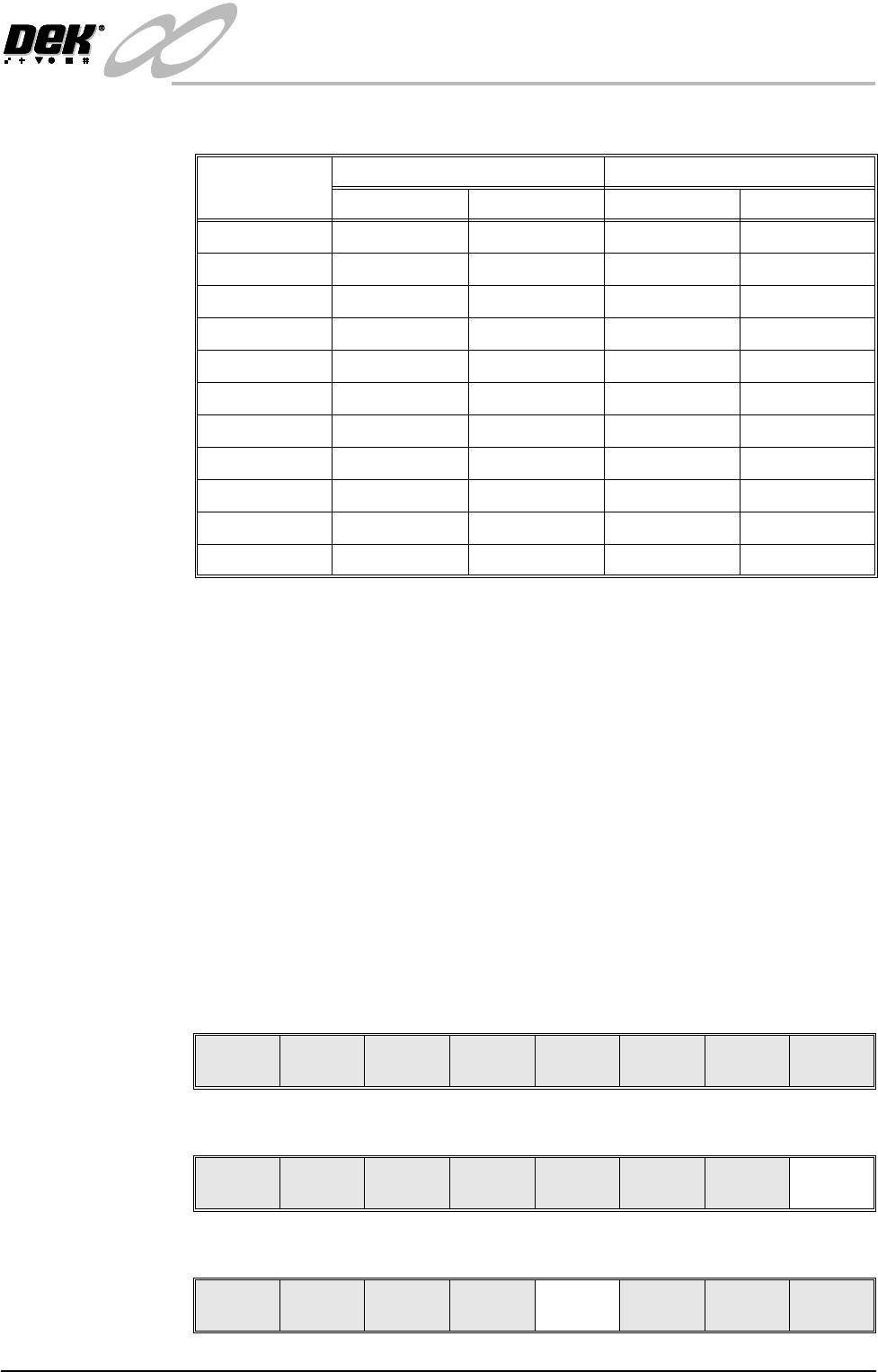
Procedure For machines with the MIU option, ensure MIU is configured with the correct
protocols for upline and downline machines as detailed earlier.
1. Power up the machine using the mains isolator, ensure that the air supply is
connected.
The message prompt bar displays - ‘Press System Switch to Initialize
printer or Select Diagnostics or Load Data’.
2. Press System, the machine initializes.
The main control screen is displayed and the Menu Bar shows the functions
available.
3. Select Maint. (F8).
4. Select Set Prefs (F5).
Protocol MIU Setting Cable Part Number
Upline SW2 Downline SW2 Upline Downline
Dynapert 0 0 N/A N/A
Philips 1 1 N/A N/A
SMEMA 2 2 131343 131345
Siemens 3 3 131335 131337
SMPI 4 4 131331 131333
TDK 5 5 131323 131325
Europlacer 6 6 N/A N/A
Fuji 7 7 126757 126758
Panasonic 7 7 131339 131341
Sanyo 8 8 146120 146119
Sanyo Flow Out 9 9 146120 146119
Run Head
Paste
Load
Clean
Screen
Adjust Setup Monitor Maint.
Run Head
Paste
Load
Clean
Screen
Adjust Setup Monitor Maint.
Calibrat
Pressure
Calibrat
Offset
Calibrat
Vision
House
Keeping
Set
Prefs
Diagnost
Test
Cycles
Exit