Infinity EX Transportation.pdf - 第45页
INFINITY EX TRANS PORTATION PRE IN STALLAT ION CH ECKS Chapter Issue 3 J an 04 Technical Reference Manual 31.45 PRE INST ALLA TION CHECKS Ha ving remov ed the transit brackets and located the machine in position, prepare…
INFINITY
EX
TRANSPORTATION
MAJOR RELOCATION
31.44 Technical Reference Manual Chapter Issue 3 Jan 04
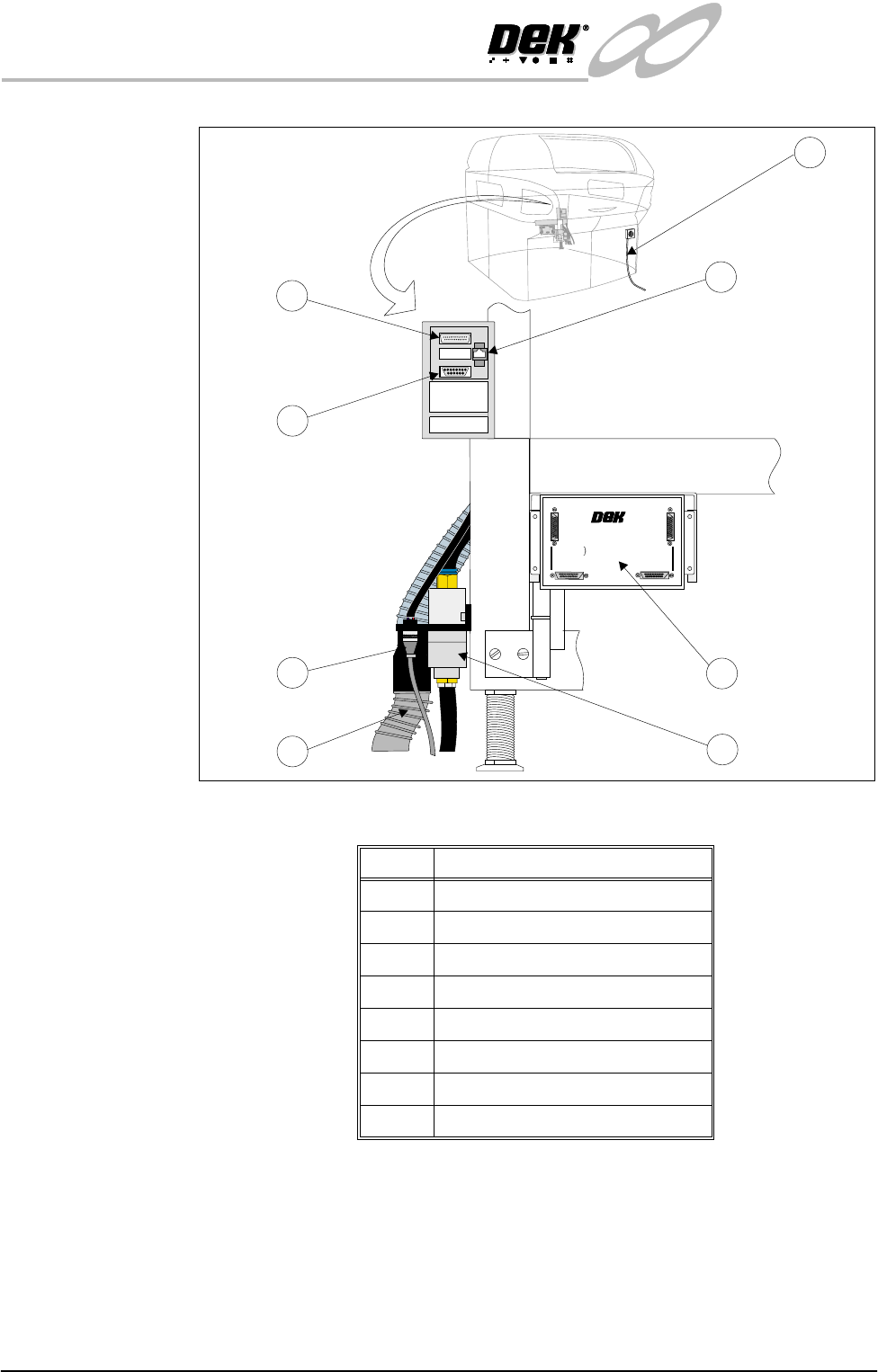
Figure 31-11 External Services
Item Description
1 6SK13 Host Comms LAN RJ45
2 Mains Supply
3 Multi-Interface Unit (optional)
4 Air Connection
5 Vacuum Connection
6 24V Vacuum Control
7 6SK09 Parallel Port Printer
8 FMI Pod (SMEMA interface only)
1
+
2
4
V
+2
4
V
+
2
4
V
(
E
-
S
T
O
P
)
+
2
4
V
(E-
ST
OP)
+
1
2
V
+
1
2
V
+
5
V
+5
V
D
O
W
N
L
I
N
E
R
E
A
D
Y
DO
WNL
INE
RE
A
D
Y
R
S
2
3
2
R
S
2
3
2
D
O
W
N
L
I
N
E
D
OW
N
L
INE
U
P
L
I
N
E
UP
LINE
D
E
K
M
A
C
H
I
N
E
DEK
M
AC
H
INE
U
P
L
I
N
E
R
E
A
D
Y
UPL
I
N
E
RE
ADY
D
O
W
N
L
I
N
E
A
V
A
I
L
A
B
L
E
DO
WN
L
IN
E
A
V
A
I
LAB
LE
S
E
N
D
D
O
W
N
L
I
N
E
S
E
N
D
D
O
W
N
L
INE
S
E
N
D
U
P
L
I
N
E
SEND
U
PLINE
D
E
K
M
/
C
N
A
VA
I
L
A
B
L
E
DE
K
M
/
C
N
A
VA
I
LA
BLE
M
U
L
T
I
-
I
N
T
E
R
F
A
C
E
U
N
I
T
MULT
I-I
N
TE
RF
ACE
U
N
IT
F
R
O
M
D
E
K
M
A
C
H
I
N
E
FRO
M
DEK
MAC
H
IN
E
2
5
6
7
8
4
3
+24V
+24V (E-STOP)
+12V
+5V
DOWNLINE READY
RS 232
DOWNLINE
UPLINE
DEK MACHINE
UPLINE READY
DOWNLINE AVAILABLE
SEND DOWNLINE
SEND UPLINE
DEK M/CN AVAILABLE
MULTI-INTERFACE UNIT
FROM
DEK
MACHINE
1
14
25
13
INFINITY
EX
TRANSPORTATION
PRE INSTALLATION CHECKS
Chapter Issue 3 Jan 04 Technical Reference Manual 31.45
PRE INSTALLATION CHECKS
Having removed the transit brackets and located the machine in position, prepare
to install the machine, as follows:
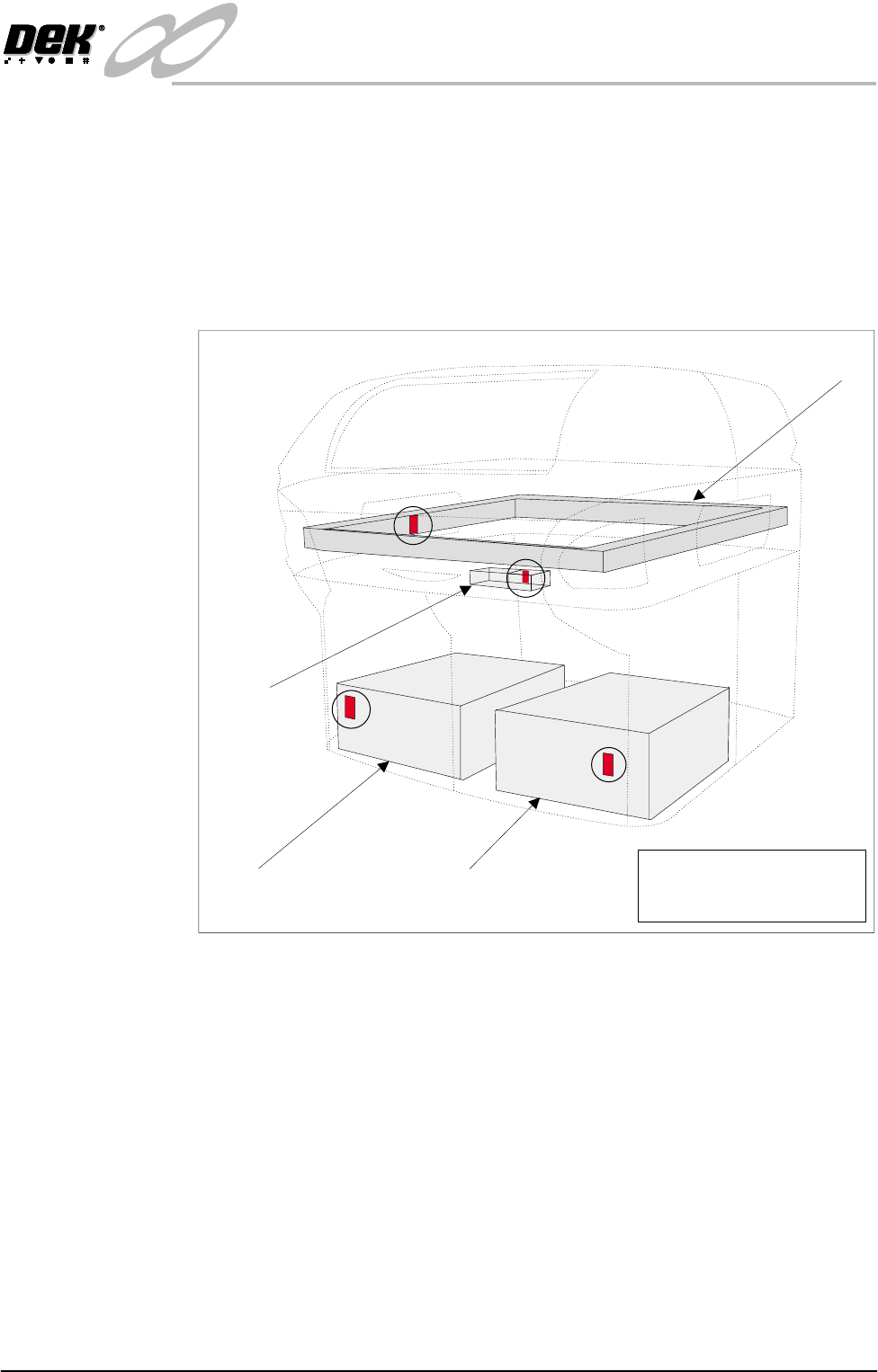
Shock Watches A self adhesive shock watch (DEK Part No. 133517), is fitted in the vertical
plane on the machine in four places (Shock Watch Locations figure refers).
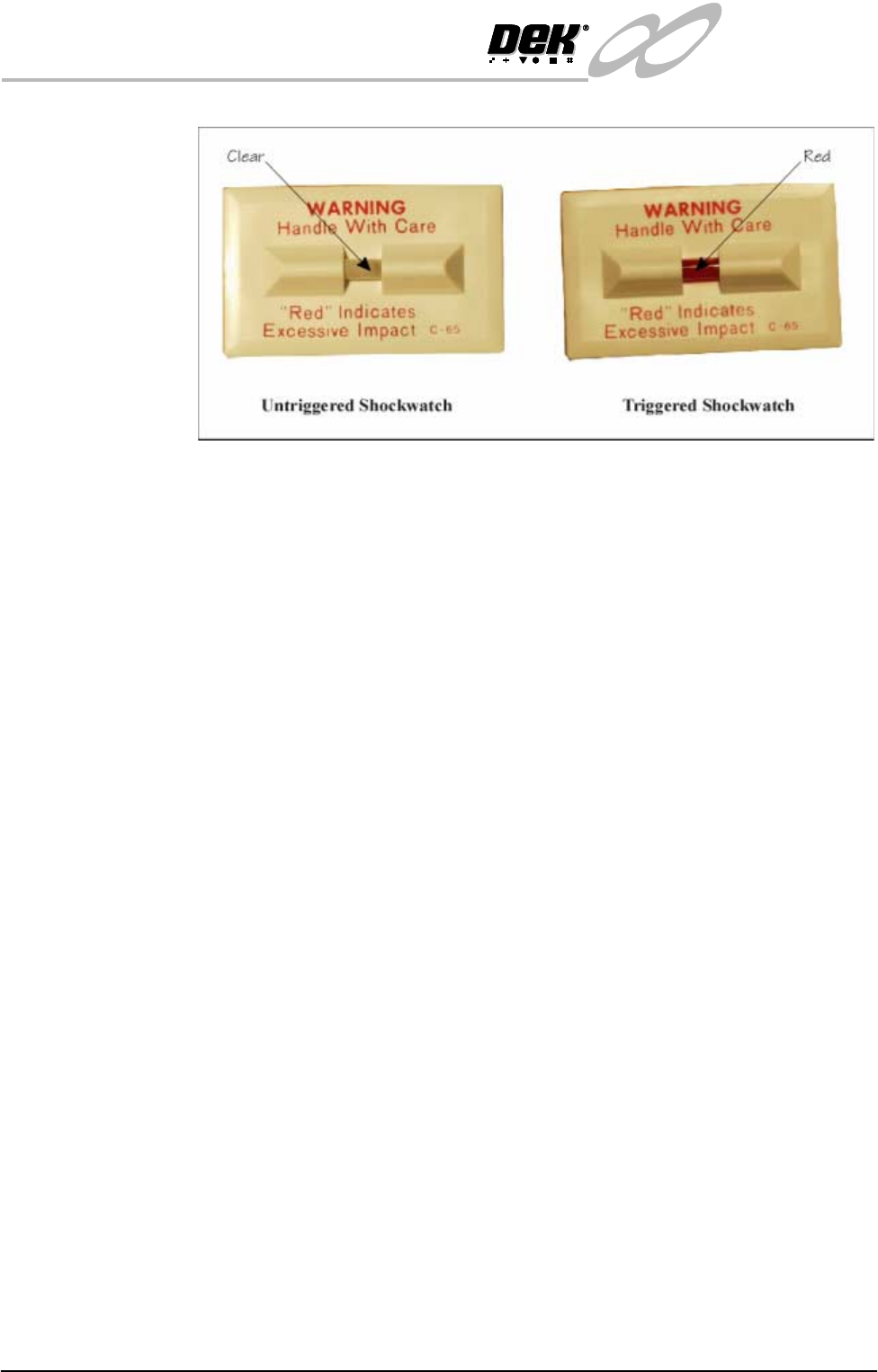
Check if the shock watches have been triggered, the indicator shows red, ('Drop
N Tell' Shockwatch figure refers).
Figure 31-12 Shock Watch Locations
Camera Shock
Watch
If the camera shock watch has triggered, ensure that the camera is secure and
level on the camera mount (refer to the Camera and Vision System Module
Chapter).
Machine PC Shock
Watch
If the machine PC shock watch has triggered, visually inspect the inside of the
PC and ensure that the cards are seated correctly.
Machine Controller
Shock Watch
If the machine controller shock watch has triggered, visually inspect the machine
controller to ensure that the cards are seated correctly.
Chase Shock Watch If the chase shock watch has triggered, visually inspect the chase is level to the
table.
Machine PC Machine Controller
Camera
Chase
NOTE
Shock Watches (4 positions)
shown circled
INFINITY
EX
TRANSPORTATION
PRE INSTALLATION CHECKS
31.46 Technical Reference Manual Chapter Issue 3 Jan 04
Figure 31-13 Drop N Tell Shockwatch
Shock Watch
Replacement
On completion of corrective action, replace any triggered shock watches.
NOTE
The machine should be fitted with four untriggered shock watches at all times.
Preparations 1. Ensure machine mains isolator is OFF.
2. Connect the pneumatic supply to the connection on the external services
panel.
NOTE
Do not connect electrical supply to the machine until the electrical services
available have been verified.
3. Ensure the machine transformer is tapped to the nearest selectable voltage
within the following limits:
• 100V, 110V, and 120V ±5%
• 200V, 210V, 220V, 230V and 240V ±2.5%
NOTE
In the event that local electrical services necessitate reconfiguration, refer
to Power Supply and Distribution chapter.
The machine is able to handle ±10V variations without overloading, but
some degradation in speed may be experienced if the supply remains at -10V
or more from the tapped voltage.
4. Check that the E Stop loop is connected, either to the external machines, in
which case these machines must be powered up and operational in order for
the loop to be closed, or if the external E Stop loop is not required the dummy
plugs supplied with the machine must be connected.
5. Check that all circuit breakers are in the ON position.
6. Ensure that all access covers and removable panels are closed and are in
place.
7. Ensure that the E Stop button is in the fully out position. To check this, push
the E Stop button until it latches. Twist the button clockwise to release it.
8. Check that all of the cables for the monitor are connected.