Infinity EX Transportation.pdf - 第59页
INFINITY EX TRANS PORTATION MACHI NE POWE R UP SEQUE NCE Chapter Issue 3 J an 04 Technical Reference Manual 31.59 both uprights. 8. Re-tighten the bolts loosened in Step 6 and repeat the check. 9. If adjustment has occ u…
INFINITY
EX
TRANSPORTATION
MACHINE POWER UP SEQUENCE
31.58 Technical Reference Manual Chapter Issue 3 Jan 04
5. Using a spirit level, place across both setting plates and check the plates are
level.
6. If adjustment is required, loosen the four bolts that secure the auxiliary
conveyor guide plate to rear rail support and the four bolts that secure the rail
bracket to front rail support.
7. Carefully adjust the height of the conveyor rails until they match the print
station rails.
8. Re-tighten the securing bolts loosened in Step 6 and repeat the check.
9. If adjustment has occurred, carry out Fitting of Auxiliary Conveyors (HTC
Option) - Levelling Check para 13.
Left Hand Conveyor To check and if required adjust the height of the left hand auxiliary conveyor to
the print station rails carry out the following at transport height:
1. Select Drive Rail to Board Width. The rails are driven to the board width
selected.
2. Adjust the left hand auxiliary conveyor rail width to approximately 250mm.
3. Using a Board Clamp Setting Plate Pt No 140403, place the plate on the left
hand auxiliary conveyor transport belts.
4. Place a second board clamp setting plate onto the transport belts of the print
station. Ensure the plates abut and are fully supported by the transport belts.
5. Using a spirit level, place across both setting plates and check the plates are
level.
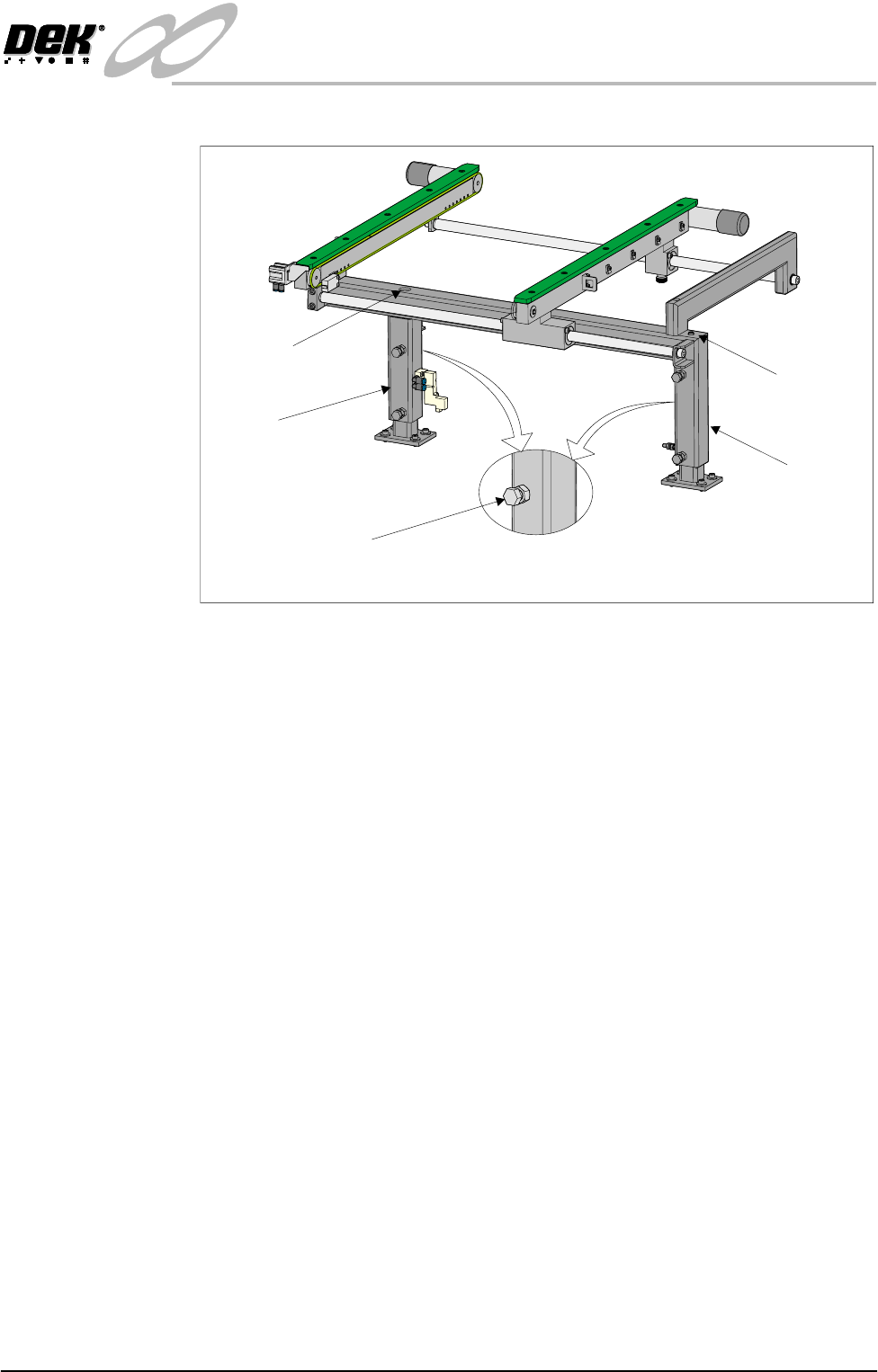
6. If adjustment is required, loosen bolt C on the outer face of both conveyor
frame uprights.
7. Adjust the height of the conveyor rails until they match the print station rails
by loosening or tightening height adjustment grub screw, fitted to the top of
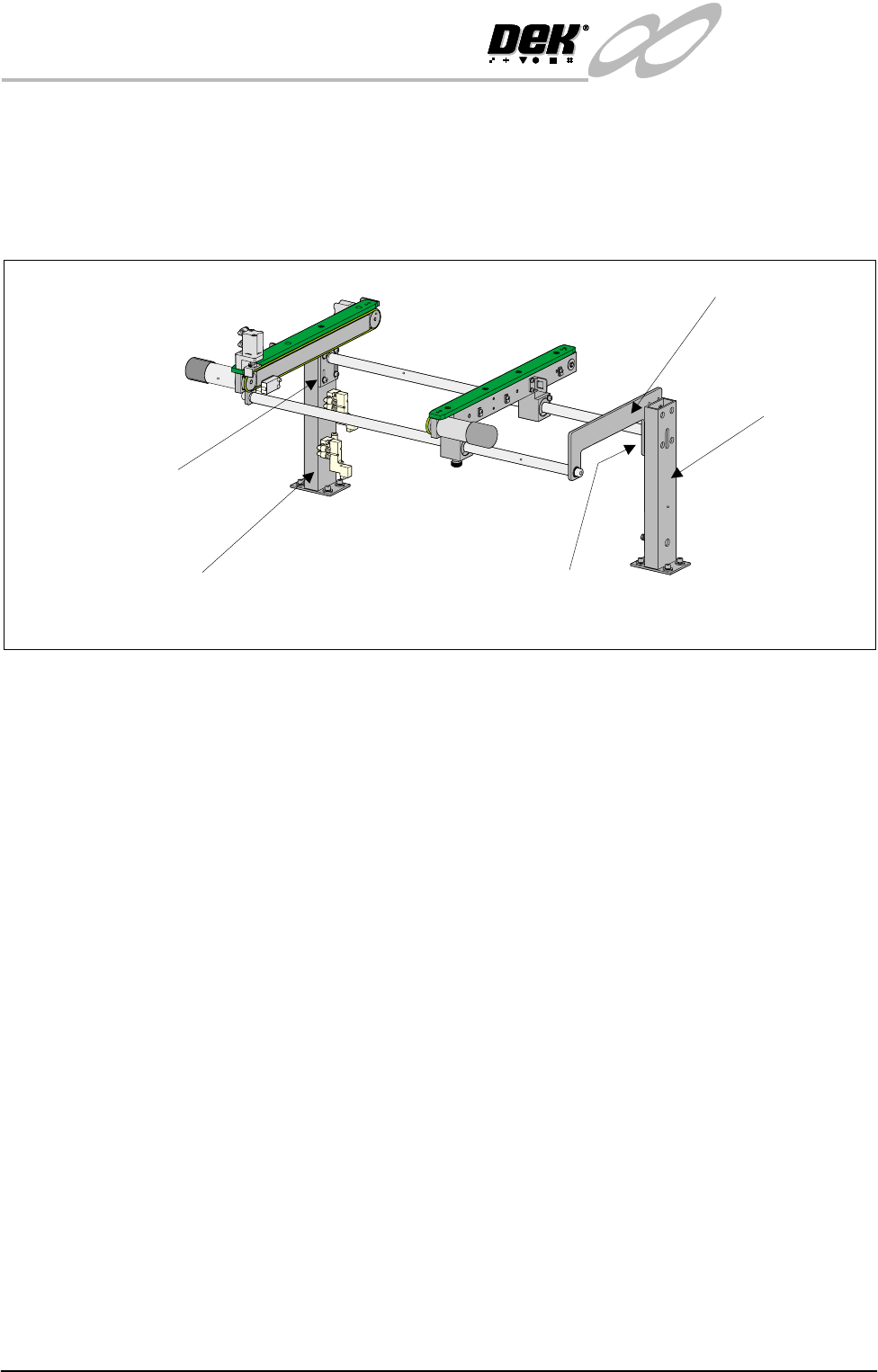
Rear View of Right Auxiliary Conveyor
Front Auxiliary Conveyor
Rail Support
Rear Auxiliary Conveyor
Rail Support
Shaft Guide Plate
Shaft Guide Plate to Rear
Rail Support Bolts (4 off)
Rail Bracket to Front
Rail Support Bolts
(in 4 positions)
INFINITY
EX
TRANSPORTATION
MACHINE POWER UP SEQUENCE
Chapter Issue 3 Jan 04 Technical Reference Manual 31.59
both uprights.
8. Re-tighten the bolts loosened in Step 6 and repeat the check.
9. If adjustment has occurred, carry out Fitting of Auxiliary Conveyors (HTC
Option) - Levelling Check para 4.
3-Stage Conveyor
Controller (M27)
The 3-Stage conveyor controller (M27) enclosure is located at the rear of the
machine above the ac power supply module (M23). This enclosure must be set
to the required machine configuration.
3-Stage/Single Stage
Mode
For 3 stage mode, both 1/3 Stage Operation buttons on the M27 enclosure must
be OFF (LED extinguished). The LCD screen on the PLC displays ‘3 Stage’ on
the top line.
For single stage operation, both 1/3 Stage Operation buttons must be ON (LED
lit). The LCD screen on the PLC displays ‘1 Stage’ on the top line.
Fast/Normal Mode For a conveyor to operate in fast transfer mode, both Fast Transfers Disabled
buttons on the M27 enclosure must be OFF (LED extinguished). The LCD
screen on the PLC displays ‘Fst.Trans’ on the bottom line for 5 seconds on
power up or when the a button is switched to OFF.
For a conveyor to operate in normal transfer mode, both Fast Transfers Disabled
buttons must be ON (LED lit). Normal transfer mode is not displayed on the
PLC.
Rear View of Left Hand Auxiliary Conveyor
Bolt C on Outer Face
Of Conveyor Frame Uprights
Rear Upright of
Conveyor Frame
Front Upright of
Conveyor Frame
Height Adjustment
Grub Screw
Height Adjustment
Grub Screw
INFINITY
EX
TRANSPORTATION
UNDERSCREEN CLEANER
31.60 Technical Reference Manual Chapter Issue 3 Jan 04
UNDERSCREEN CLEANER
Blue USC
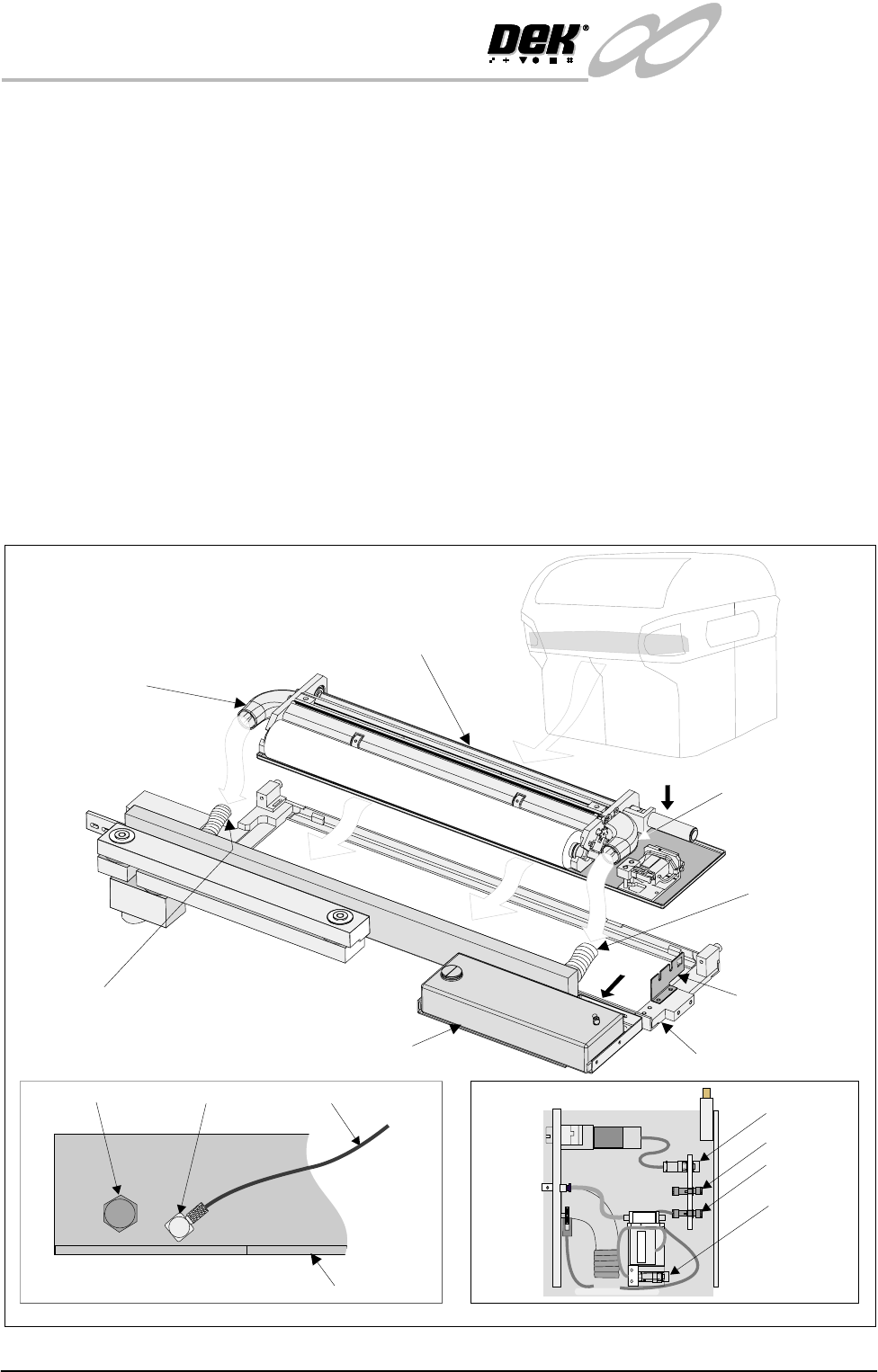
Assembly Fitting
1. Align the vacuum inlets of the underscreen cleaner to the flexible vacuum
connections of the underscreen cleaner tray.
2. Position the underscreen cleaner in the underscreen cleaner tray.
3. Connect the left and right hand flexible vacuum connections to the under-
screen cleaner.
4. Fit electrical connections 8PL72, 8SK73, 8SK71 to the connector bracket
(view on Arrow B).
5. Connect the solvent tank outlet hose to the outlet elbow (view on Arrow A).
6. On completion of fitment, power up machine, select F10 and type bluon.
Press Enter. The message ‘Blue Underscreen Cleaner Enabled’ is dis-
played in the message prompt bar.
7. Check connections for air/solvent leaks.
8. Ensure the cable tie fitted around the take up roll is removed before use.
Solvent Tank
Flexible Vacuum
Connection
Flexible
Vacuum
Connection
Under Screen
Cleaner Tray
Under Screen Cleaner Assembly
Vacuum Inlet
(left hand)
Vacuum Inlet
(right hand)
Connector
Bracket
A
B
Enlarged View on Arrow A
Solvent Low Sensor Elbow Outlet Hose
Solvent Tank (Rear)
Enlarged View on Arrow B
8PL72
8SK73
8SK71
8SK76
Electrical Connections