Infinity EX Transportation.pdf - 第64页
INFINITY EX TRANSPORT ATION FOREIGN MAC HINE INTERFACE 31.6 4 Technical Reference Manual Chapter Issue 3 Jan 04 FOREIGN MA CHINE INTERF A CE Introduction The Foreign Machin e Interface ( FMI) is an electr ical mea ns of …
INFINITY
EX
TRANSPORTATION
UNDERSCREEN CLEANER
Chapter Issue 3 Jan 04 Technical Reference Manual 31.63
5. Raise the printhead and insert the head prop.
6. Select Confirm.
7. Remove the solvent tank cap and add solvent to the tank using a funnel.
Replace the cap.
8. With the printhead in the up position, the menu bar displays the Prime Paper
and Prime Solvent options. Select Prime Solvent (F6) and when prompted
press the two control buttons until the paper is wet (this may take several
attempts before solvent is sprayed onto the paper).
9. Select Prime Paper (F5) and when prompted press the two control buttons
simultaneously to feed a fresh area of dry paper over the solvent dispense
pipe ensuring that the paper feeds correctly.
10.Remove the head prop and lower the head.
11.Press the System button and select Exit (F8).
Vortex USC To enable the Vortex under screen cleaner carry out the following:
1. Select Maint. (F8).
2. Select Set Prefs (F5).
3. Select F10 function key on the keyboard, type vorton and select Enter.
4. Set up the machine and filtration units as shown in the table.
5. Raise the printhead and insert the head prop.
6. Select Confirm.
7. Remove the solvent tank cap and add solvent to the tank using a funnel.
Replace the cap.
8. With the printhead in the up position, the menu bar displays the Prime
Solvent option. Select Prime Solvent (F6) and when prompted press the two
control buttons until the cleaning cassette wet cell is impregnated with
solvent (this may take several attempts before solvent is sprayed onto the wet
cell).
9. Remove the head prop and lower the head.
10.Press the System button and select Exit (F8).
Vacuum Non Vacuum
Check the filtration unit is ON, air flow set to
Max
Set the machine transport mode to LEFT
to LEFT
Set Machine transport mode to LEFT to LEFT
INFINITY
EX
TRANSPORTATION
FOREIGN MACHINE INTERFACE
31.64 Technical Reference Manual Chapter Issue 3 Jan 04
FOREIGN MACHINE INTERFACE
Introduction The Foreign Machine Interface (FMI) is an electrical means of communication
between the machine and an adjacent machine, using electrical signals. The
signals are transferred using opto-couplers and/or relay contacts which keep the
machines electrically isolated.
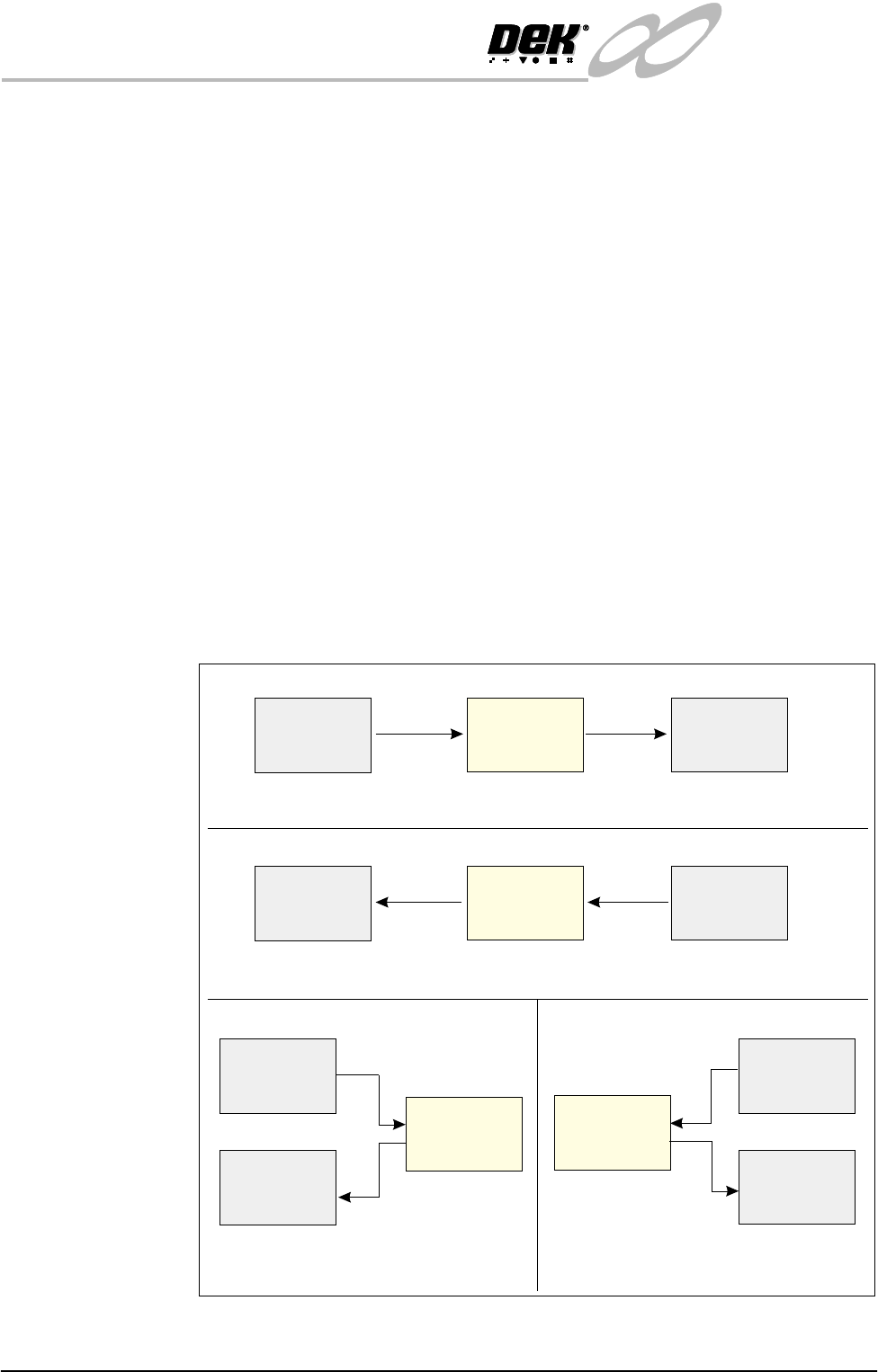
The adjacent machine can be upline or downline of this machine in a left-to-right
or right-to-left board transfer arrangement, or it can be at one side of this
machine in a left-to-left or right-to-right arrangement.
The machine can interface with many different types of adjacent machinery
which can be of any proprietary manufacture. The adjacent machine utilizes a
set of timing and control signals (protocols) for communication with other
machines. As there are many different protocols, DEK supplies a custom
designed FMI to suit the protocol for each type of adjacent machine.
The FMI hardware comprises:
• An FMI Pod and connecting cable for the SMEMA interface only.
• A Multi-Interface Unit (MIU) for all other interfaces.
• An FMI loom which connects the FMI port, on the machine controller, to
the MIU or FMI Pod.
• Two interface cables, one cable for each adjacent machine.
Figure 31-16 Machine Arrangements for Board Transfers
Left to Right Board Transfers
Right to Left Board Transfers
Upline
Downline
Adjacent
Machine
Adjacent
Machine
DEK
Machine
Upline
Downline
Adjacent
Machine
Adjacent
Machine
DEK
Machine
Left to Left Board Transfers
Right to Right Board Transfers
Upline
Adjacent
Machine
Downline
Adjacent
Machine
Upline
Adjacent
Machine
Downline
Adjacent
Machine
DEK
Machine
DEK
Machine
INFINITY
EX
TRANSPORTATION
FOREIGN MACHINE INTERFACE
Chapter Issue 3 Jan 04 Technical Reference Manual 31.65
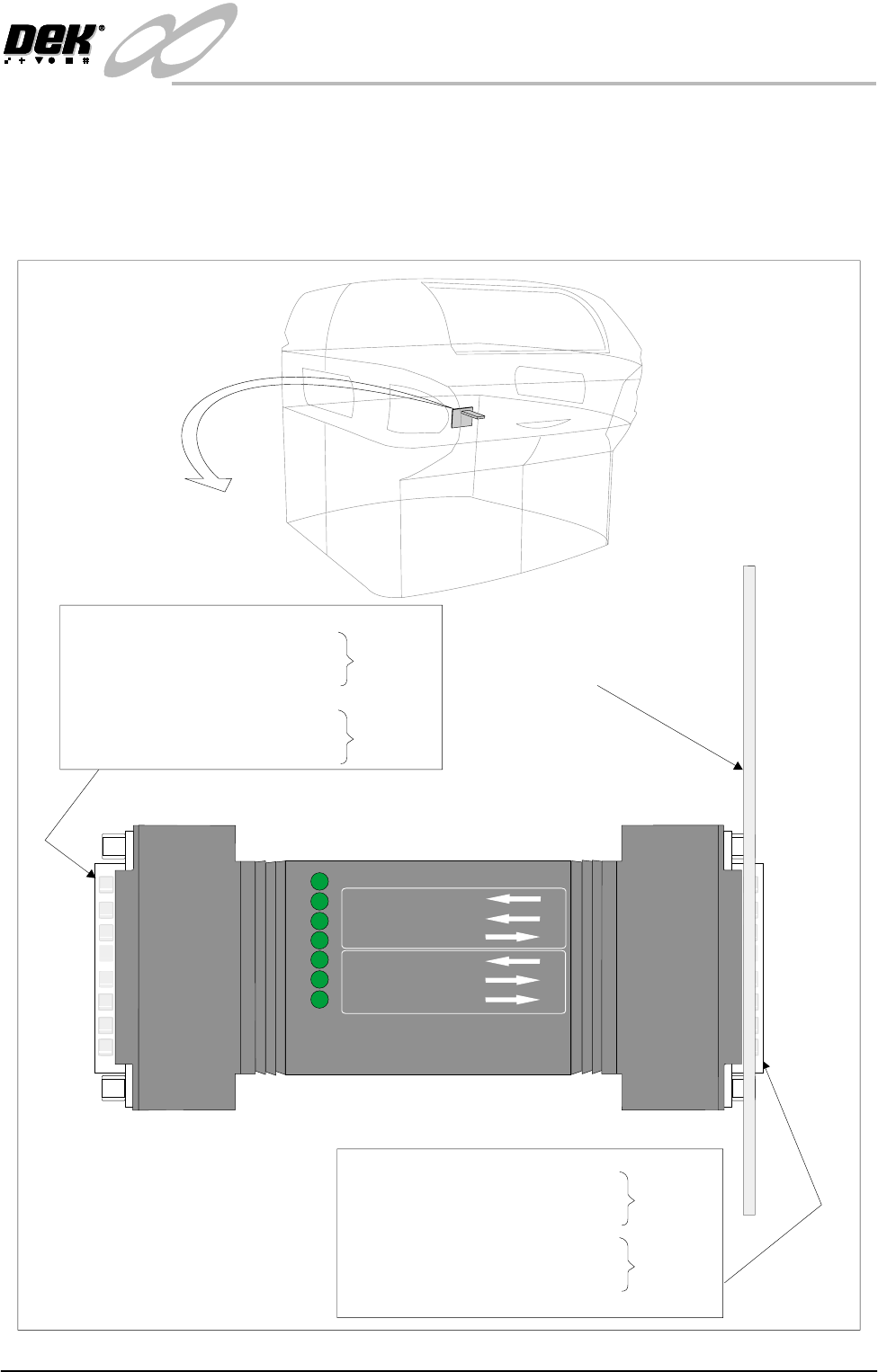
FMI Pod The FMI Pod is only used where both the upline and downline is using a
SMEMA interface. For all other interfaces refer to the MIU interface later in
this chapter.
The DEK FMI Pod is a communications interface that allows DEK Printing
Machines to communicate with upline and downline board handlers.
M28SK02
03 Board Available (Input)
10 Board Pass (Input)
01 Dek M/C Available (Output)
16 Downline M/C Available (Input)
19 Board Available (Output)
24 Board Pass (Output)
Upline
Downline
Service Panel
POWER ON
FMI POD
PART No. 160740
M/C AVAILABLE
BOARD AVAILABLE
BOARD PASS
DOWNLINE
BOARD AVAILABLE
BOARD PASS
M/C AVAILABLE
UPLINE
18 Board Available (Input)
05 Board Pass (Input)
15 Dek M/C Available (Output)
09 Downline M/C Available (Input)
06 Board Available (Output)
13 Board Pass (Output)
M28PL01
Upline
Downline