Infinity EX Transportation.pdf - 第55页
INFINITY EX TRANS PORTATION MACHI NE POWE R UP SEQUE NCE Chapter Issue 3 J an 04 Technical Reference Manual 31.55 right hand auxiliary con ve yor , ensuring the plate mo ves freely without binding or jamming. 5. If adjus…

INFINITY
EX
TRANSPORTATION
MACHINE POWER UP SEQUENCE
31.54 Technical Reference Manual Chapter Issue 3 Jan 04
e. Click on the Date & Time tab. Adjust the local time and date.
f. Select OK.
E Stop Loop
Operation
9. Carry out the following:
a. Restore the DEK 265 program.
b. Select Diagnost (F6).
c. The Module Diagnostics Page is displayed with the System Error mes-
sage, ‘System Power Down’ superimposed on top of it.
d. Press the System button to enable system power.
10.Check correct operation of all components of the E Stop loop, ie E Stop
Buttons, covers and external E Stop if fitted.
NOTE
If High Throughput Conveyor option is fitted, carry out Steps 15 and 16.
11.On completion of E stop loop check, Exit from the Diagnostics module.
12.Press the System button and raise the head using two button control.
13.Fit the head prop
14.Power down the machine.
15.On completion of E stop loop check, enter the Rail System Diagnostics
module and select Adjust and alter the board width to 250mm.
16.With HTC option fitted, carry out the following two procedures:
• Auxiliary Conveyor Rail Parallelism
• Auxiliary Conveyor Height Setting
Auxiliary Conveyor Rail Parallelism
WARNING
BOARD CLAMPS. EXTREME CARE MUST BE EXERCISED WHEN
WORKING IN THE TOOLING AREA OF THE MACHINE TO AVOID
INJURY. THE FOILS ON THE FRONT AND REAR BOARD CLAMPS
ARE VERY SHARP.
Front Rail To check and if required adjust the auxiliary conveyors front rail parallelism,
carry out the following procedure:
NOTE
The parallelism of the auxiliary conveyors rails is dependent on the front and
rear print station rails being parallel. Therefore, before any adjustment is
carried out an assessment of the parallelism of the print station rails must be
carried out.
1. Select Drive Rail to Board Width. The rails are driven to the board width
selected.
2. Adjust the both auxiliary conveyor rail widths to approximately 250mm.
3. Place one of the Board Clamp Setting Plates Pt No 140403 onto the print
station transport belts.
4. Manually slide the setting plate back and forth from the print station to the
INFINITY
EX
TRANSPORTATION
MACHINE POWER UP SEQUENCE
Chapter Issue 3 Jan 04 Technical Reference Manual 31.55
right hand auxiliary conveyor, ensuring the plate moves freely without
binding or jamming.
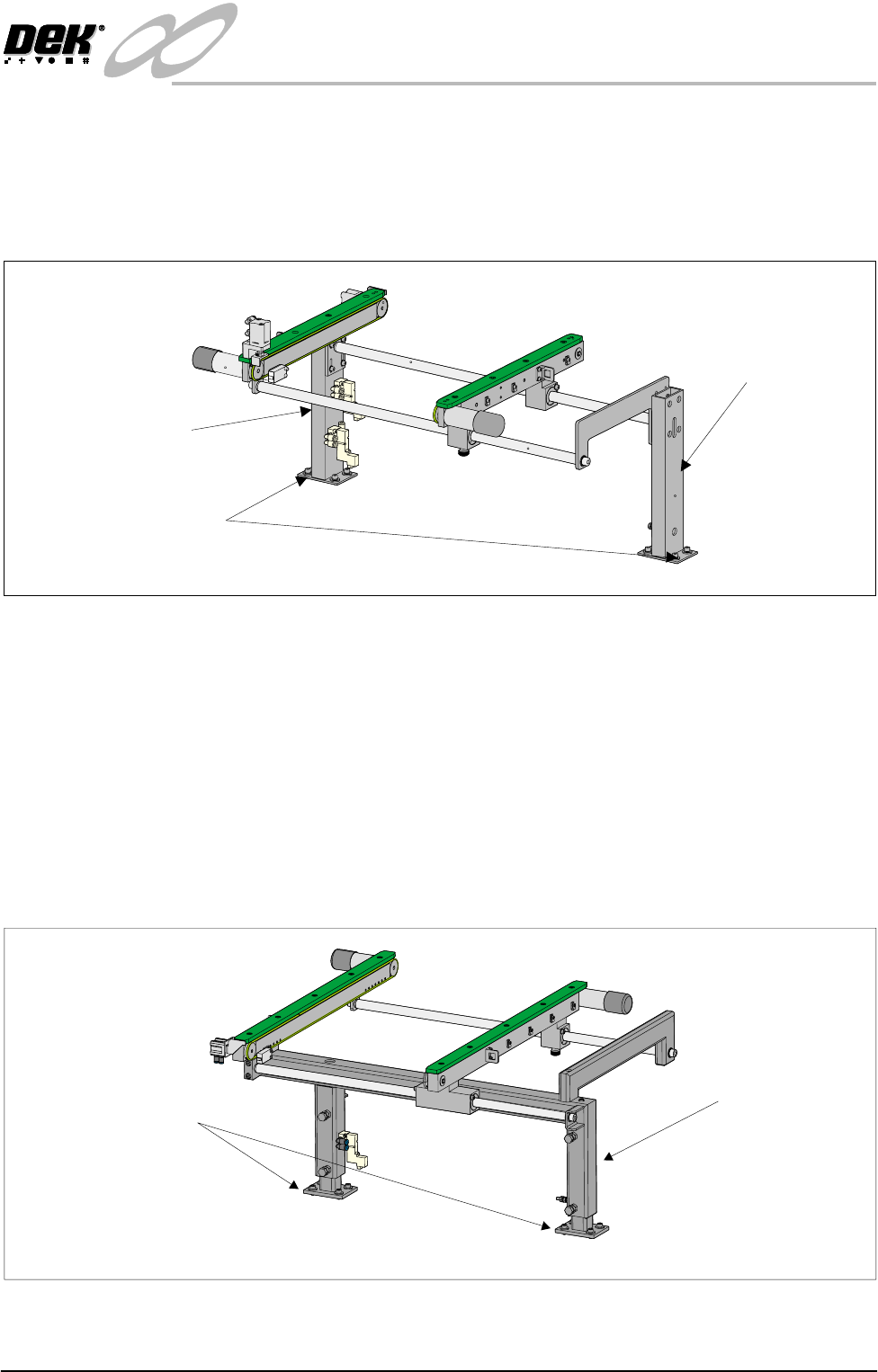
5. If adjustment is required on the right hand auxiliary conveyor, loosen the
eight auxiliary conveyor rails support securing bolts (four on each support)
that secure the auxiliary conveyor to the machine lower frame.
6. Carefully adjust the conveyor to obtain front rail parallelism with the print
station front rail, whilst maintaining the gap between the auxiliary rail and
print station rail.
7. Re-tighten the securing bolts and re-check for parallelism.
8. Repeat Step 5 for the left hand auxiliary conveyor.
9. If adjustment is required left hand auxiliary conveyor, loosen eight auxiliary
conveyor frame securing bolts (four on each upright) that secure the con-
veyor to the machine lower frame.
10.Carefully adjust the conveyor to obtain front rail parallelism with the print
station front rail, whilst maintaining the gap between the auxiliary rail and
print station rail.
11.Re-tighten the bolts disturbed in Step 10 and re-check for parallelism.
Rear Rail To check and if required adjust the auxiliary conveyors rear rail parallelism,
Rear View of Right Auxiliary Conveyor
Front Auxiliary Conveyor
Rail Support
Rear Auxiliary Conveyor
Rail Support
Rail Support to Main Frame
Bolts (4 off in 2 positions)
Rear View of Left Auxiliary Conveyor
Left Hand Auxiliary
Conveyor Frame
Conveyor Frame to
Machine Main Frame
(4 bolts in 2 positions)
INFINITY
EX
TRANSPORTATION
MACHINE POWER UP SEQUENCE
31.56 Technical Reference Manual Chapter Issue 3 Jan 04
carry out the following procedure:
NOTE
1. The parallelism of the auxiliary conveyors rails is dependent on the front and
rear print station rails being parallel. Therefore, before any adjustment is
carried out an assessment of the parallelism of the print station rails must
be carried out.
2. Ensure that the auxiliary conveyor front rail is in alignment with the print
station front rail before any adjustment of the auxiliary conveyor rear rail
parallelism (refer to Auxiliary Conveyor Rail Parallelism - Front Rail
section of this chapter).
1. Select Drive Rail to Board Width. The rails are driven to the board width
selected.
2. Adjust the both auxiliary conveyor rail widths to approximately 250mm.
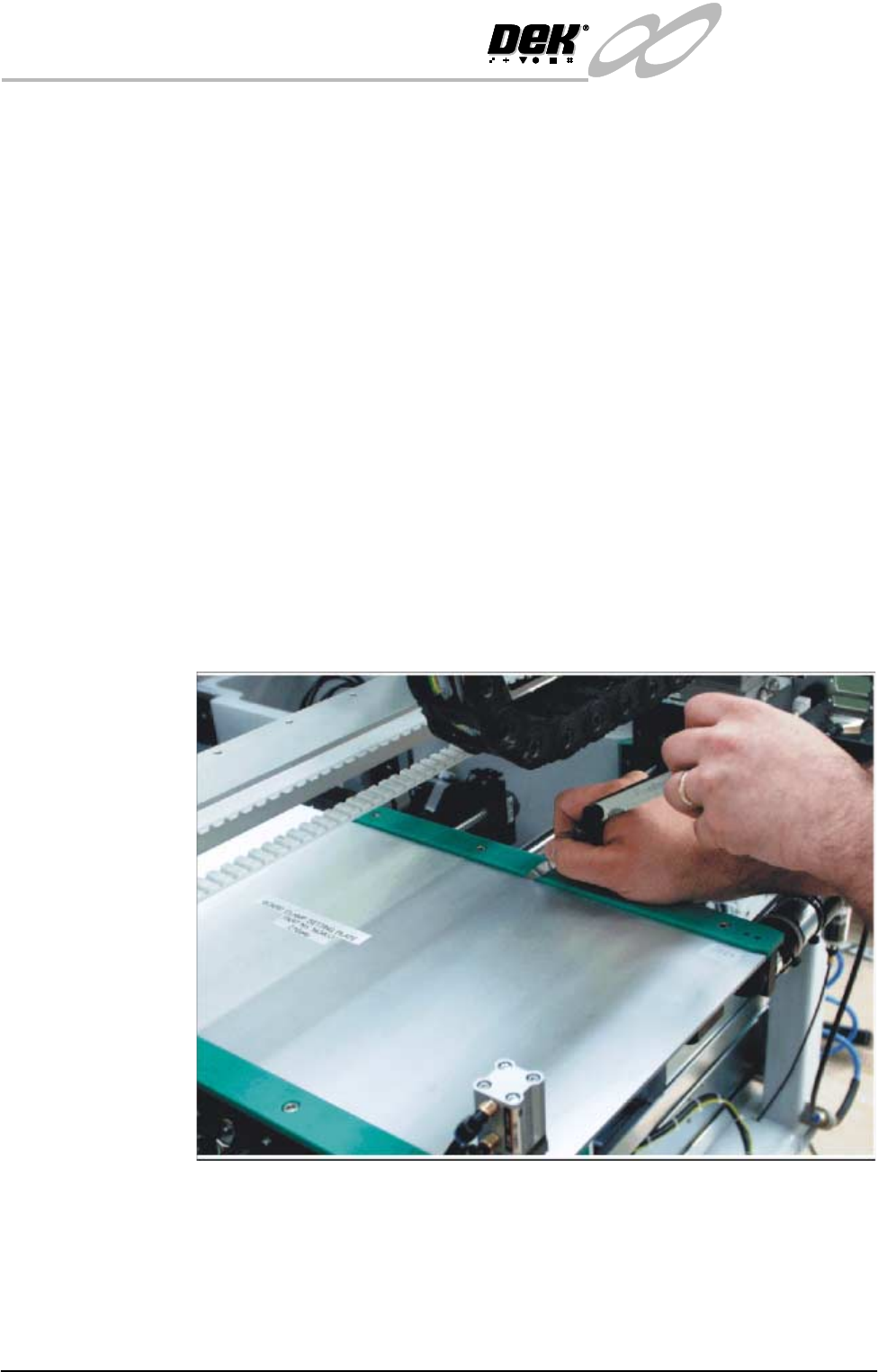
3. Using a Board Clamp Setting Plate Pt No 140403, place the plate on the right
hand auxiliary conveyor transport belts.
4. Place a 0.5mm feeler gauge between the plate and the green wear insert of
the auxiliary conveyor rear rail.
5. Adjust the auxiliary conveyor rail width until the feeler gauge fit is tight
between the plate and the green wear insert. Check the fit of the feeler gauge
along the whole length of the conveyor rail.
6. Remove the feeler gauge and manually move the plate in and out of the
machine along the conveyor transport belts, ensuring the plate moves freely
without binding or jamming.
For fine adjustment carry out the following: