instruction-manual-product-monitoring-data-acquisition-monitouch-V9-hardware-en.pdf - 第119页
5-2 2. Warranty Policy 2. W arranty Policy Inquiries about Failure Please direct inquiries about failure or repair to your local d istributor . Please provide information including the MONITOUCH model, serial number , sy…
Inspection and Maintenance
1. Inspection and Maintenance 5-1
5
1. Inspection and Maintenance
Daily Inspection
Check that the screws on the V9 series unit are tightened firmly.
Check that the connectors and terminal screws used for connection with other devices are
tightened firmly.
If the display surface or frame is dirty, wipe it with a soft cloth soaked in commercially available
alcohol.
Conduct periodical inspection once or twice a year. The number of inspections may be increased
as necessary if facilities are relocated or modified, or the environment is hot, humid, or dusty.
Periodical Inspection
Inspect the following points periodically.
Are the ambient temperature and humidity appropriate?
0 to +50 °C (0 to +40 °C for the V9150 series), 85 %RH or less
Are the environmental conditions appropriate?
No excessive dust and no conductive dust
Is there corrosive gas in the atmosphere?
Is the source voltage in the allowable range?
AC power supply: 100 to 240 VAC 15 % to +10 %DC power supply: 24 VDC 10 %
Are the V9 series mounting screws tightened firmly?
Are the connectors and terminal screws used for connection with other devices tightened firmly?
Has the coin-type lithium battery passed its replacement date?
Within about 5 years from the date of manufacture
DANGER
Always turn OFF the power before conducting inspection or maintenance. Failure to do
so could cause an electric shock or damage to the unit.
5-2 2. Warranty Policy
2. Warranty Policy
Inquiries about Failure
Please direct inquiries about failure or repair to your local distributor.
Please provide information including the MONITOUCH model, serial number, symptoms of the failure,
error messages (if shown), etc.
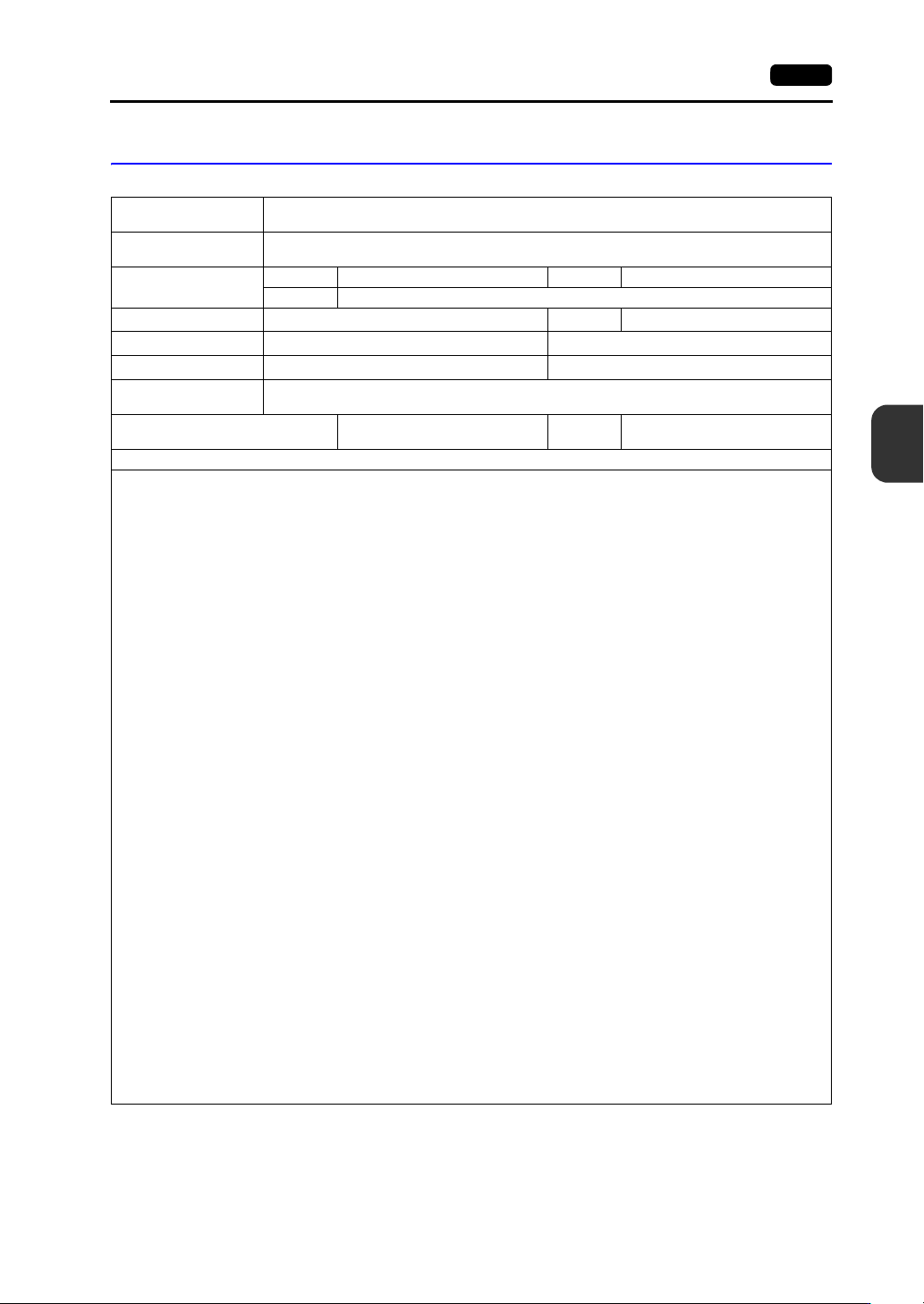
* An inquiry form is provided on the final page (page 5-3) of this chapter. This form may be used for
inquiries.
Warranty Period
The product is under warranty for one year after the date of purchase or delivery to the specified place.
On the assumption that the maximum stock period of the product after manufacture is 6 months, the
warranty period is limited to 18 months (checked by the serial number) after manufacture. When a
warranty period is specified in the contract, however, the period in the contract takes precedence.
Free-of-charge Repair
If the product fails before the expiry of the warranty, it will be repaired free of charge.
However, repair of any failure resulting from the causes below will be chargeable even within the
warranty period.
Breakage of or damage to the appearance (case or surface sheet), touch switches, LCD, or other
components due to dropping, impact, or mishandling
End of service life of the LCD or backlight
Fusion of a printed circuit board pattern associated with connection to external devices, or fusion
of a pattern in the terminal block or connector section of a printed circuit board caused by
short-circuiting of an external load circuit.
Overvoltage or different voltage applied due to wiring mistakes (power supply terminal, external
communication terminal, or other terminal blocks)
Failure caused by a lightning surge
Failure due to the entry of conductive substances, water, solvent, particles, etc. under
inappropriate environmental conditions
Failure due to inappropriate environmental conditions (e.g. corrosive gas or high humidity)
Failure due to vibration or impact exceeding the specified level
Disassembly and modification by the customer or failure obviously resulting from improper
handling by the customer
Chargeable Repair
Any failure that occurs after the expiry of the warranty or that does not satisfy the requirements for
free-of-charge repair will be repaired on a chargeable basis.
Inspection and Maintenance
2. Warranty Policy 5-3
5
Inquiry Form
*1 See the label on the back of the unit for the model code and serial number (nine digits plus one letter of the
alphabet).
*2 Enter the version if it can be verified.
The version is displayed by selecting [System Information] in the Local mode of the V9 series unit.
For information on the Local mode, refer to the separate V9 Series Troubleshooting/Maintenance Manual.
Your name
Company name
Contact
TEL FAX
Email
Model code
*1
Ser. No.
*1
MONITOUCH version
*2
Program version: OS version:
Driver information
*2
Maker, model name: Version:
Purchased from:
(Distributor)
Person in charge
Date of
purchase
Symptoms
(Please describe the symptoms of the failure and also include any displayed error messages.)