instruction-manual-product-monitoring-data-acquisition-monitouch-V9-hardware-en.pdf - 第99页
3-34 2. Specifications of Components Please use this page freely .
3
2. Specifications of Components 3-33
Names and Specifications of Components
DUR-00
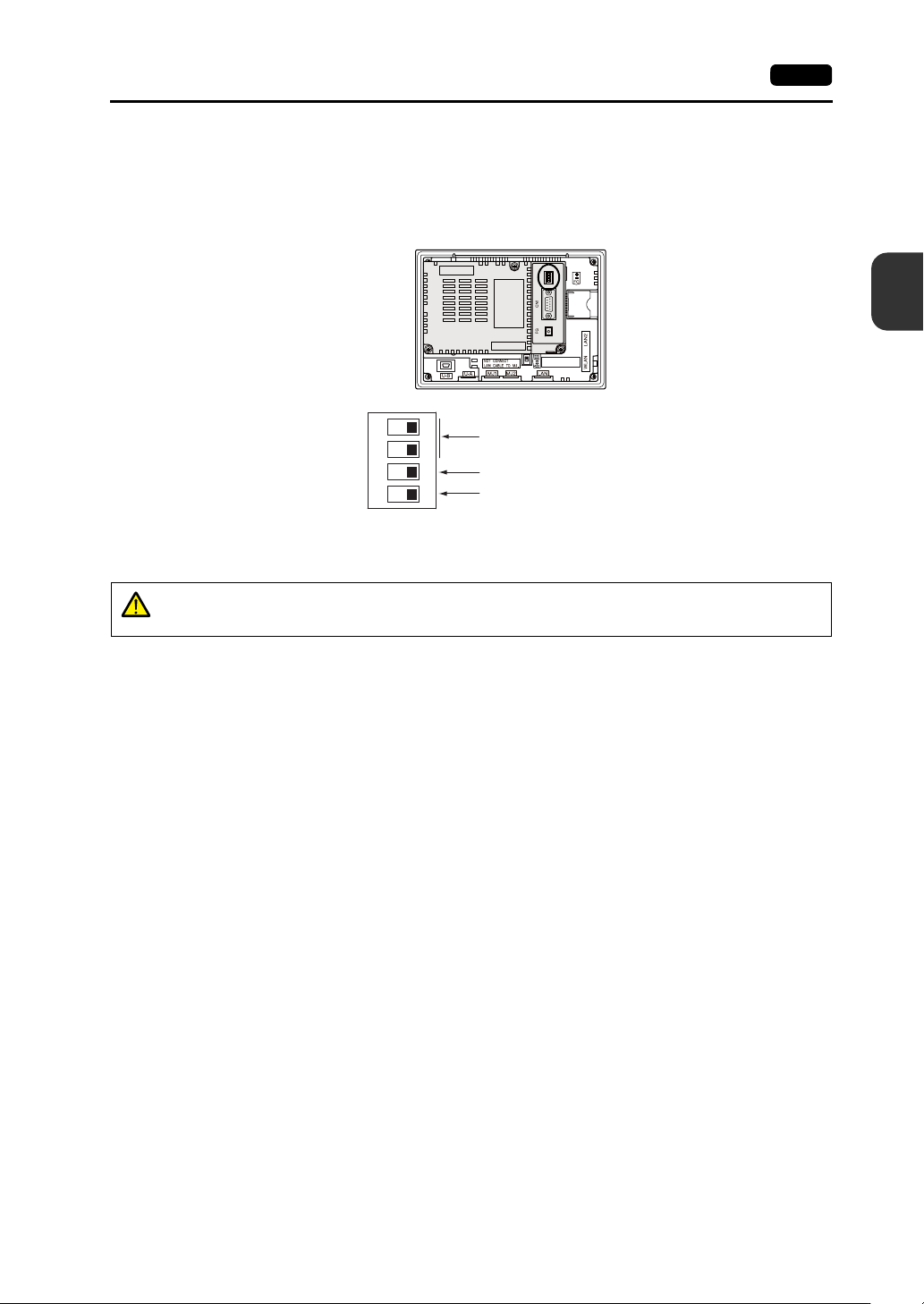
The unit is equipped with DIP switches 1 to 4. Turn OFF power to the unit before changing any DIP
switches.
Upon delivery, all DIP switches are set to OFF.
DIPSW 1, 2 (Terminating Resistance Setting)
When connecting a controller to CN1 via RS-422/485 (2-wire connection), set DIPSW1 to the ON
position.
When connecting a controller to CN1 via RS-422/485 (4-wire connection), set DIPSW1 and 2 to
the ON position.
Rear view
ON
1234
Not used
CN1: +RD/-RD terminating resistance at pins 1 and 2
CN1: +SD/-SD terminating resistance at pins 3 and 4
CAUTION
When connecting a controller to CN1 via RS-232C, set DIPSW1 and 2 to the OFF
position.
3-34 2. Specifications of Components
Please use this page freely.