instruction-manual-product-monitoring-data-acquisition-monitouch-V9-hardware-en.pdf - 第67页
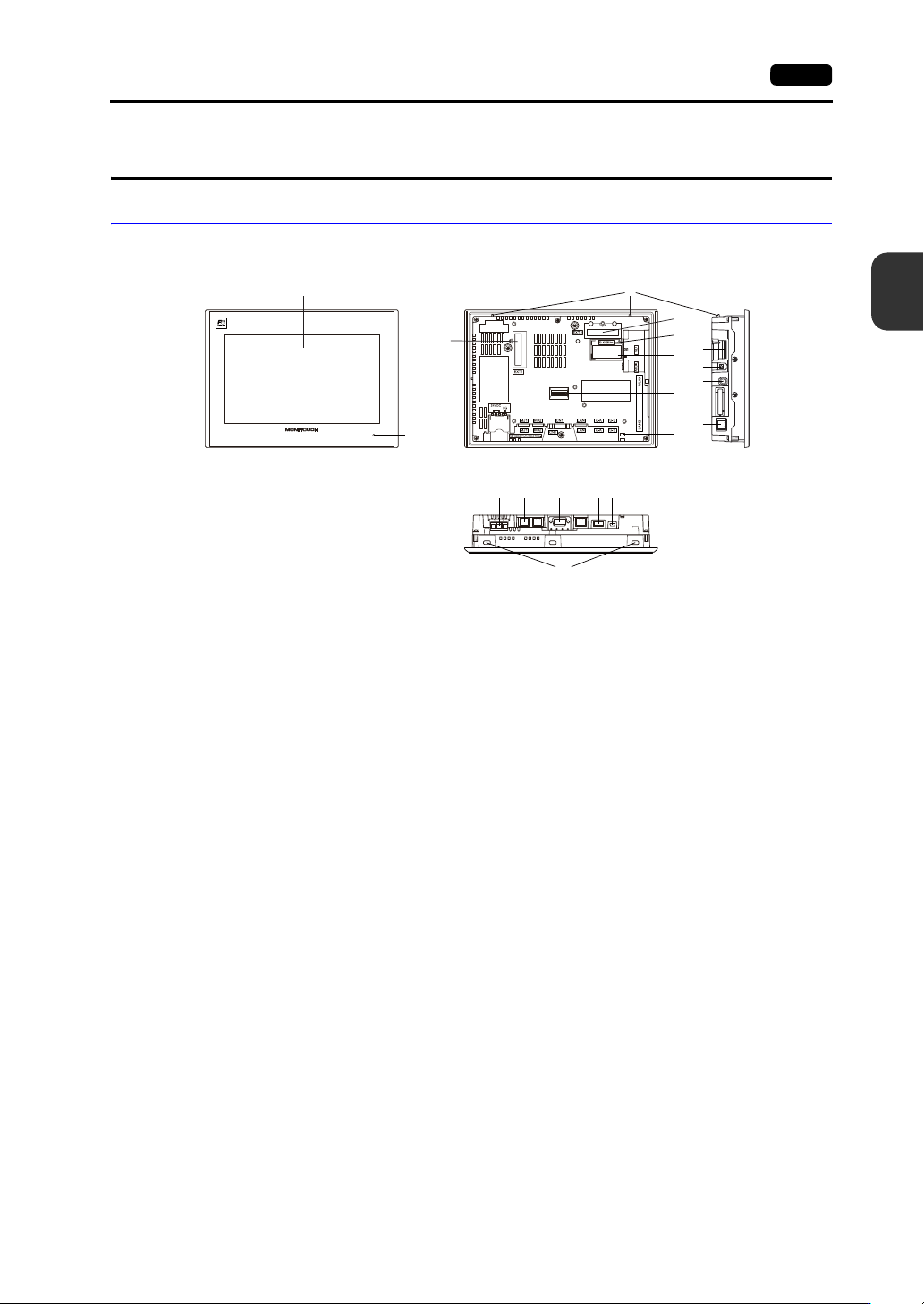
3-2 1. Names and Functions of Components 12. Connector for wireless LAN dipole antenna ( WLAN) Only for wireless LAN I/F models. This connector is for connecting t he ext ernal dipole antenna “V9-ANT” (optional) for wire…
3
1. Names and Functions of Components 3-1
Names and Specifications of Components
1. Names and Functions of Components
Advanced Model
1. Display
This is the display area.
2. POWER lamp
This lamp illuminates green when the V9 series is powered ON and operating normally.
The lamp flashes when there is a failure (circuit board failure, power supply failure).
3. Communication interface unit connector (EXT1)
This connector is used to connect any “CUR-xx” communication interface unit (for SX-BUS,
OPCN-1, T-Link, CC-Link, Ethernet, PROFIBUS-DP, DeviceNet, and FL-net).
4. Fall prevention tabs
These tabs prevent the V9 series unit from falling off the mounting panel until the mounting fixtures
are tightened.
5. Connector for optional unit (EXT2)
This connector is used to connect each optional “GUR-xx” unit (for video input, RGB input, and
RGB output).
6. SD card access LED
This LED flashes when the unit is reading from or writing to an SD card.
7. Battery holder
This part contains the backup battery for the SRAM and clock.
When the battery voltage drops, replace the battery with a new one.
8. DIP switches
This 8-bit DIP switch is used for setting the terminating resistance of the CN1 signal line and the
MJ1/MJ2 RS-485 signal line.
9. USB cable clamp hole
This clamp hole is used to attach a USB cable tie.
10. SD card slot (SD)
This slot is where an SD card can be inserted.
11. Audio output connector (AUDIO)
This terminal is used for audio output.
V910xiW
+
-
1
2
3
8
14
21
9
7
6
15 16 17 18 19 20
5
10
11
12
4
13

3-2 1. Names and Functions of Components
12. Connector for wireless LAN dipole antenna (WLAN)
Only for wireless LAN I/F models.
This connector is for connecting the external dipole antenna “V9-ANT” (optional) for wireless LAN.
13. 100BASE-TX/10BASE-T connector (LAN2)
This connector is used for Ethernet communication.
14. Power supply terminal block
This terminal block is for supplying power (24 VDC) to the V9 series unit.
15. Modular jack 1 (MJ1)
This connector is used for screen program transfer and connection with PLCs or other peripheral
devices.
16. Modular jack 2 (MJ2)
This connector is used for connection with PLCs or other peripheral devices.
17. PLC communication connector (CN1)
This connector is used for connection to a controller (PLC, temperature controller, inverter, etc.).
18. 100BASE-TX/10BASE-T connector (LAN)
This connector is used for Ethernet communication.
19. USB-A (U-A)
This port is used to connect a printer, USB flash drive, keyboard, or mouse.
20. USB mini-B (U-B)
This port is used for transferring screen programs or connecting a PictBridge-compatible printer.
21. Mounting holes
The mounting holes are used for inserting fixtures when securing the V9 series unit to a mounting
panel.
3
1. Names and Functions of Components 3-3
Names and Specifications of Components
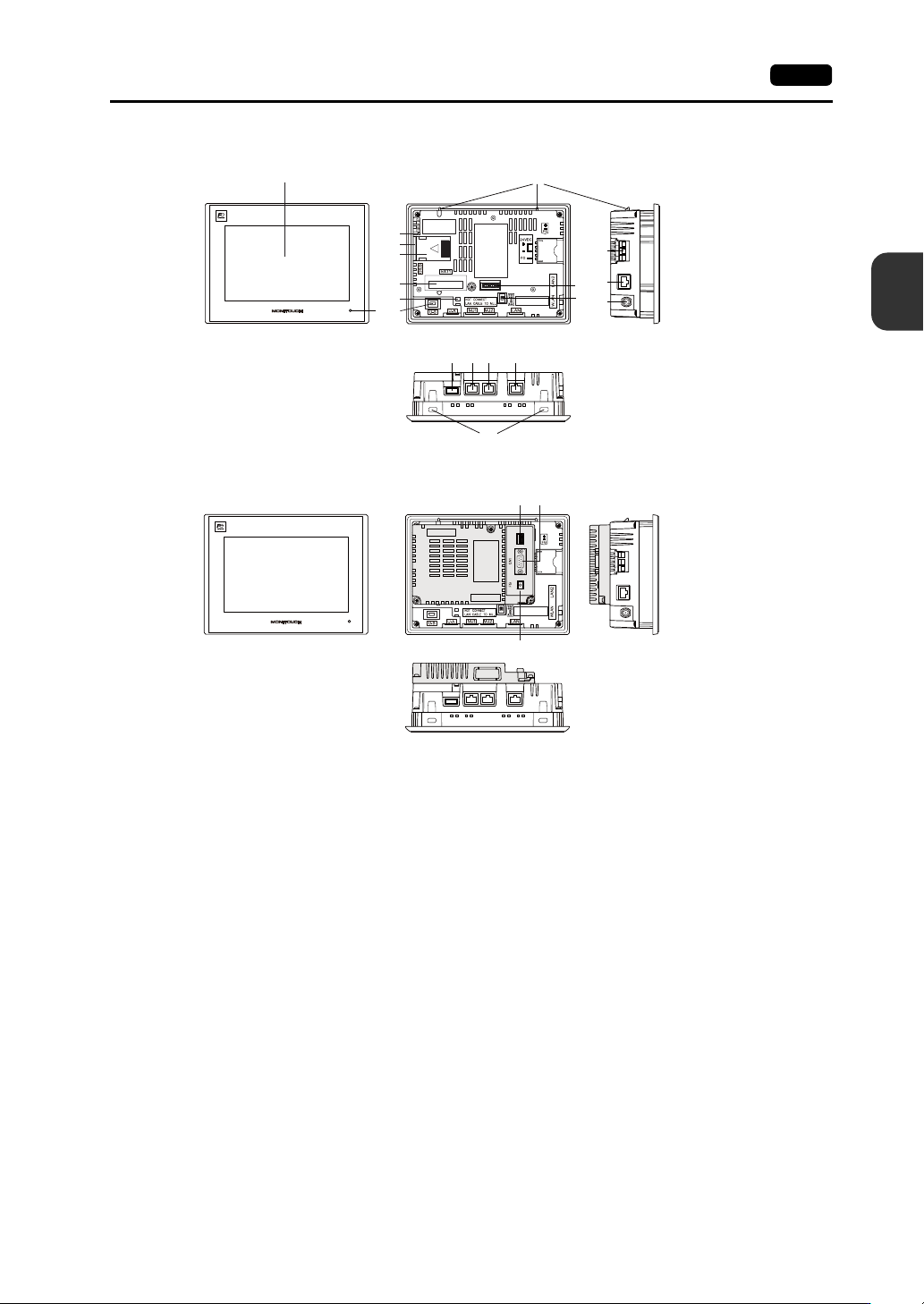
1. Display
This is the display area.
2. POWER lamp
This lamp illuminates green when the V9 series is powered ON and operating normally.
The lamp flashes when there is a failure (circuit board failure, power supply failure).
3. SD card access LED
This LED flashes when the unit is reading from or writing to an SD card.
4. SD card slot (SD)
This slot is where an SD card can be inserted.
5. Battery holder
This part contains the backup battery for the SRAM and clock.
When the battery voltage drops, replace the battery with a new one.
6. Communication interface unit connector (EXT1)
This connector is used to connect the optional “DUR-00” unit or any “CUR-xx” communication
interface unit (for SX-BUS, OPCN-1, T-Link, CC-Link, Ethernet, PROFIBUS-DP, DeviceNet, and
FL-net).
* The “DUR-00” and “CUR-xx” cannot be used at the same time.
7. USB cable clamp hole
This clamp hole is used to attach a USB cable tie.
8. USB mini-B (U-B)
This port is used for transferring screen programs or connecting a PictBridge-compatible printer.
1
2
11
19
10
15 16 17 18
12
13
14
3
4
5
6
7
9
8
20 21
22
V907xiW
V907xiW+DUR-00