00198711-01_UM_X-Serie-S_EN.pdf - 第252页
5 Tasks at the placement machine Ins truction manual SIPLACE X-Series S 5.6 Alert information and online help From software version 713.0 Edition 11/2019 252 5.6.3 Color coding in the on line help alert information 5 5.6…
Instruction manual SIPLACE X-Series S 5 Tasks at the placement machine
From software version 713.0 Edition 11/2019 5.6 Alert information and online help
251
Once an alert has been resolved and the solution has been automatically determined by the place-
ment machine, this alert will be automatically removed from the status field.
If the solution is not recognized automatically, the alert can also be manually deleted from the sta-
tus field.
To do this, click on the icon; the alert message will no longer be shown in the status field.
5.6.2 Viewing information about the selected alert
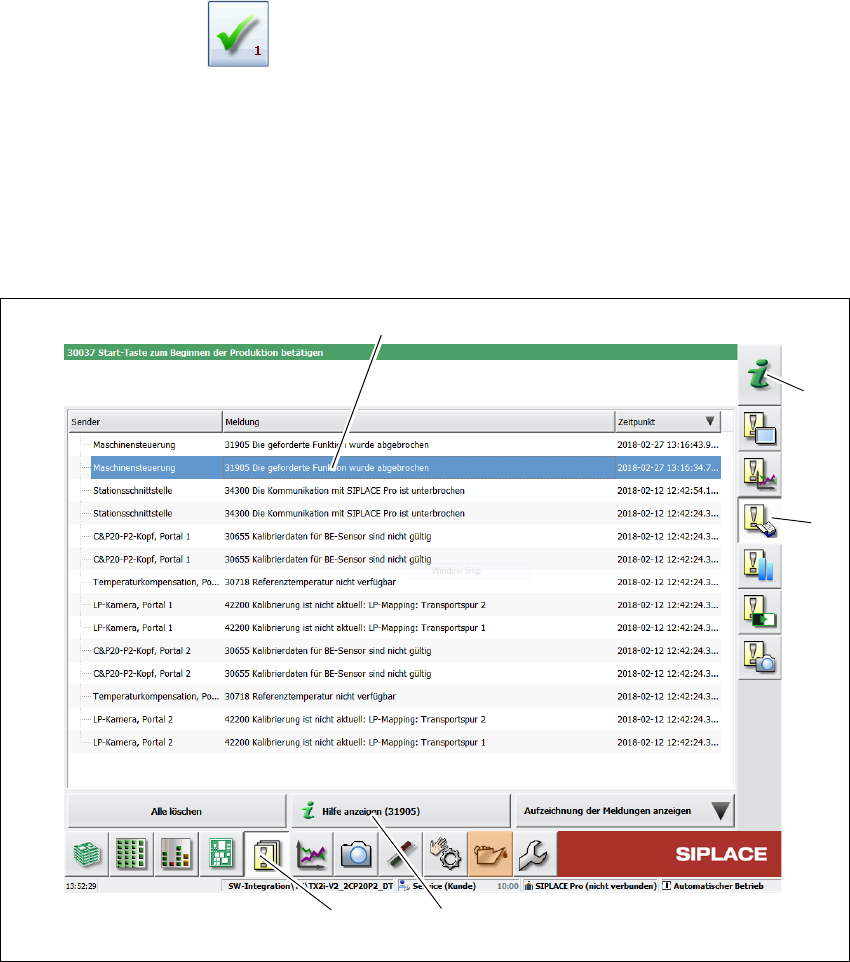
Click on the button (1) in the toolbar.
All the alerts which occurred will be listed.
Select the error category using the buttons in the vertical toolbar (2).
Click on a message in the alert list (3), to open detailed information about it.
. 5
Fig. 5.6 - 2 Example:Alarm list
Select the alert display for which you want to view information from the list of alerts.
Click on the "Show Help" (4) button to view the information.
To view information about a different alert, search the index of the help system (5) by entering the
alert number.
(5)
(2)
(3)
(4)
(1)

5 Tasks at the placement machine Instruction manual SIPLACE X-Series S
5.6 Alert information and online help From software version 713.0 Edition 11/2019
252
5.6.3 Color coding in the online help alert information
5
5.6.4 Context-sensitive online help
To see information about the current view, click on the icon to start the help system for the
station computer. The main window of the help system will open with alert information. The infor-
mation refers to the view currently shown and from which the help function was started. Use the
list of contents, index and the search function to view the contents of the Online Help.
Text highlight Meaning
Red text Alert number and message
Black text Possible cause(s) of alert
Green text Instructions for solving the alert
Blue underlined text Open additional information
Instruction manual SIPLACE X-Series S 5 Tasks at the placement machine
From software version 713.0 Edition 11/2019 5.7 Indicator lamps with horn
253
5.7 Indicator lamps with horn
5.7.1 Overview
These indicator lamps are used to signal operating statuses and malfunctions of the placement
machine. The horn indicates when an alert has occurred. SIPLACE placement machines can ei-
ther be fitted with a two or three color indicator lamp. The relevant indicator lamp system (two or
three color) is set in the autoconfiguration, see installation guide for station software, Item No.
00196771-xx.
5.7.1.1 Two color indicator lamp (standard)
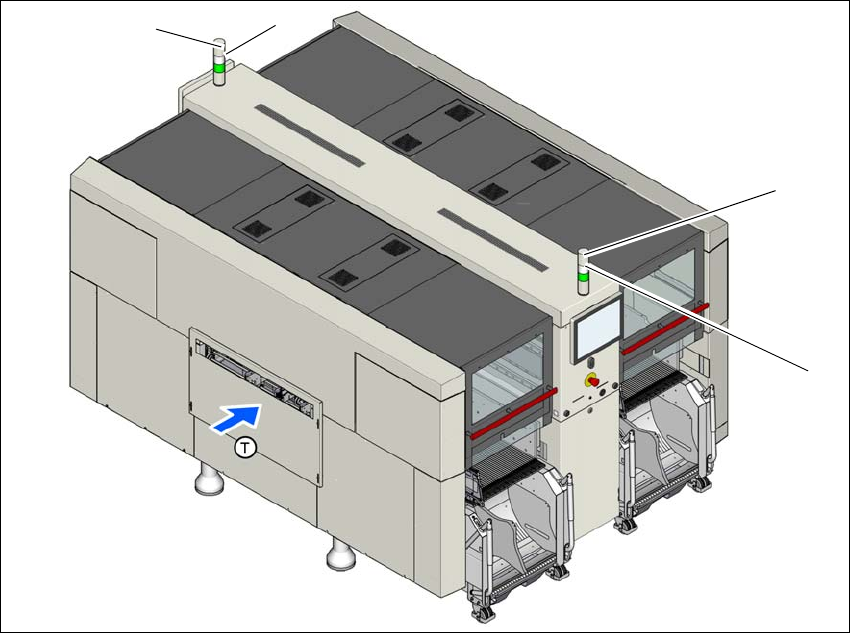
Fig. 5.7 - 1 Indicator lamps for operating states (example of SIPLACE X2 S / X3 S / X4 S shown)
L1 White indicator lamp, right
L2 Green indicator lamp, right
L3 White indicator lamp, left
L4 Green indicator lamp, left
T Direction of PCB transport
(L2)
(L1)
(L3)
(L4)