00198711-01_UM_X-Serie-S_EN.pdf - 第78页
2 Operational safety Instruction manual SIPLACE X-Series S 2.6 Safety features From software version 713.0 Edition 11/2019 78 2 2 Fig. 2.6 - 4 Hand guard - inside and outside (1) Hand guard - view from out side (2) Hand …
Instruction manual SIPLACE X-Series S 2 Operational safety
From software version 713.0 Edition 11/2019 2.6 Safety features
77
2.6.2 Hand guard on the board conveyor
The hand guard on the PCB conveyor prevents you from reaching into the placement machine, in
the event that there is no input/output conveyor extension fitted.
If there is no input/output extension fitted to the input conveyor and/or the output conveyor, make
sure that a hand guard is fitted in its place. This means that a hand guard must be fitted to the
input conveyor of the first placement machine in a line and to the output conveyor of the last place-
ment machine in a line. If a SIPLACE X-Series S placement machine is operated outside the line
and without the input/output extension, make sure that the hand guard is fitted to the input con-
veyor and the output conveyor of this placement machine.
2
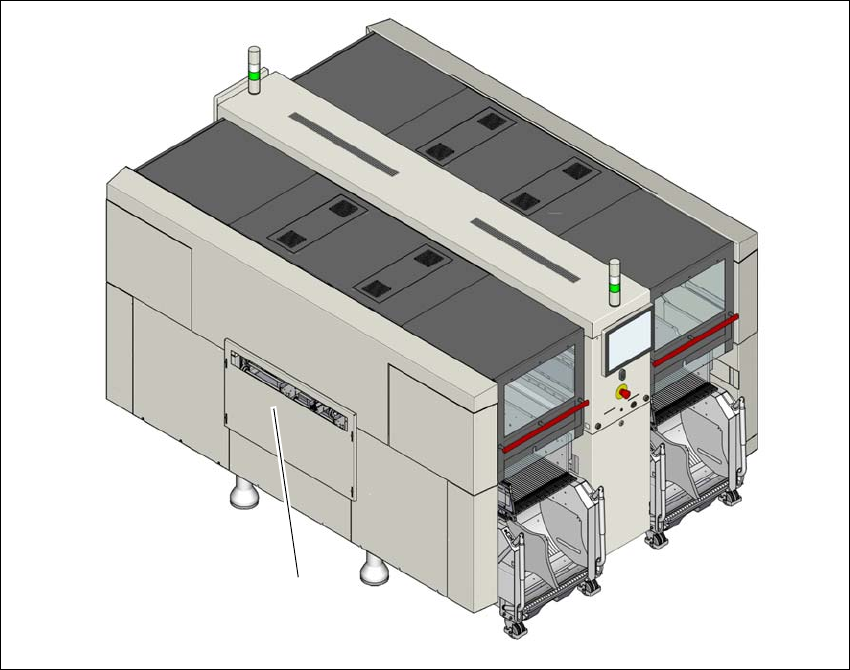
Fig. 2.6 - 3 Hand guard on the SIPLACE X4 S placement machine
(1) Hand guard
(1)
2 Operational safety Instruction manual SIPLACE X-Series S
2.6 Safety features From software version 713.0 Edition 11/2019
78
2
2
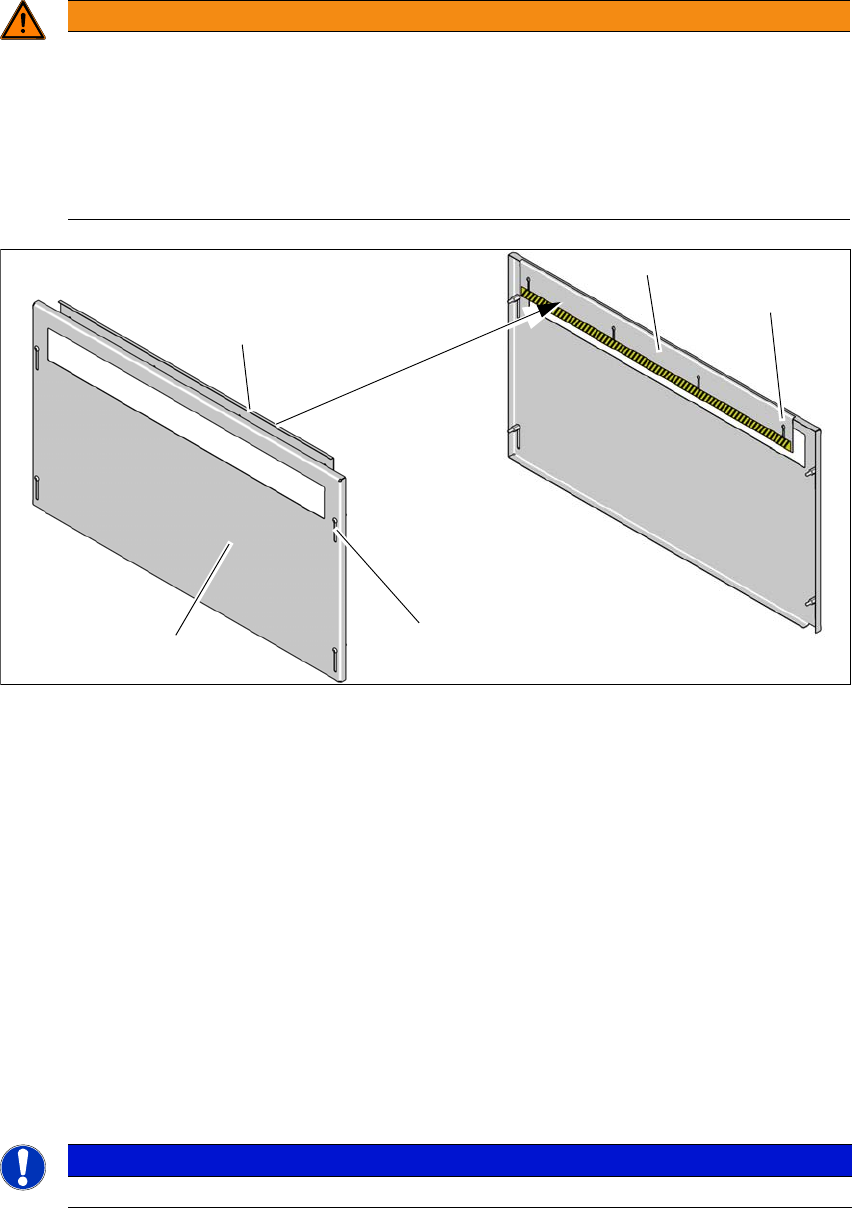
Fig. 2.6 - 4 Hand guard - inside and outside
(1) Hand guard - view from outside
(2) Hand guard - view from inside
(3) Slots on hand guard for height adjustment - outside
(4) Slots on hand guard for height adjustment - inside
Fit the hand guard (1) to the input conveyor and to the output conveyor.
Use the slots (3) to adjust the height on the outer plate for each product so that nobody can
reach into the board conveyor from below.
Use the slots (4) to adjust the height on the inner plate for each product so that nobody can
reach into the board conveyor from above.
Adjust the height so that the board with the components can be transported safely through
the conveyor system.
2
WARNING
DANGER OF CRUSHING!
If the hand guard is not fitted, reaching into the board conveyor could lead to injuries to
the arms and hands.
Operation of a SIPLACE X-Series S placement machine without an input/output ex-
tension is only permitted with a hand guard fitted to the input and output conveyors.
The operating company is responsible for ensuring that the hand guard is fitted.
PLEASE NOTE
Observe the maximum height of the board with the highest component.
(1)
(2)
(2)
(3)
(4)
Instruction manual SIPLACE X-Series S 2 Operational safety
From software version 713.0 Edition 11/2019 2.6 Safety features
79
2.6.3 Switches and buttons on the placement machine
2.6.3.1 Position of switches and buttons on the placement machine
2
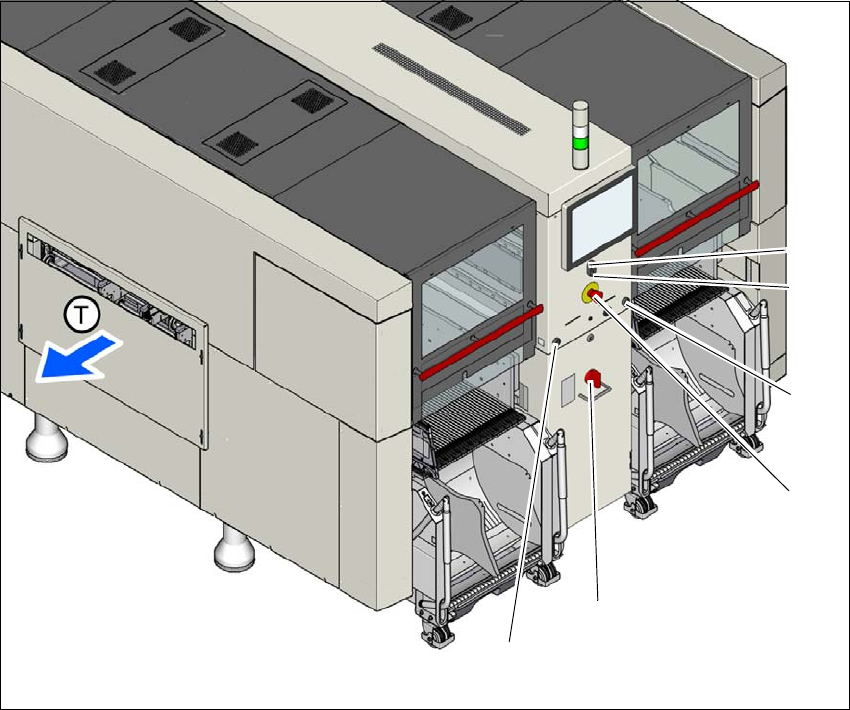
Fig. 2.6 - 5 Position of buttons and switches - view of PCB output side (example of SIPLACE X2 S / X3 S / X4 S
shown)
(1) Start button (white)
(2) Stop button (black)
(3) EMERGENCY STOP button
(4) Main switch
(5) Button for docking and undocking the component trolley at the respective location
(T) PCB transport direction
(3)
(1)
(4)
(2)
(5)
(5)