00198711-01_UM_X-Serie-S_EN.pdf - 第300页
6 Station extensions Instruction manual SIPLACE X-Series S 6.1 Nozzle changer From software version 713.0 Edition 11/2019 300 6.1.2.8 Nozzle changer "row 2" for the SIPLACE MultiS tar CPP The "nozzle chang…
Instruction manual SIPLACE X-Series S 6 Station extensions
From software version 713.0 Edition 11/2019 6.1 Nozzle changer
299
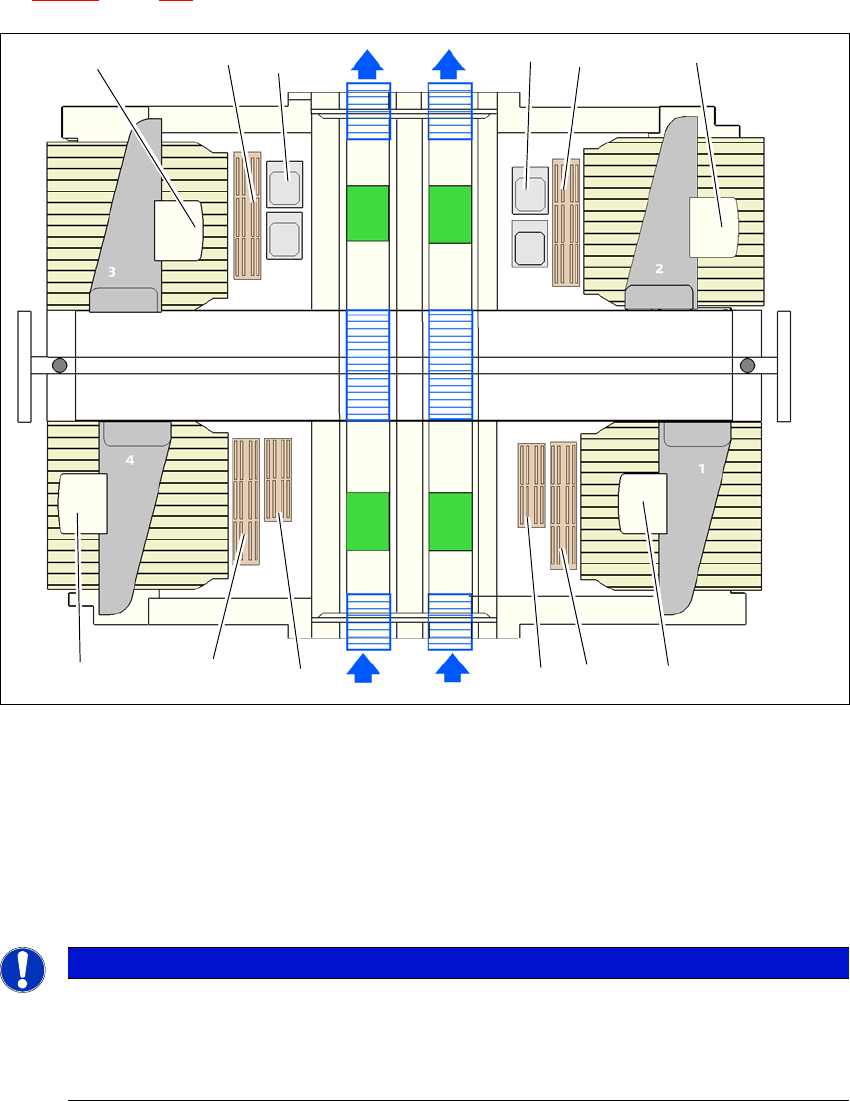
6.1.2.7 Configuration example: CPP for SIPLACE X4 S
Locations 1, 2, 3 and 4 can each accommodate one nozzle changer for the CPP head (item 1 in
fig. 6.1 - 11
, page 299).
6
Fig. 6.1 - 11 Position of nozzle changer for the SIPLACE MultiStar CPP - configuration example (SIPLACE X4 S)
6
6
(1) Nozzle changer
(2) SIPLACE MultiStar CPP
(3) Stationary cameras
(4) Nozzle changer row 2 (optional)
PLEASE NOTE
The placement machine stops if magazines are missing
In the event of missing or incorrectly positioned magazines, the safety circuit will stop the
placement machine.
Use all magazine places.
(2)(1)
(1)
(2)
(1)
(2) (2)
(3)
(3)
(1)
(4)
(4)
6 Station extensions Instruction manual SIPLACE X-Series S
6.1 Nozzle changer From software version 713.0 Edition 11/2019
300
6.1.2.8 Nozzle changer "row 2" for the SIPLACE MultiStar CPP
The "nozzle changer for row 2" option enables you to configure an additional row of nozzle chang-
ers for the SIPLACE MultiStar CPP.
The retrofit package contains the nozzle changer and an assembly kit.
6.1.3 Assembling the nozzle changer C&P20 P / C&P20 P2 / CPP
The nozzle changers are fixed to the COT insert.
Align the nozzle changer so that the sloping side points towards the COT insert.
6
6.1.3.1 Notes on operation
When you fill a magazine with a certain nozzle type for the first time, attach an adhesive label
to identify the type.
6
Open the locking plate and place the nozzles in the nozzle holders.
Close the locking plate so that the nozzles cannot drop out of the magazines.
6
6
Programming the nozzle changer is described in the SIPLACE Pro instruction manual.
WARNING
Risk of head crashes with mixed configurations!
There is a risk of head crashes with mixed configurations.
Only install the associated nozzle changer for each placement head, with the nozzle
magazines for the respective placement head.
PLEASE NOTE
6
Fill the magazines outside the placement machine and only replace complete mag-
azines.
CAUTION
Filling up magazines!
Before you fill magazines, make sure that all the nozzles on the Collect&Place head
have
been returned to their magazines.
PLEASE NOTE
Risk of jamming!
If components fall onto magazines, there is a risk that the locking plate could jam.
Do not allow components to drop onto the magazines.
You should therefore regularly clean the magazines and free locations.
Instruction manual SIPLACE X-Series S 6 Station extensions
From software version 713.0 Edition 11/2019 6.1 Nozzle changer
301
6.1.3.2 Changing the magazine
Press the lever (item 1 in fig. 6.1 - 12, page 302), to release the magazine from the balls of the
snap fasteners (item 5 in fig. 6.1 - 12
, page 302). Lift the magazine off the base.
6
WARNING
Risk of head crashes with protruding lever
Any lever that is protruding over the magazine (item 1 in fig 6.1 - 12
) can result in a head
crash.
You should therefore make sure that the lever does not protrude over the maga-
zines.