00191369-01.pdf - 第110页
3 Introduction and Basic Concepts User’ s M anual SIPLACE HS -50 3.3 User Interface - Views and Menus Software Version SR.501.xx Edition 01/99 108 0 HQXV 0RGH0HQX The comple te set of functio ns pres en…

User’s Manual SIPLACE HS-50 3 Introduction and Basic Concepts
Software Version SR.501.xx Edition 01/99 3.3 User Interface - Views and Menus
107
8VHU,QWHUIDFH9LHZVDQG0HQXV
9L HZV
To perform a particular operation at a particular moment via the user interface, you may need
to switch this to a different view. You can do this by clicking the appropriate toolbar button (see
section 3.2.2.2) or by selecting the corresponding menu item in the "View" menu (see section
3.3.2.2).
NOTE
For a description of the functions available in the various views, refer to the chapters which
explain the procedures applicable to the operations to be performed (e.g. "Refilling Empty
Tracks", Chapter 4).
3 Introduction and Basic Concepts User’s Manual SIPLACE HS-50
3.3 User Interface - Views and Menus Software Version SR.501.xx Edition 01/99
108
0HQXV
0RGH0HQX
The complete set of functions present in the "Mode" menu is only available in the main view.
In the views "Setup ...", "Errors..." and "Feeders" and their sub-views, only the menu items
"Stop processing PCB" and "Processing PCB" are available. In the other views, the "Mode"
menu is not displayed.
NOTE
For a detailed description of the menu items "Stop processing PCB", "Processing PCB" and
"Continue processing", refer to section 3.2.2.1 since these functions are usually activated via
the corresponding icons in the working area.
3URFHVVLQJ3&%
Assembly of the PCBs is started or continued if previously interrupted.
Å Click the menu item 3URFHVVLQJ3&%(or the corresponding icon).
6WRSSURFHVVLQJ3&%
The current PCB assembly process is stopped.
Å Click the menu item 6WRSSURFHVVLQJ3&%(or the corresponding icon)
$ ERUWSURFHVVLQJ
This function allows you to abort certain operating steps such as feeder position recognition
or nozzle changes in the event of a machine stoppage (fatal error, Stop button pressed)
Å Click the menu item $ERUWSURFHVVLQJ.
The current operation is aborted when you confirm the action in the displayed dialog box.
&RQWLQXHSURFHVVLQJ
The preceding assembly process, interrupted for example because of an error, is continued
once the fault has been eliminated.
Å Click the menu item &RQWLQXHSURFHVVLQJ (or the corresponding icon).
User’s Manual SIPLACE HS-50 3 Introduction and Basic Concepts
Software Version SR.501.xx Edition 01/99 3.3 User Interface - Views and Menus
109
6ZLWFKWR0,6
This menu function cannot be executed in the current software version.
6ZLWFKWR6,3/$&(3UR
This menu function cannot be executed in the current software version.
6ZLWFKWRRSHUDWLQJV\VWHP
You use this menu item to switch to the Windows operating system after entering your
password. From here, you can then subsequently return to the SIPLACE user interface.
NOTE
This menu option is not available at the "Operator" access level.
Å Click the menu item 6ZLWFKWRRSHUDWLQJV\VWHP
The Windows user interface is displayed and the SC software continues to run in the
background.
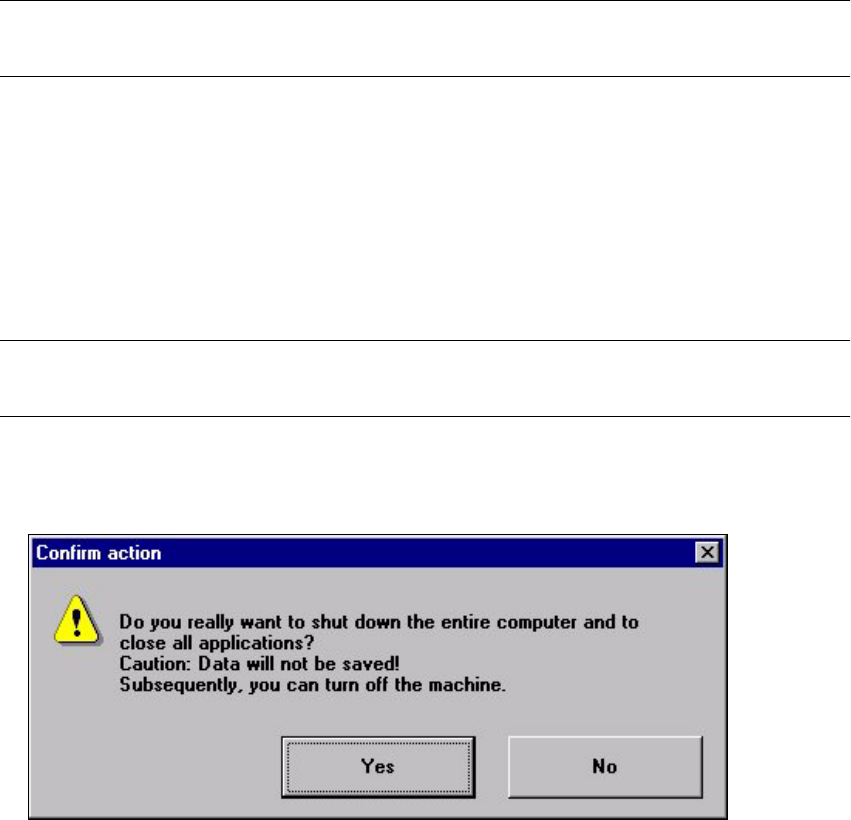
6KXWGRZQFRPSXWHU
All applications are closed without any files which may have been processed being saved and
the station computer is shut down.
NOTE
This menu option is not available at the "Operator" access level.
Å Click the menu item 6KXWGRZQFRPSXWHU
The following dialog box is opened.
Å Click <HV if you want to terminate your work.
The station computer is shut down.
Å Switch off the machine at the main switch.