00191369-01.pdf - 第166页
5 Single Functions User’s Manual SIPLACE HS-50 5.2 Single functions, G antry Software Version SR.501.xx Edi tion 01/99 164 $ OOQR] ]OH V If this r adio button is acti vated, the se lecte d function i.e."R eturn&q…
User’s Manual SIPLACE HS-50 5 Single Functions
Software Version SR.501.xx Edition 01/99 5.2 Single functions, Gantry
163
)XQFWLRQV
The "Nozzle configuration revolver head" screen provides functions which allow you to change
the nozzle configuration and to then confirm that this change has been made. The required
function is carried out by clicking on the appropriate button.
NOTE
The functions "Return", "Pick up", "Remove" and "Replace" can only be carried out if a noz-
zle changer is installed and configured in the machine options.
6HWWLQJV
2QHQR]]OH
If this radio button is activated, the functions "Return", "Pick up", "Remove", and "Replace" can
only be carried out for one selected nozzle. When you call one of these functions a dialog box
appears. You can enter the number of the segment with the required nozzle.
By default the box already contains the number of the segment currently in the changeover
position (marked by an arrow, see Fig. 5.2 - 5
).
Å Activate the 2QHQ R]]OHradio button.
Å Click the button for the required function.
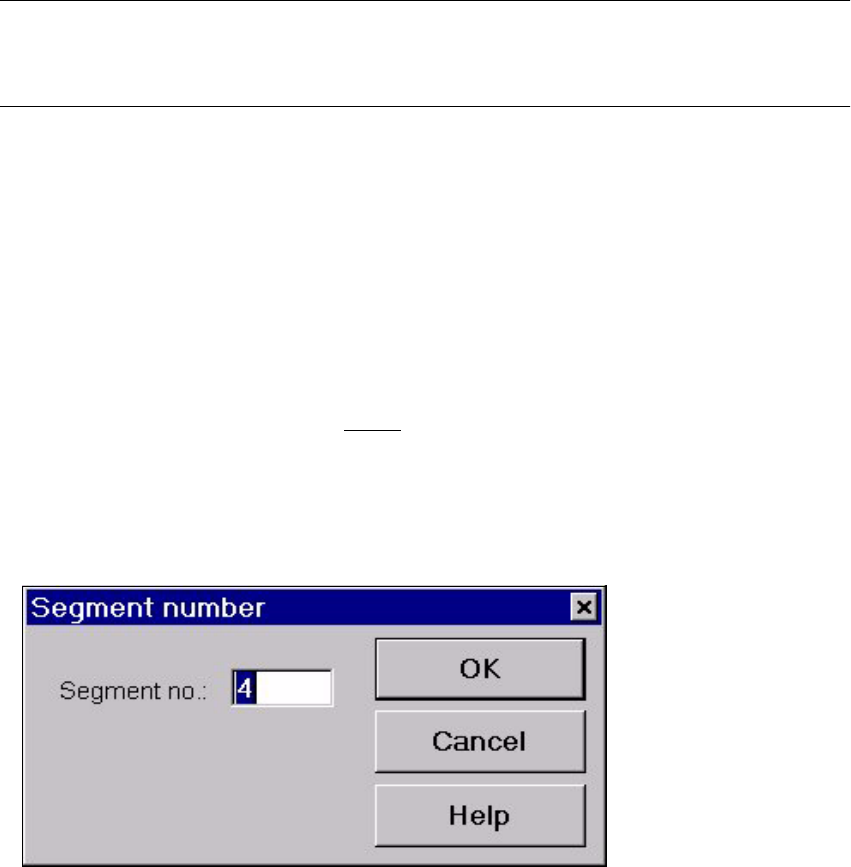
The dialog box shown below is then displayed.
Å In the entry field, enter the number of the required segment, and confirm with 2.. The func-
tion is then carried out for the selected nozzle.

5 Single Functions User’s Manual SIPLACE HS-50
5.2 Single functions, Gantry Software Version SR.501.xx Edition 01/99
164
$OOQR] ]OH V
If this radio button is activated, the selected function i.e."Return", "Pick up" or "Remove" is car-
ried out for all nozzles on the revolver head.
Å Activate the $OOQR]]OHVradio button.
Å Click the button for the required function.
The function is carried out for all functions on the revolver head.
5HWXUQ
When this function is activated, the nozzles are returned to the correct magazine of the nozzle
changer (or the nozzle on the selected segment is returned to its magazine).
Å Click the 5HWXUQbutton.
If the "All nozzles" radio button is activated, the function is carried out immediately.
If the "One nozzle" radio button is activated, a dialog box is opened for you to enter the
number of the required segment (see page 5 - 163
).
5HPRYH
When this function is activated, all nozzles or the nozzle on the specified segment are dis-
carded into the reject container.
Å Click the 5HPRYHbutton.
If the "All nozzles" radio button is activated, the function is carried out immediately.
If the "One nozzle" radio button is activated, a dialog box is opened for you to enter the
number of the required segment (see page 5 - 163
).
3LFNXS
When this function is activated, nozzles specified for current use are picked up from their
respective magazines (or a nozzle is picked up for the specified segment).
Å Click the 3LFNXSbutton.
If the "All nozzles" radio button is activated, the function is carried out immediately.
If the "One nozzle" radio button is activated, a dialog box is opened for you to enter the
number of the required segment (see page 5 - 163
).
5HSODFH
This function is used to replace the nozzle on the specified segment with one of the same
type.
Å Click the 5H SODFH button.
A dialog box opens to allow you to enter the segment number.
(The rest of the procedure is described on page 5 - 163
).

User’s Manual SIPLACE HS-50 5 Single Functions
Software Version SR.501.xx Edition 01/99 5.2 Single functions, Gantry
165
59KHDGLQGH[LQJ
This function is used to move the revolver head.
Å Click the 59KHDGLQGH[LQJbutton.
The revolver head is moved on one segment.
The current positions of the segments are shown in the graphic.
&RQILUP
This function allows you to confirm that a nozzle has been changed (without nozzle changer).
To change a nozzle without a nozzle changer you must perform the operation by hand. You
can only change the nozzle on one segment at a time because the segment must be in the
changeover position. By turning the head in a clockwise fashion you can bring each segment
in turn to the changeover position.
Å In the table, find the segment for which the nozzle is to be changed.
Å Click the 59KHDGLQGH[LQJbutton as often as required to bring the required segment
round until it is displayed in the changeover position (marked with an arrow).
The table entry for this segment is now highlighted in light blue (see Fig. 5.2 - 5
).
Å Remove the nozzle by hand and replace it with a nozzle of the type shown in the "Preset"
column.
Å Click the &RQILUP button.
The change is confirmed. The entries in the columns "Actual" and "Preset" agree. The new
nozzle configuration is saved to the machine data.