00197088-03_AI_Barcode_SICK620_SX12_X-S_TX_DE_EN.pdf - 第111页
4 Software Installation and Configuration Assembly Instructions / Montageanleitung SIPLACE TX-Series, X-Series S, SX1/SX2 V2 Option PCB Barcode / LP-Barcode (Lector 620) 05/2019 111 4 Software Installation and Configur…
3 Installation
3.9 Performing Final Work
110 Assembly Instructions / Montageanleitung SIPLACE TX-Series, X-Series S, SX1/SX2 V2
Option PCB Barcode / LP-Barcode (Lector 620) 05/2019
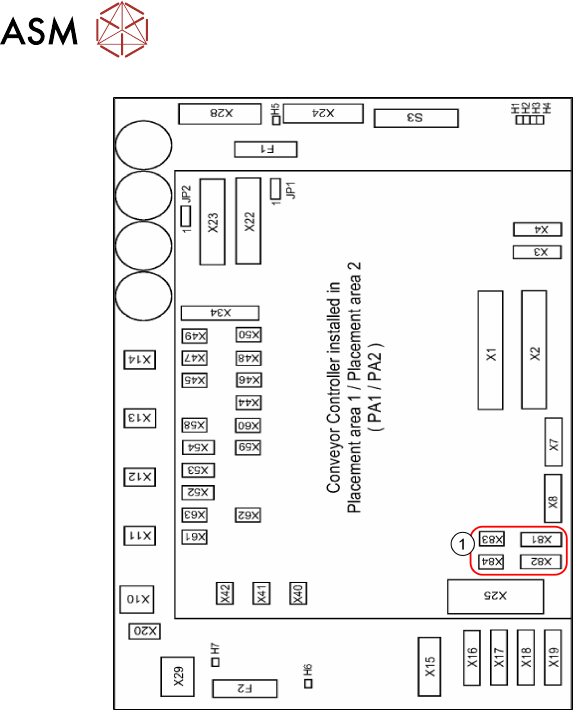
Fig.72: Conveyor control
1. Connectors for PCB barcode scanners
– Lane 1 / Single Conveyor:
PCB Barcode Scanner b 1 Lane
Bottom X81+83
PCB Barcode Scanner b 2 Lane
Top X82+84
– Lane 2 (Dual Conveyor only)
PCB Barcode Scanner b3 Lane Bot-
tom X81+83
PCB Barcode Scanner b4 Lane Top
X82+84
See also:
–
5.3.3 "Conveyor control TSP420
[03087642-xx]" [}125]
– 5.1 "Circuit Diagrams" [}113]
► Connect the cables to the connectors
X81 to X84(1).
► Repeat these steps for the second con-
veyor lane if required.
3.9 Performing Final Work
► Fit the covers and the lifting table plate.
► Fix the hand guard back onto the machine.
► Switch the machine back on and install the software.
4 Software Installation and Configuration
Assembly Instructions / Montageanleitung SIPLACE TX-Series, X-Series S, SX1/SX2 V2
Option PCB Barcode / LP-Barcode (Lector 620) 05/2019
111
4 Software Installation and Configuration
To install the SICK software "SOPAS" and to configure the 2D LECTOR 620 PCB barcode scan-
ner, see the "Installation and Configuration Barcode Scanner SICK" manual [DE:00198202‑xx]
[EN:00198203‑xx].
NOTICE
Further Information
For more information, please contact the SIPLACE service with reference to the following
numbers:
► TI2016-05V03 / TI2016-05C03
► TI2015-12V06 / TI2015-12C06

4 Software Installation and Configuration
112 Assembly Instructions / Montageanleitung SIPLACE TX-Series, X-Series S, SX1/SX2 V2
Option PCB Barcode / LP-Barcode (Lector 620) 05/2019