00198371-01_UM_SWS-EN.pdf - 第121页
User manual SIPLACE Wafer System (SWS) 6 Options Edition 04/2018 6.3 SWS wafer stretcher (expander) 121 6.3.6.1 Part s in the 12" wafer expan der retrofit kit Fig. 6.3 - 6 Parts in the 12" wafer support retrofi…
6 Options User manual SIPLACE Wafer System (SWS)
6.3 SWS wafer stretcher (expander) Edition 04/2018
120
6.3.6 Converting the SWS wafer stretcher (expander)
In order to use various wafer sizes (8" and 12") with the SWS wafer stretcher (expander), you need
to convert the SWS wafer stretcher (expander).
You can order the SWS wafer stretcher (expander) as follows:
– 00519717-xx 12 inch Wafer Expander
and as an option 6
– 03079734-xx 8 inch Retrofit Kit
or
– 00519719-xx 8 inch Wafer Expander
and as an option 6
– 00519720-xx 12 inch Retrofit Kit
The following instructions describe the changeover from an 8" to a 12" wafer support (see also
“Differences in conversion from 12" to 8” on page 133).
User manual SIPLACE Wafer System (SWS) 6 Options
Edition 04/2018 6.3 SWS wafer stretcher (expander)
121
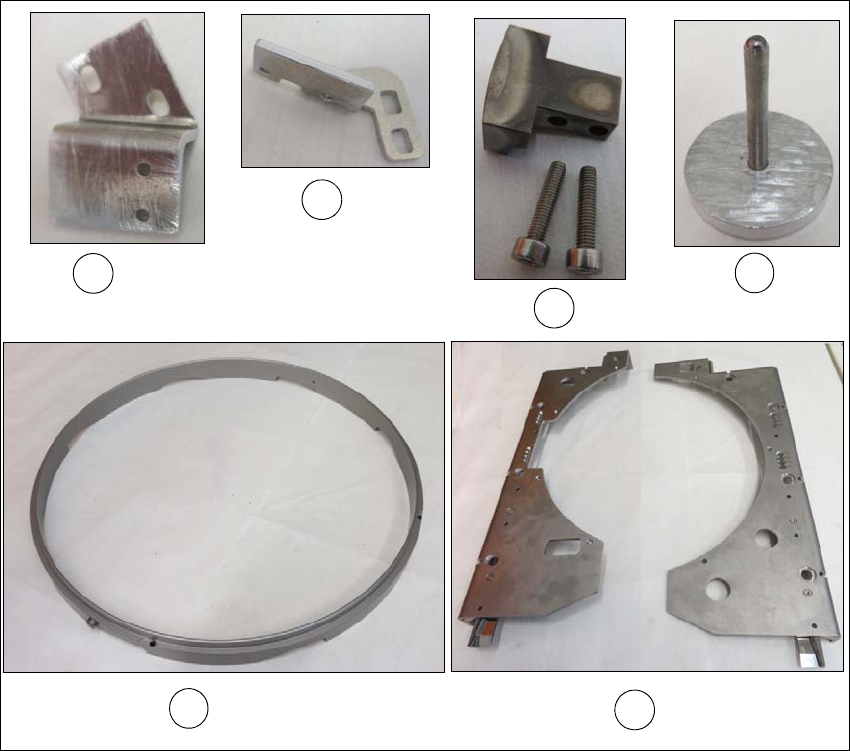
6.3.6.1 Parts in the 12" wafer expander retrofit kit
Fig. 6.3 - 6 Parts in the 12" wafer support retrofit kit
(1) Assembly bracket for sensor 1 (including 2 x M3x6 screws)
(2) Assembly bracket for sensor 2 (including 2 x M3x6 screws)
(3) Block with fastening screws for clamp
(4) Auxiliary tool for fixing the lifting piston, [item no. 03121551-xx] is supplied and will in future
be included in the SWS service box.
(5) Stroke ring
(6) Downholder plate right and left
1
5
6
2
4
3

6 Options User manual SIPLACE Wafer System (SWS)
6.3 SWS wafer stretcher (expander) Edition 04/2018
122
6.3.6.2 Preparations
Close all current processes on the SWS module.
Move the wafer table into the changeover position.
Select Manual operations -> Wafer handling systems -> Go to change position.
Open the clamp.
Select Manual operations -> Wafer handling systems ->Open wafer clamp.
– The clamp will open and the expansion ring will move downwards.
Open the expander
Select Manual operations -> Wafer handling systems ->Release stretcher.
– The downholder plate will move upwards.
Select Settings -> Shut down machine.
SWS GUI and Linux are shut down properly. 6
Switch off the SWS at the main switch.
CAUTION
Avoid damage to the gripper
When working on the SWS wafer stretcher (expander), the gripper could be damaged.
Push the gripper in the direction of the wafer lift and out of the SWS wafer stretcher
(expander) working area.