00198371-01_UM_SWS-EN.pdf - 第133页
User manual SIPLACE Wafer System (SWS) 6 Options Edition 04/2018 6.3 SWS wafer stretcher (expander) 133 6.3.6.4 Differences in conversion from 12" to 8 The sensors need to be dismantled from th e wafer s upport a nd…
6 Options User manual SIPLACE Wafer System (SWS)
6.3 SWS wafer stretcher (expander) Edition 04/2018
132
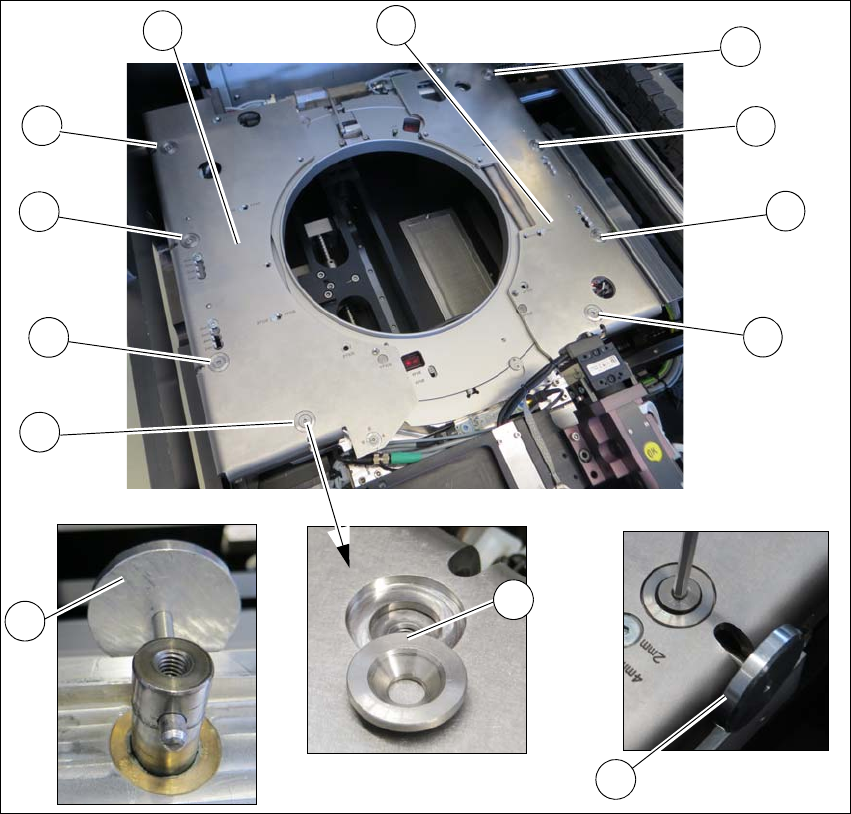
Fitting the downholder plates
Fig. 6.3 - 17 SWS wafer stretcher (expander) - removing the downholder plate
Align the lifting piston with the auxiliary tool (2) so that the opening points outwards.
Place the downholder plates from the 12" retrofit kit onto the wafer support.
Insert the conical fixing discs (3) into the hole.
Loosely tighten the downholder plates with the screws.
Insert the auxiliary tool (2) into the opening and fix into place with the lifting piston inside.
Tighten all 4 screws (1) on the two downholder plates (4).
1
1
1
1
1
1
1
1
2
3
4
4
4
User manual SIPLACE Wafer System (SWS) 6 Options
Edition 04/2018 6.3 SWS wafer stretcher (expander)
133
6.3.6.4 Differences in conversion from 12" to 8
The sensors need to be dismantled from the wafer support and fitted onto the 8" expansion plates.
See See “Wafer support - 8" stroke ring removed” on page 126.
The block needs to be dismantled form the clamp and used in place of the clamping level. See
See “Wafer support - loosening the clamp” on page 124.
6 Options User manual SIPLACE Wafer System (SWS)
6.3 SWS wafer stretcher (expander) Edition 04/2018
134