00198371-01_UM_SWS-EN.pdf - 第98页
5 SWS tasks User manual SIPLACE Wafer System (SWS) 5.5 Checking the reject bin of the flip unit Edition 04/2018 98 5.5 Checking the reject bin of the flip unit Check and empty the reject bin on the flip unit (item 3 in…
User manual SIPLACE Wafer System (SWS) 5 SWS tasks
Edition 04/2018 5.4 Checking and configuring the tools and nozzles on the flip unit
97
5.4 Checking and configuring the tools and nozzles on
the flip unit
Open the side sliding cover on the SIPLACE CA4 V2.
5
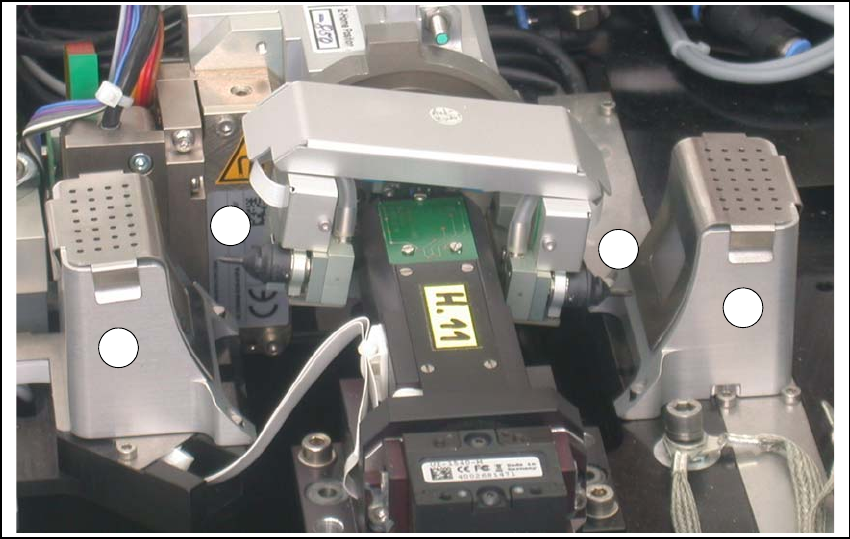
Fig. 5.4 - 1 Flip unit with nozzles and reject bins
Legend
5
Check the state and type of the nozzles and tools on the flip unit. If necessary, replace them
with new ones or those appropriate for the product.
You can either use the standard nozzles of the SIPLACE placement machines or rubber tips
with appropriate adapter nozzles.
Proceed with checking the reject bins.
(1) Nozzle segment 1 (2) Nozzle segment 2
(3) Reject bin
2
3
3
1
5 SWS tasks User manual SIPLACE Wafer System (SWS)
5.5 Checking the reject bin of the flip unit Edition 04/2018
98
5.5 Checking the reject bin of the flip unit
Check and empty the reject bin on the flip unit (item 3 in fig. 5.4 - 1).
When replacing the reject bins make sure that the underlying surface is clean and that the bin
is seated correctly in its fixation. Otherwise they are not recognized by the sensors.
Close the side sliding cover on the SIPLACE CA4 V2.
5.6 Refilling components at the SWS with the Wafer
Changer System
As soon as all wafers have been processed for a die type (note on the user interface), move
the magazine lift into the magazine change position, so that the magazine lift is level with the
height of the change position.
Remove the magazine from the magazine lift and replace the processed wafer.
Alternatively, you can also completely replace a processed wafer magazine with another
magazine which has already been prepared with new wafers.
After the wafer magazine has been replaced and the SWS sliding door closed, a magazine
scan will be automatically performed. 5
5.7 Shift changeover tasks
Check that the tools on the flip head are seated correctly (see section 5.4 on page 97) and
then check those on the die attach head, if required. ?
Remove any components from the machine.
Empty the component reject bin.
Check whether the correct multiple needle kit has been fitted (see section 5.3 on page 93).
Remove any flux from the LDU and clean the LDU thoroughly with alcohol, using the clean
cycle. For more details, see the ?SIPLACE LDU-X User Manual (item number of German ver-
sion [00196057-xx]).

User manual SIPLACE Wafer System (SWS) 5 SWS tasks
Edition 04/2018 5.8 Changing the Setup on the SWS
99
5.8 Changing the Setup on the SWS
Check whether the orientation of the wafer locking bar matches the relevant wafer size (see
fig. 3.4.4.1
, page 81).
5
Check that the magazine is occupied correctly.
Adjust the support plate for the wafer magazine and insert the new magazine.
Check the needle configuration of the ejection system (see section 5.3, page 93).
Check whether the flip unit has been fitted with the required tools and nozzles (see section
5.4, page 97).
Load or compile the required product (see software guide).
PLEASE NOTE
Configuring the SWS
When putting the SWS into operation, it is configured with the required wafer size and
thickness of the wafer frame.
Adapting the SWS to other sizes and thicknesses is described in the service manual.