00194845-0302_MM_D1_D2_EN.pdf - 第32页
5 Monthly m aintenance jobs SIPLA CE D1 / D2 02/2010 EN E dition 32 5
SIPLACE D1 / D2 5 Monthly maintenance jobs
02/2010 EN Edition
31
Clean the linear guides for the Y axis 5
a Clean the linear guides for the Y axis thoroughly over their entire length using the SIPLACE
cleaning tissue.
a Use a lint-free cloth to remove any stubborn dirt from the linear guides.
a Oil and preserve the linear guides using a fresh SIPLACE cleaning cloth.
5
Clean the linear guides for the X axis 5
s Clean the linear guides for the X axes thoroughly over their entire length using the SIPLACE
cleaning tissue.
s Use a lint-free cloth to remove any stubborn dirt from the linear guides.
s Oil and preserve the linear guides using a fresh SIPLACE cleaning cloth.
5
Clean the running surface of the Y axis opposing bearing 5
d Use a SIPLACE cleaning tissue to clean the running surface of the opposing bearing.
5
Clean the Y axis friction surface 5
f Use a SIPLACE cleaning tissue to clean the Y axis friction surface.
5
5
5
5
5
5
5
5
5
5
5
5
5 Monthly maintenance jobs SIPLACE D1 / D2
02/2010 EN Edition
32
5

SIPLACE D1 / D2 5 Monthly maintenance jobs
02/2010 EN Edition
33
For SIPLACE D1 only:
Clean the IC and FC camera 5
There is a risk of cutting your finger along the edges of the mirror. 5
To protect your hands, wear laboratory gloves and avoid touching the edges. 5
5
The laboratory gloves are also essential for effective cleaning (fingerprints). 5
5
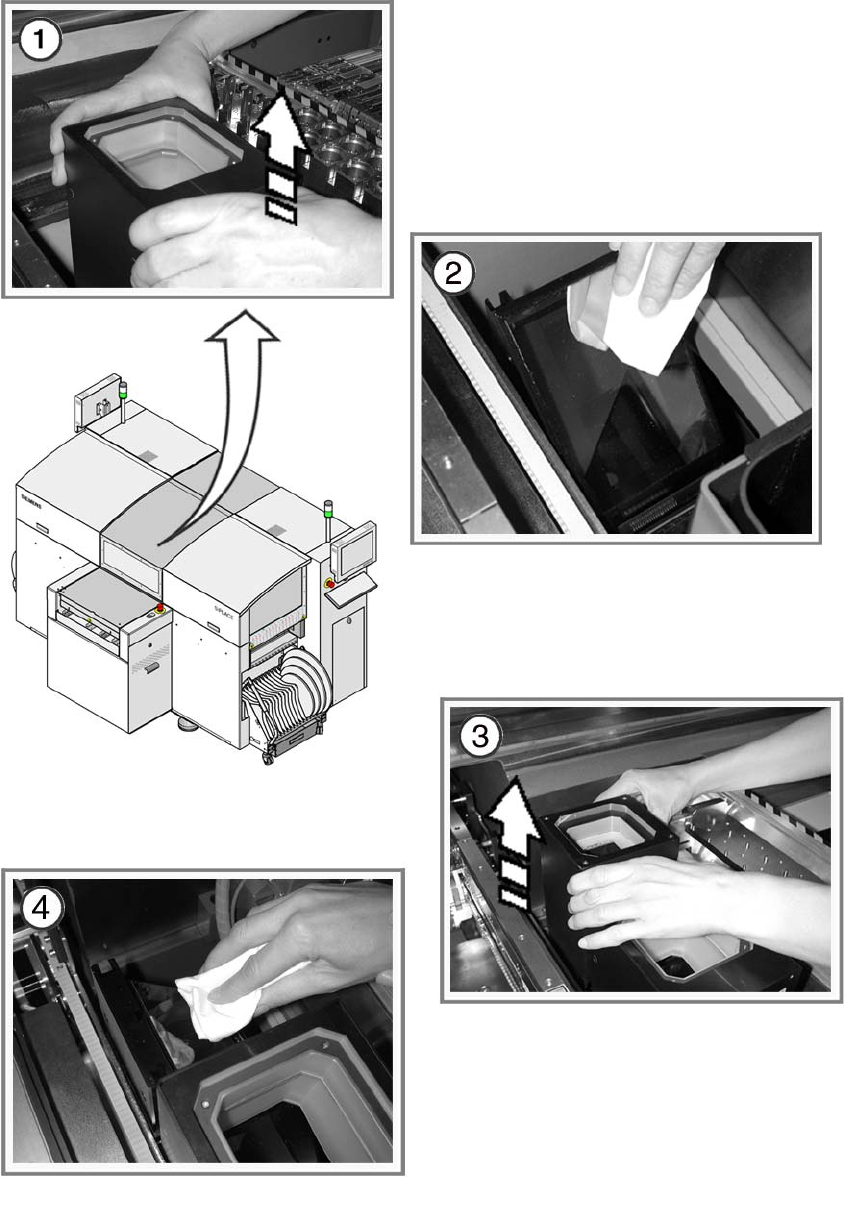
a Carefully pull the top part of the IC camera up and off.
s Clean the tilted glass plate with a lens cloth.
5
: Insert the top part of the IC camera.
When you insert the top part of the IC camera, make sure that it lies flat against the bottom part
and does not move.
5
d Remove the top part of the FC camera in the same way.
f Clean the tilted glass plate with a lens cloth.
5
: Insert it once more.
5
For SIPLACE D1 only:
Clean the coplanarity module (if present) 5
: Use lens cleaning cloth to clean the lenses of the coplanarity module.
5
5
: Switch the placement machine on at the main switch.
: Dock the component trolley in the placement machine.
5
5
5
5
5