00194845-0302_MM_D1_D2_EN.pdf - 第65页
SIPLA CE D1 / D2 8 Annual maintenance work 02/2010 EN Edition 65 Function test of used t ape cutter 8 a Introduc e a DIN A3 she et or two DIN A4 sh eets stuck toge ther into the used tape ch annel. 8 One DIN A4 sheet on …
8 Annual maintenance work SIPLACE D1 / D2
02/2010 EN Edition
64
8

SIPLACE D1 / D2 8 Annual maintenance work
02/2010 EN Edition
65
Function test of used tape cutter 8
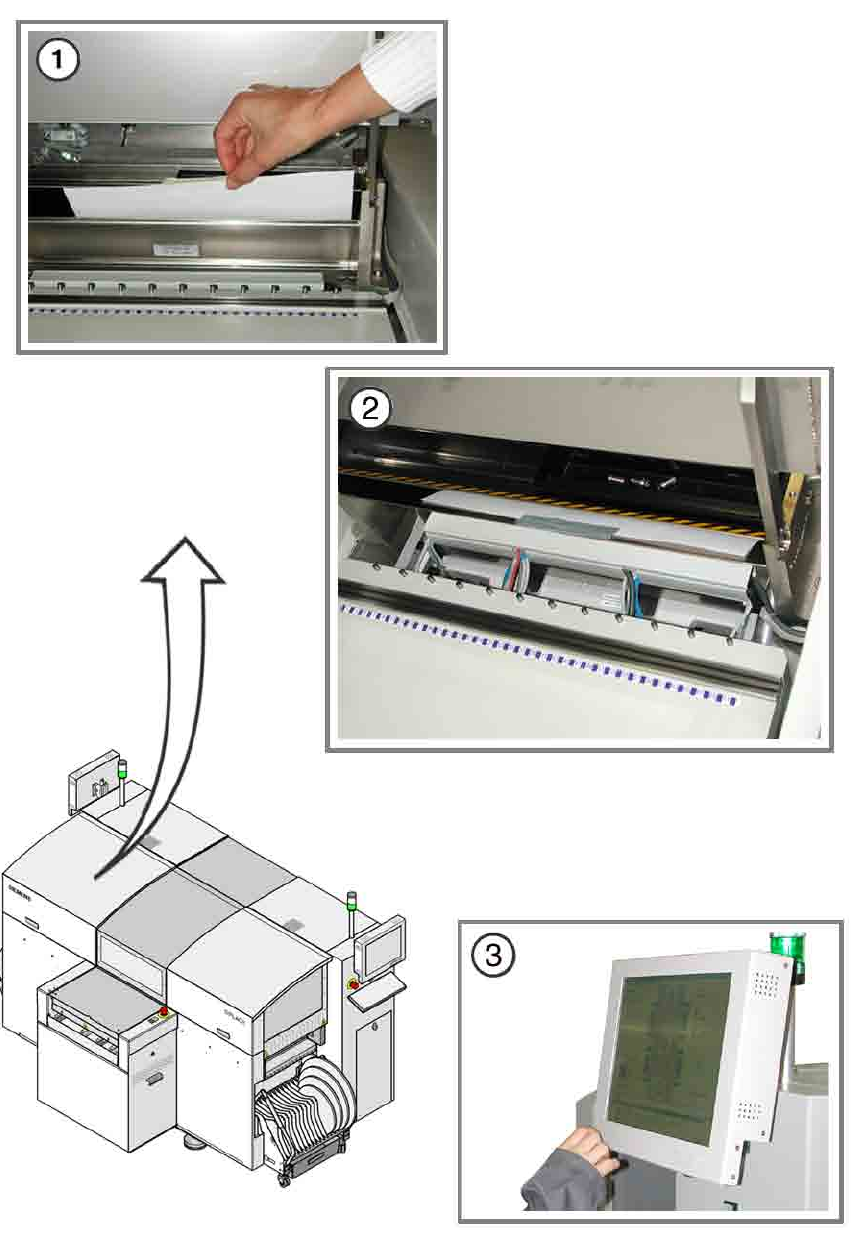
a Introduce a DIN A3 sheet or two DIN A4 sheets stuck together into the used tape channel.
8
One DIN A4 sheet on its own is too short to reach the tape cutter. 8
8
8
s Stick the sheet(s) firmly to the used tape channel using adhesive tape.
8
Make sure that no paper protrudes into the traveling range of the placement head. 8
8
8
d Log onto the station as a service engineer and start SITEST.
d Click on the "Component tables" button on the taskbar.
d In the view that appears, click on "Activate tape cutter".
8
: Remove the stuck-on sheet from the used tape channel.
Contact your Regional Service Center if it is not cut through cleanly.
8
8
8
8
8
8
8
8
8
8 Annual maintenance work SIPLACE D1 / D2
02/2010 EN Edition
66
8