00194845-0302_MM_D1_D2_EN.pdf - 第72页
8 Annual maintenance work SIPLA CE D1 / D2 02/2010 EN E dition 72 8
SIPLACE D1 / D2 8 Annual maintenance work
02/2010 EN Edition
71
Check the hood switch and the emergency-stop button 8
: Make sure that the placement system is switched on and the operating system has started up.
: Make sure that "Control on" is set on the placement machine.
You can tell this from the main fault indicator.
Press the Start button.
8
a Open a protective cover. The other protective cover(s) must be closed.
The control must drop out immediately. You will hear this clearly by the venting compressed air.
s Move the gantry in the X and Y directions.
It must move effortlessly and without resistance.
: If the control does not switch off or the gantry does not move effortlessly, then the hood switch
may be defective. Replace it with a new switch and check the functions again.
: Test all the protective covers individually and move the associated gantry.
8
d Check the hood switch for damage, particularly the plastic web in the middle.
If there is any damage, replace the hood switch with a new one.
: Check that the actuator moves cleanly and effortlessly into the switching unit.
If this is not the case, align the actuator and switching unit with respect to one another.
8
f Check the emergency-stop button for damage.
: Check that the control switches off immediately when you actuate the button.
Replace the button with a new one if this is not the case.
8
8
8
8 Annual maintenance work SIPLACE D1 / D2
02/2010 EN Edition
72
8

SIPLACE D1 / D2 8 Annual maintenance work
02/2010 EN Edition
73
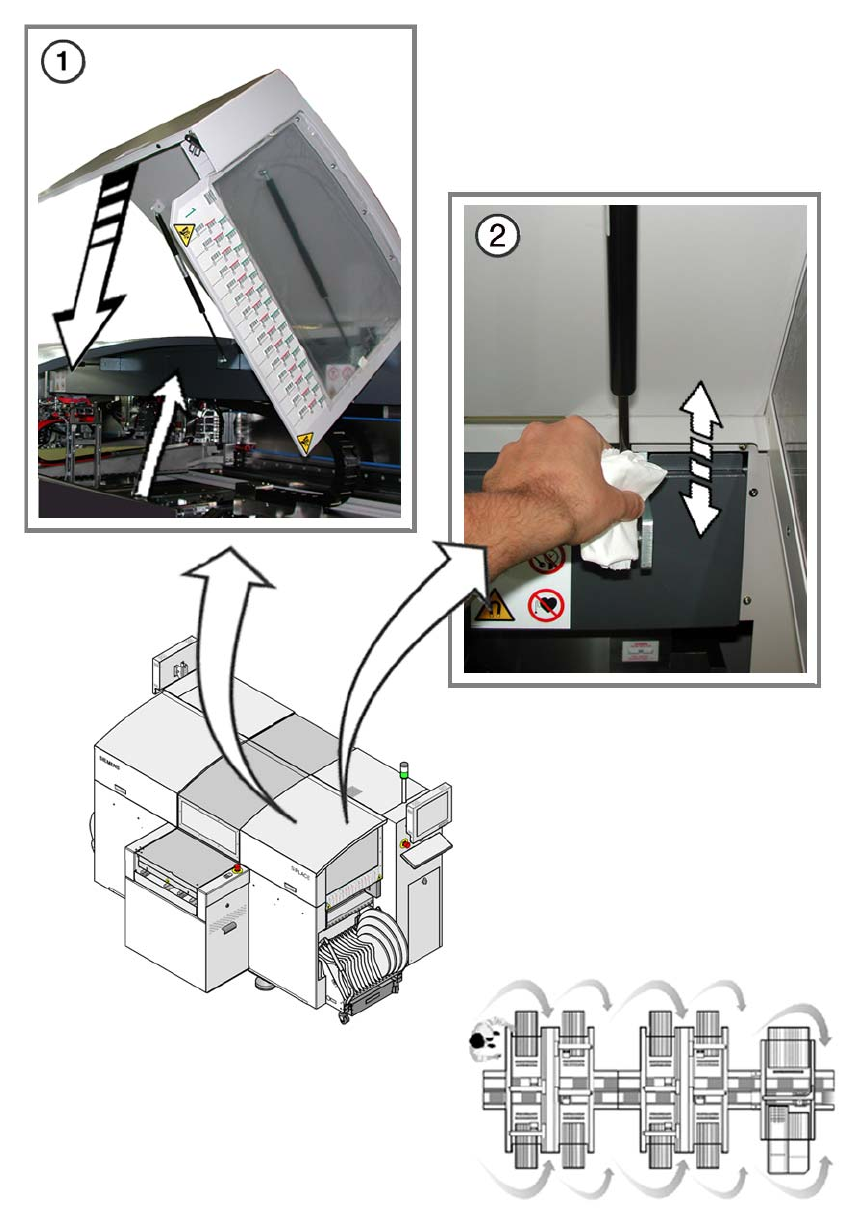
Check the protective covers 8
a Open the protective covers to a height of 100 mm (+/-5mm) measured between the machine
frame and the edge of the protective cover. Replace the damping cylinder if the damping cyl-
inder covers cannot be held open reliably at this height.
s Use a lint-free cloth to remove any excess oil from the gas spring.
8
: Close the protective covers.
8
Clean the protective covers 8
8
The choice of cleaning agent for the protective covers must be made with particular care so as not
to damage the ESD coating on the protective covers. 8
8
: Check the protective covers for dirt.
: Clean them with a dry lint-free cloth if necessary.
If it is very dirty, use a lint-free cloth and a small amount of a neutral or weak alkaline cleaning
agent.
8
This must NOT be 8
– acidic or strong alkaline,
– contain ketones, esters, aromatics, halogenated hydrocarbons, etheric oils or similar.
8
Apply as little pressure as possible when cleaning the protective covers to avoid damaging the
ESD coating. 8
8
: After cleaning, wipe over with fresh water.
8
8
8