00196749-02_UM_LDU-X_EN.pdf - 第22页
4 Software Description 4.2 How to use the software 22 Operating Manual SIPLACE LDU-X Linear Dipping Unit 11/2017 4.2 How to use the software The LDU-X functions are controlled via the control panel: 1. Display (4 lines, …
4 Software Description
4.1 Operating Modes
Operating Manual SIPLACE LDU-X Linear Dipping Unit 11/2017 21
4 Software Description
The following section describes the LDU‑X software. This software can be displayed in German or
English.
4.1 Operating Modes
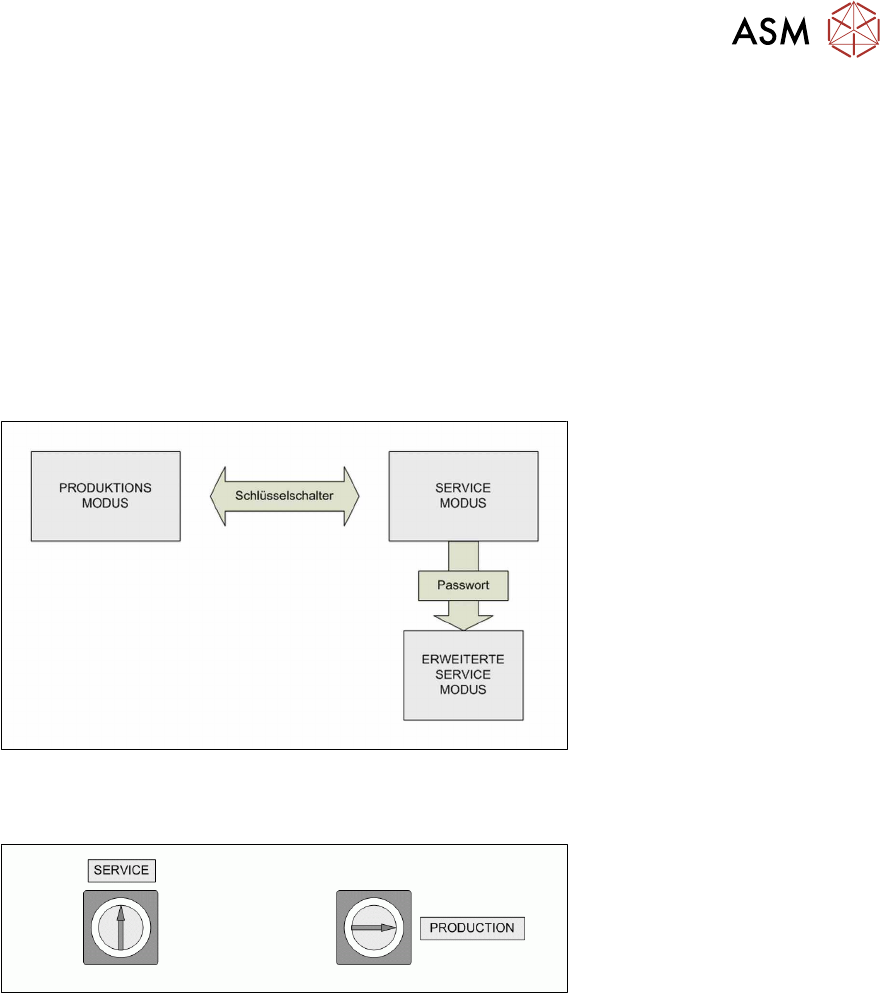
The LDU‑X can be run in two operating modes. In production mode, you can control all the produc-
tion-related processes. Service mode gives you access to all the LDU-X parameters. With the help
of the key switch, you can change over between modes.
The service mode is subdivided into standard and advanced service mode. The advanced service
mode is password protected and is only intended for appropriately trained personnel or service
technicians.
If the key switch points vertically to SERVICE, the service menu will be shown on the display.
If the key switch points horizontally to PRODUCTION, the production menu will be shown on the
display.
4 Software Description
4.2 How to use the software
22 Operating Manual SIPLACE LDU-X Linear Dipping Unit 11/2017
4.2 How to use the software
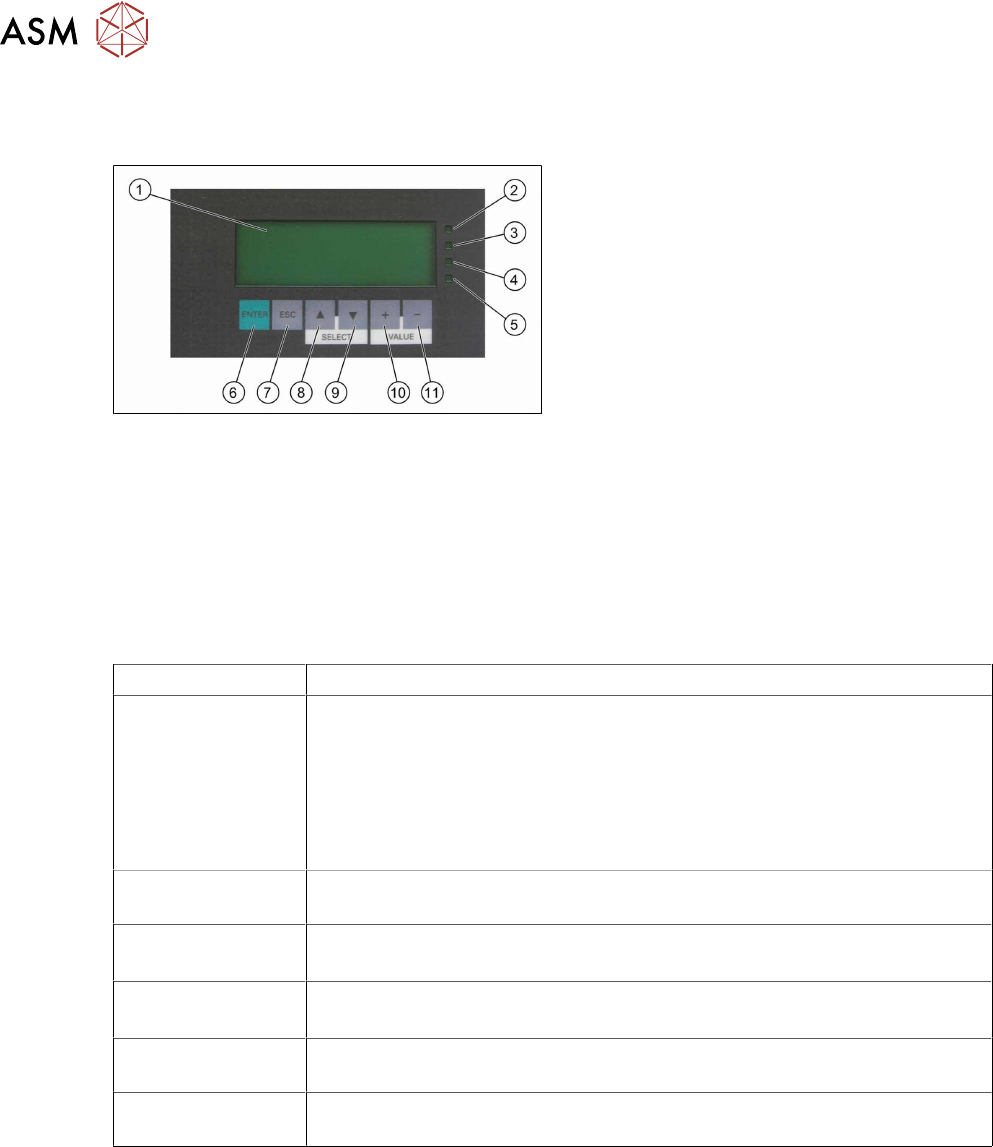
The LDU-X functions are controlled via the control panel:
1. Display (4 lines, each with 20 characters)
2. LED for refill unit *
3. ENTER button
4. ESC button
5. SELECT UP button
6. SELECT DOWN button
7. VALUE button + (plus)
8. VALUE button – (minus)
9. Green status lamp
10. Yellow status lamp
11. Amber status lamp
12. Red status lamp
*Only present if the LDU-X is fitted with a refill
unit.
The user interface menus are shown in four lines on the LDU-X display.
The individual buttons on the operating panel have the following functions:
Button Function
ENTER Selection button / Acknowledgment button
This button
- starts the function previously selected
- switches over to a submenu
- starts the editing mode of the previously selected parameter.
If you press the ENTER button while editing a parameter, the set value will
be saved and the editing mode exited.
ESC This button switches back to the previous menu and/or terminates a previ-
ously activated function.
SELECT UP This button moves you up in the current menu.
If the menu has more entries above, the previous four entries will be shown.
SELECT DOWN This button moves you down in the current menu.
If the menu has more entries below, the next four entries will be shown.
VALUE button +
(plus)
Increases the value of the previously selected parameter.
VALUE button –
(minus)
Reduces the value of the previously selected parameter.
The current position of the cursor will be shown by a black arrow.
Selecting menu entries
► Use the SELECT UP and SELECT DOWN button to move this black arrow to the required
menu entry.
► Press the ENTER button,
- to start the function previously selected.
- to switch over to a submenu.
- to start the editing mode of the previously selected parameter.
4 Software Description
4.3 Menu Description
Operating Manual SIPLACE LDU-X Linear Dipping Unit 11/2017 23
Editing values
► Press the "+"- button, to increase the value of the previously selected parameter.
► Press the "-"- button, to reduce the value of the previously selected parameter.
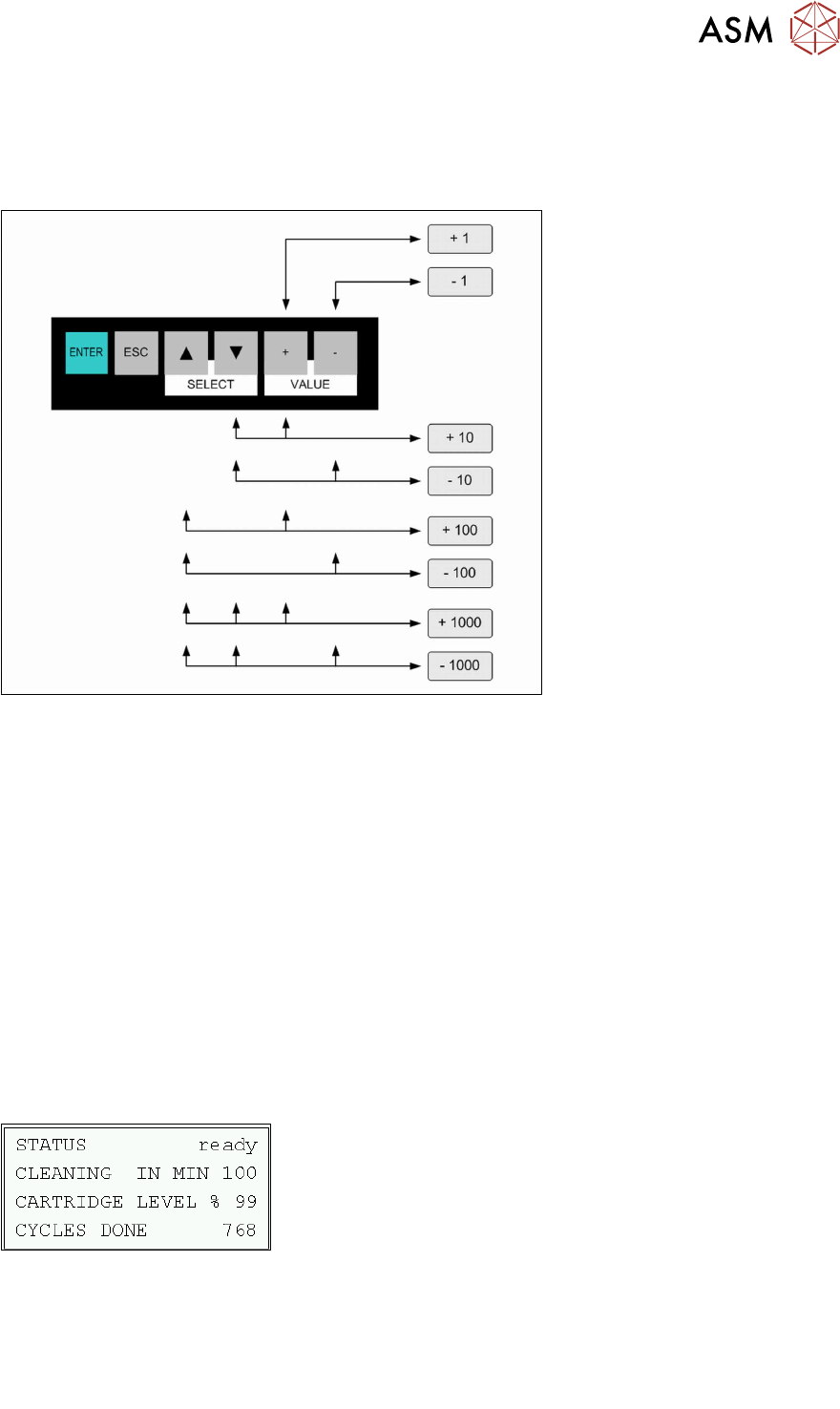
If you want to alter the value considerably, you might find the following key combinations useful.
Fig.2:
► Example: Press the SELECT UP button and the "+" button simultaneously to increase the
parameter value in steps of one hundred.
► Example: Press the SELECT DOWN button and the "-" button simultaneously to reduce the
parameter value in steps of ten.
4.3 Menu Description
The following section introduces and explains the individual menus and functions in the LDU‑X
software. The description relates to the software V2.01.
4.3.1 Production Menus
The production menu shows information about the LDU-X state.
The third line in the menu shows information according to the options installed for that particular
LDU-X.
Working with the refill unit
STATUS Shows the current state of the LDU-X
CLEAN SYSTEM Shows after how many minutes the LDU-X should be cleaned
CARTRIDGE LEVEL Shows how much flux is in the refill unit tube
CYCLES DONE Shows the number of coating cycles which have been performed
since the LDU was last switched on.