00196749-02_UM_LDU-X_EN.pdf - 第52页
5 Working with the LDU‑X 5.2 Configuring the LDU‑X 52 Operating Manual SIPLACE LDU-X Linear Dipping Unit 11/2017 5.2.4 Removing the LDU‑X There are two ways to remove the adapter from the placement machine: 1. Feeder mod…
5 Working with the LDU‑X
5.2 Configuring the LDU‑X
Operating Manual SIPLACE LDU-X Linear Dipping Unit 11/2017 51
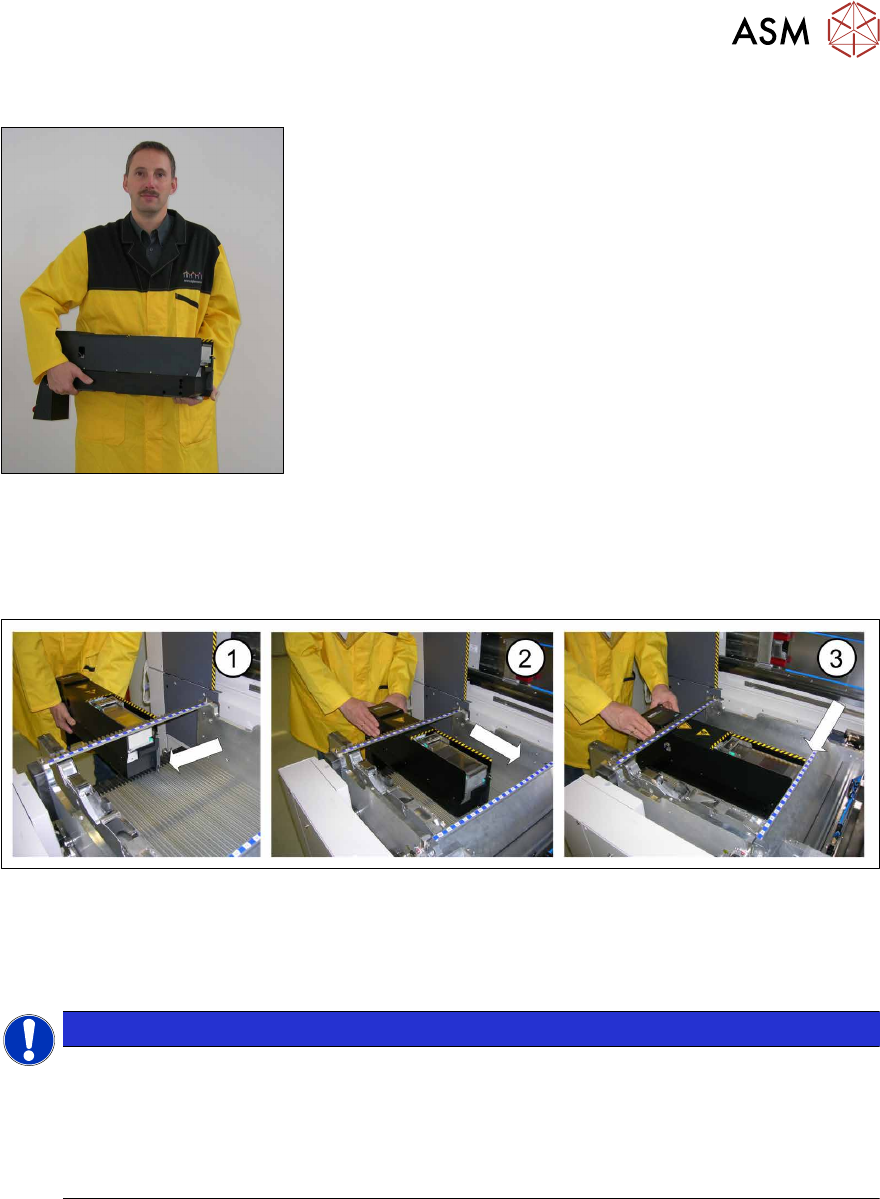
5.2.2 Handling
► Carry the LDU-X as horizontally as possible, with both hands.
5.2.3 Configuring the LDU-X
There are no restrictions for setting up the LDU‑X on a changeover table. You can configure an X
changeover table fully, with the LDU‑X and the corresponding feeders.
► (1) Configure the LDU‑X at the relevant track of the changeover table.
► (2) Push the LDU‑X up to the end stop in the track.
► (3) Press the LDU‑X firmly against the stop, so that the LDU‑X engages.
ð The LDU-X will switch on automatically and will log on to the machine.
NOTICE
Configure the LDU‑X first
To set up the LDU‑X you need a certain amount of space to the right and left of the LDU-X.
► Place the LDU‑X onto the changeover table first.
► Align the LDU‑X (planarity)
► Now place the remaining feeders onto the changeover table.
5 Working with the LDU‑X
5.2 Configuring the LDU‑X
52 Operating Manual SIPLACE LDU-X Linear Dipping Unit 11/2017
5.2.4 Removing the LDU‑X
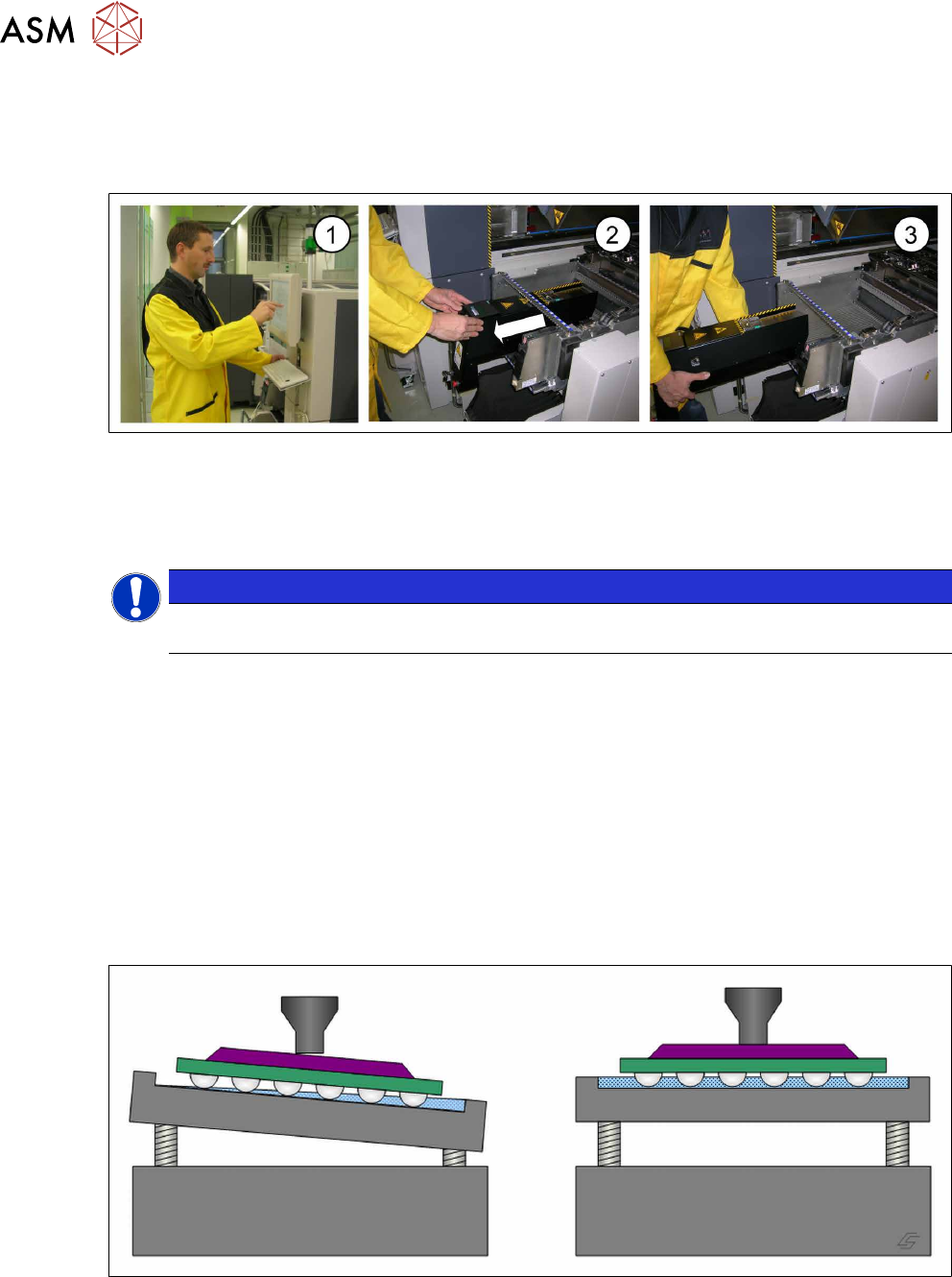
There are two ways to remove the adapter from the placement machine:
1. Feeder module logout via the GUI.
► (1) Log the LDU-X out of the station computer via the user interface.
ð The FCU opens the mechanical lock.
► (2) Pull the LDU-X out.
► (3) Remove the LDU-X from the changeover table.
NOTICE
If the LDU‑X is not removed from the changeover table within approx. 8 seconds, the lock
will engage again and it will be logged back on at the placement machine.
2. Remove the LDU‑X manually from the changeover table.
If the placement machine is switched off or communication with the FCU is not possible, the
LDU_X can also be removed manually.
► Move the changeover table from the placement machine.
► Manually open the lock at the head end.
► Pull the LDU-X out.
► Remove the LDU-X from the changeover table.
5.2.5 Setting up the LDU-X
Information
To ensure that the components can be dipped into the medium over the entire dipping area, it is
important that the dipping area is not tilted. You therefore need to align the LDU-X parallel to the
gantry or to the placement head of the placement machine. The LDU‑X has two adjustment screws
for this purpose. The correct position of the cavity can be checked with the help of the measure-
ment run in the station software.
5 Working with the LDU‑X
5.2 Configuring the LDU‑X
Operating Manual SIPLACE LDU-X Linear Dipping Unit 11/2017 53
Aligning the placement machine
The measurement run sets the dip plate parallel to the gantry. It does NOT determine the level of
the dip plate compared to the ground. It is therefore important that the machine in which the LDU‑X
is used is standing absolutely level. If the machine is not level and the dip plate is then aligned par-
allel to the gantry, the dip plate will then not be level in relation to the ground. The flux might run out
of the cavity in this case.
► Make sure that the placement machine is level.
► Check the levelness in the conveyor area with an accurate spirit level.
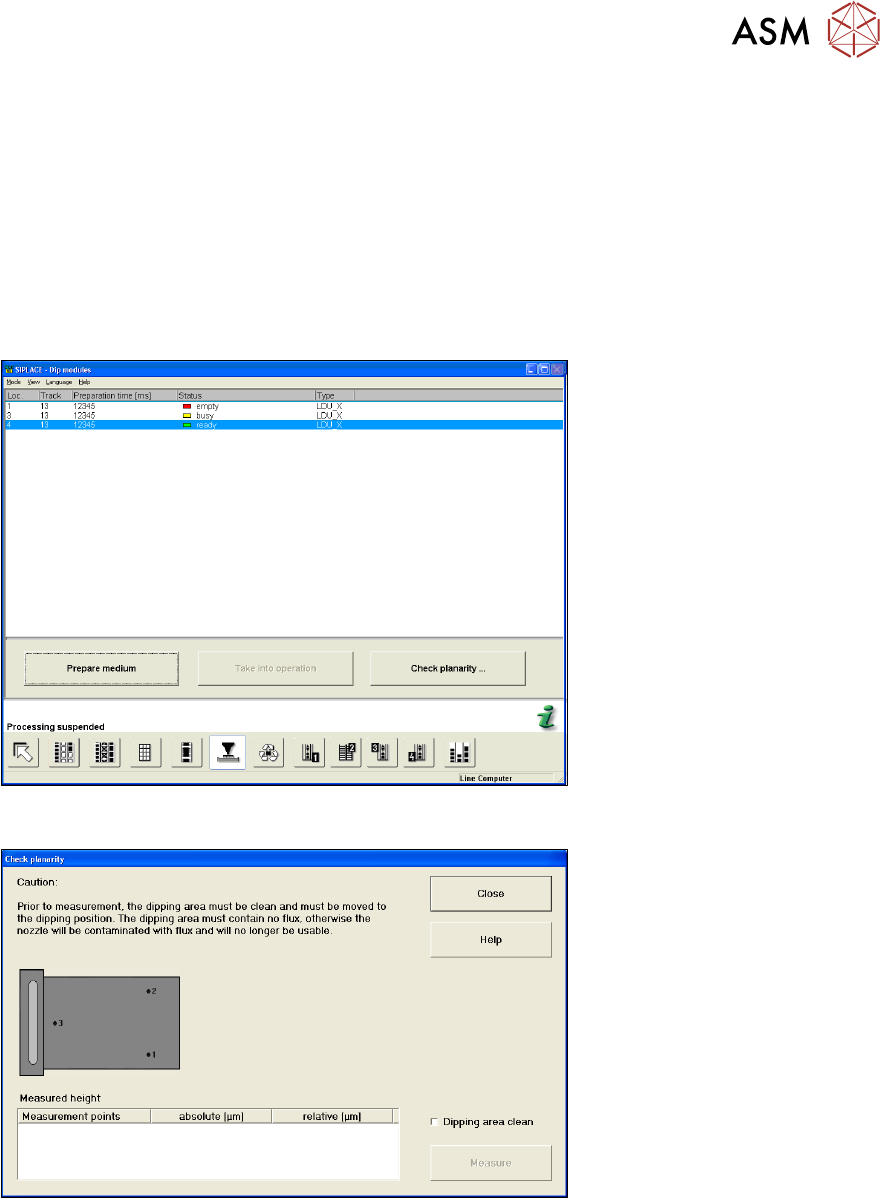
5.2.5.1 Performing Height Measurement
► In the LDU‑X basic view in SIPLACE Pro, select the Check Planarity button...
The Check Planarity dialog box will appear.
► Check whether the cavity is free of flux.
► Confirm the clean state of the cavity by enabling the Dipping Area Clean checkbox. The
Measurement button will become active.
► Check whether there is a nozzle on the placement head.
► Click on the Measurement button to begin measurement. The machine will automatically per-
form the measurement and then show the values determined in the Measuring Height field.
► Read the values. If the relative values for measuring points 2 and 3 are lower than +/- 50 µm,
the LDU‑X is set correctly.
► If the values are greater than +/- 50 µm, adjust the adjusting screws on the LDU‑X accord-
ingly, to align the dip plate (see next section).