00196749-02_UM_LDU-X_EN.pdf - 第42页
4 Software Description 4.3 Menu Description 42 Operating Manual SIPLACE LDU-X Linear Dipping Unit 11/2017 The LDU-X display will show the following message: The LDU-X will now begin filling. The flux is pressed into the …
4 Software Description
4.3 Menu Description
Operating Manual SIPLACE LDU-X Linear Dipping Unit 11/2017 41
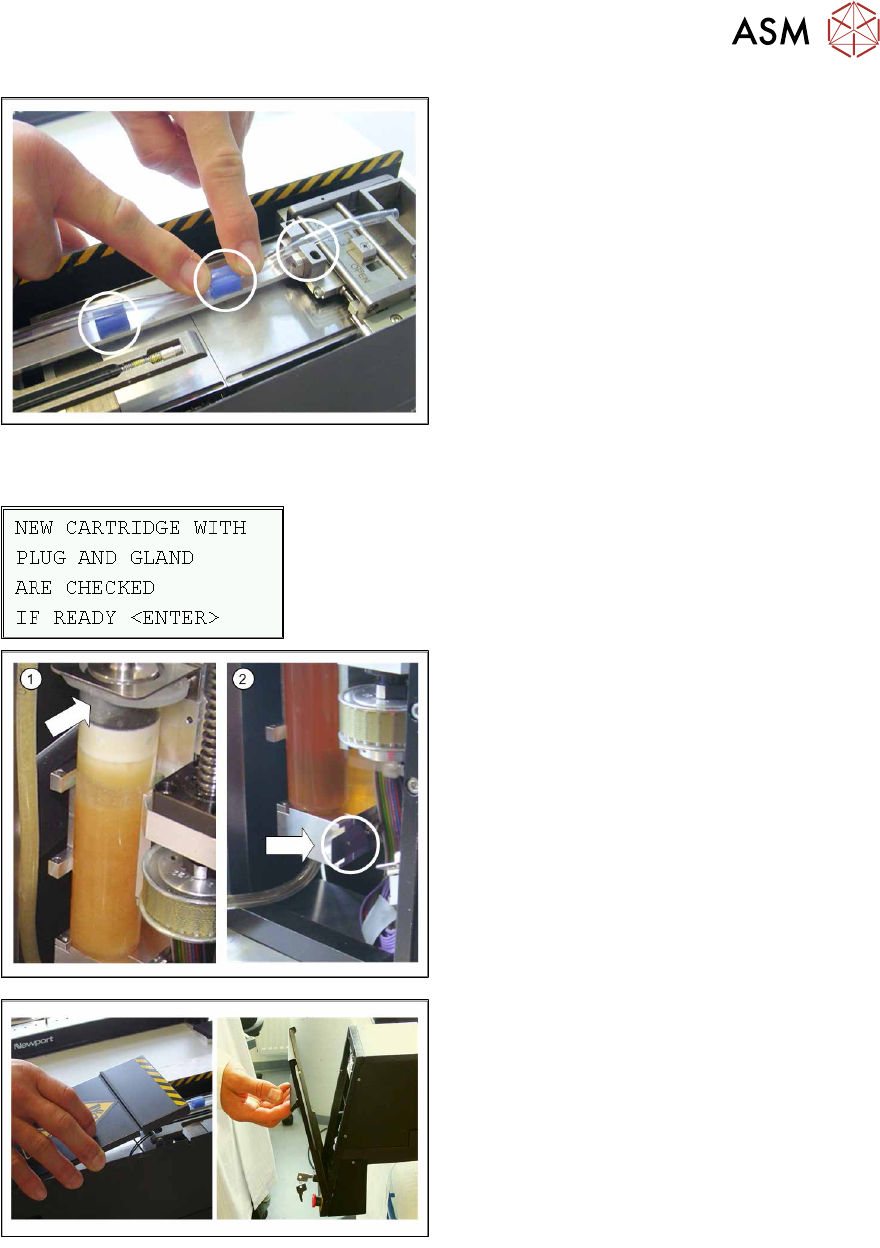
► Press the hose into the clamps at the 3
points shown in the diagram.
► Press the ENTER button.
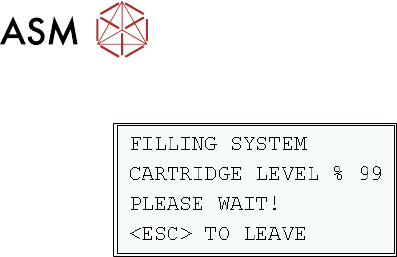
The LDU-X display will show the following message:
► (1) Check again whether the rubber plug
has been inserted correctly into the cart-
ridge.
► (2) Check again whether the hose clamp
fixture has engaged properly.
► Close the cover.
► Close the service lid.
► Press the ENTER button.
4 Software Description
4.3 Menu Description
42 Operating Manual SIPLACE LDU-X Linear Dipping Unit 11/2017
The LDU-X display will show the following message:
The LDU-X will now begin filling. The flux is pressed into the hose and coated alternately, until the
set flux level has been reached.
Once the set level of flux has been reached, the LDU-X automatically performs the function WARM UP.
WARM UP function
With the help of this warm up function, the flux in the LDU‑X can be prepared so that it is ready for
operation. This performs a set number of single cycles in succession until the defined warm up time
has expired. This movement "warms up" the flux.
INITIALIZATION function
With the initialization function, the LDU‑X can be brought into a defined basic position. If initializa-
tion is performed successfully, you can assume that the electrical and mechanical functions of the
LDU-X are OK.
Initialization procedure
The axes can have any initial starting position. Firstly, the Z axis (dip plate) is moved down to the Z
sensor. After this, the X axis (flux tank) is moved to the X init sensor in the basic position.
4 Software Description
4.3 Menu Description
Operating Manual SIPLACE LDU-X Linear Dipping Unit 11/2017 43
4.3.2.2 PRODUCT PARAMETERS menu
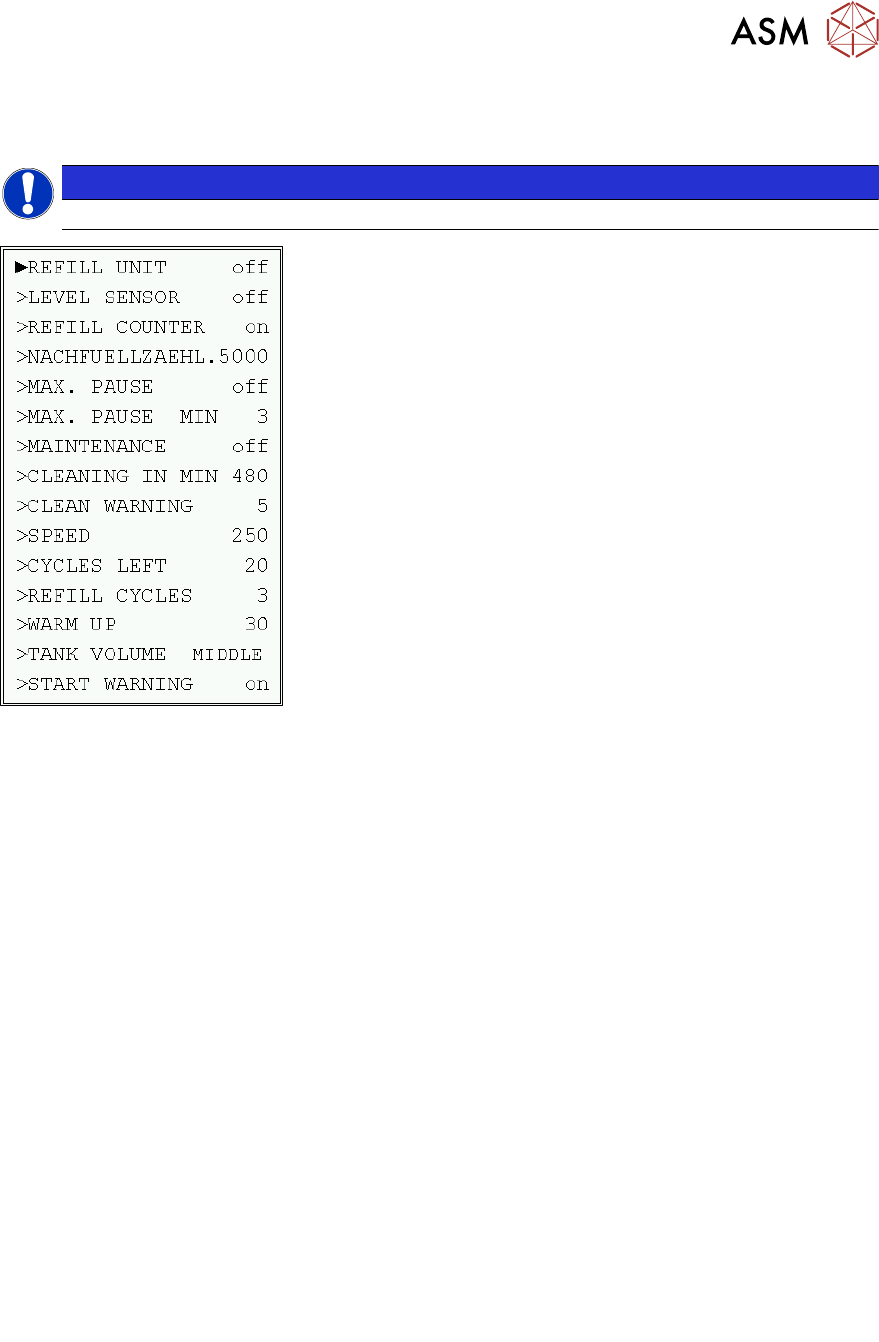
The production parameters can be set in this menu.
NOTICE
The values shown in this section are the defaults for the individual parameters.
REFILL UNIToff Switches the refill unit on and off
LEVEL SENSORoff Switches the level sensor on and off
REFILL COUNTEROn Switches the refill counter on and off
REFILL COUNTER5000 Starting value for the refill counter
MAX.PAUSEoff Switches the non-coating time check on/off
MAX.PAUSEMIN3 The maximum time in minutes during which coating may not be
performed
MAINTEN-
ANCEoff
Switches the cleaning interval check on and off
CLEANING IN MIN480 Cleaning interval duration in minutes
CLEAN WARNING5 Warning display before end of cleaning interval in minutes
SPEED250 Coating speed
CYCLES LEFT20 Number of cycles which will still be coated if a warning is issued.
This applies, for example, if the level sensor reports that the level
of flux is too low.
REFILL CYCLES3 Number of coating cycles after each flux refill
WARM UP30 Number of coating cycles during warm up
TANK VOLUME
middle
Required tank level to be monitored by the sensor
STARTWARNINGon Switches the command to check flux at start of LDU on and off
These settings are checked by the system and corrected where necessary. For example, the refill
unit does not function without the level sensor. If multiple options are enabled, these will be priorit-
ized in the order listed in the menu.