00196749-02_UM_LDU-X_EN.pdf - 第80页
7 Options 7.2 Refill Unit 80 Operating Manual SIPLACE LDU-X Linear Dipping Unit 11/2017 ► Place the hose holder onto the hose at- tachment holder. ► Fit the top cover into place. 7.2.1.4 Function Test After the refill un…
7 Options
7.2 Refill Unit
Operating Manual SIPLACE LDU-X Linear Dipping Unit 11/2017 79
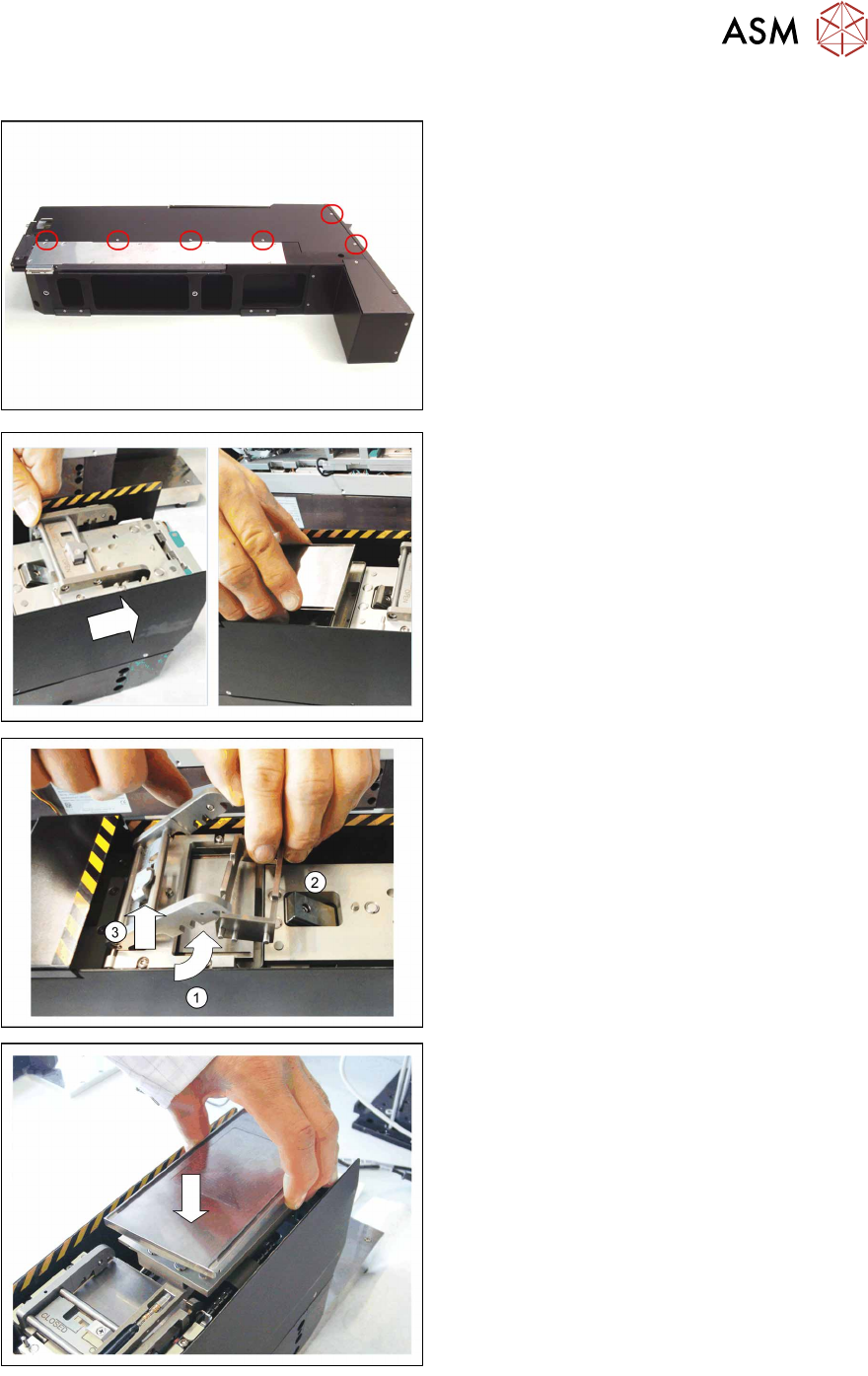
7.2.1.3 Closing the LDU-X
Fastening the side cover plates:
► Place the LDU-X down on its right-hand
side, on a soft and stable surface.
► Place the left cover plate the right way
onto the LDU-X.
► Fix with the 6 screws.
► Place the LDU-X down on its left-hand
side, on a soft and stable surface.
► Place the right cover plate the right way
onto the LDU-X.
► Fix with the 6 screws.
► Push the slide unit forwards.
► Refit the park plate.
► Push the slide back again.
Inserting the coating jar:
► (1) Lift the downholder.
► (2) Insert the coating jar and lower the
downholder again.
► (3) Push the lock on the downholder to the
position CLOSED.
► Refit the dip plate.
7 Options
7.2 Refill Unit
80 Operating Manual SIPLACE LDU-X Linear Dipping Unit 11/2017
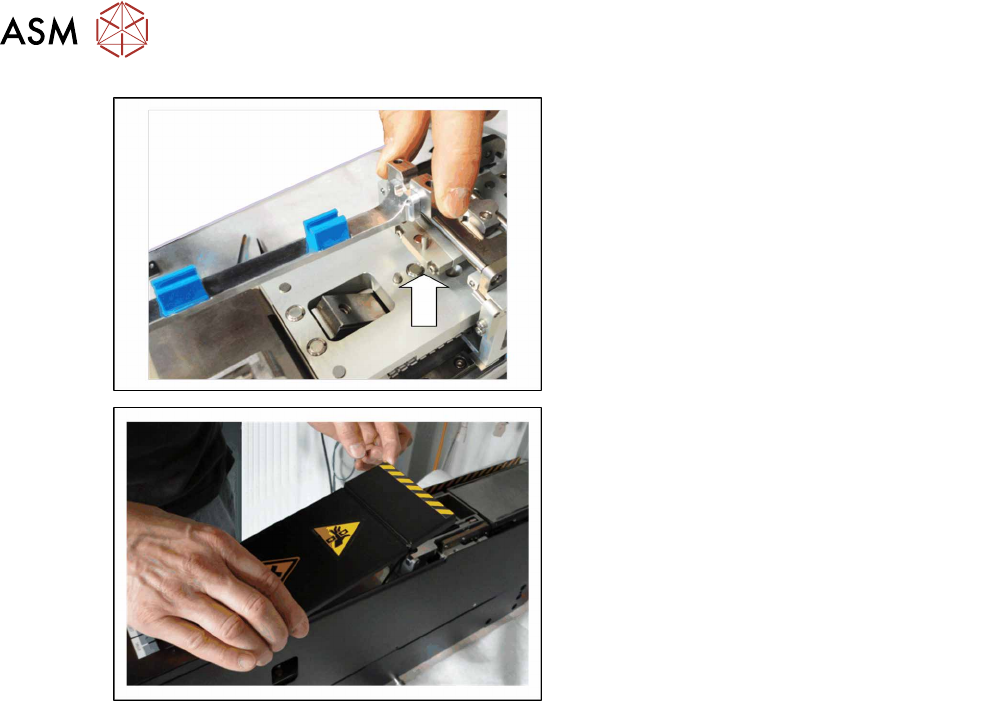
► Place the hose holder onto the hose at-
tachment holder.
► Fit the top cover into place.
7.2.1.4 Function Test
After the refill unit has been installed, check if the LDU-X works properly.
► Connect the LDU-X to a single slot EDIF or to a changeover table at the machine.
► Open the flap at the back of the LDU-X.
► On the LDU-X display, open the Service menu and select the function
PRODUCTION PARAMETERS / REFILL UNIT ON.
► Select the function REFILL UNIT / FIND CARTRIDGE.
► Check if the plunger of the refill unit moves down.
●
If the plunger moves down, stop it using your hand or a finger.
●
If the plunger does not move down, check if the cables of the refill unit are properly connec-
ted.
7.2.2 Activating and deactivating the refill unit
Perform the following steps to enable or disable the refill unit:
► Set the key switch on the LDU‑X to the position SERVICE (vertical).
► On the LDU-X display, select the PRODUCT PARAMETERS menu.
► Press the ENTER button.
► Select the function REFILL UNIT.
► Press the VALUE button (+), until the display shows the state ON (enabled) or OFF (dis-
abled).
► Press the ENTER button to save the value.
8 Process Technology
8.1 Using Flux
Operating Manual SIPLACE LDU-X Linear Dipping Unit 11/2017 81
8 Process Technology
The following section describes the dip process and the parameters which influence this process.
8.1 Using Flux
To improve the solderability of corrosive components or components with complex structures,
these components should be coated with additional flux during production. This increases the qual-
ity of the soldered connection. The flux is applied to the relevant contact surfaces of the component
or board during the placement procedure. The two most common procedures are dispensing and
dipping. In addition there are other procedures such as printing, stamping, spraying, brush applic-
ation etc.
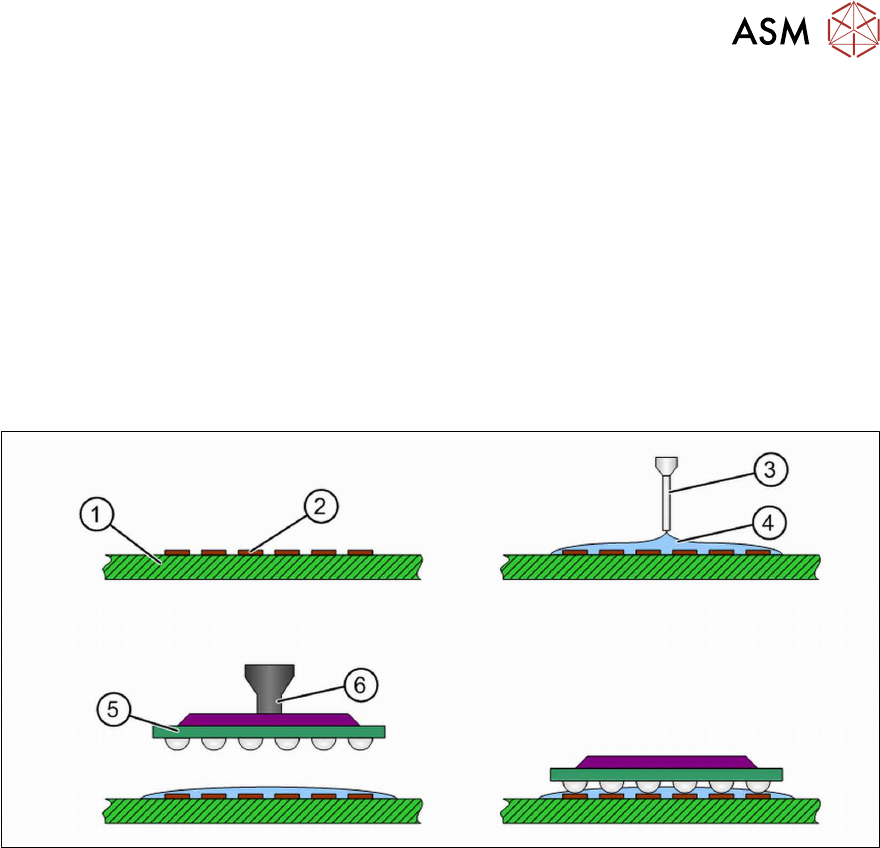
Flux application by dispensing
During dispensing, the flux is applied directly onto the board (1). A needle (3) is positioned exactly
over the soldered connection or the contact surfaces (2) and a defined amount of flux (4) is applied
to the soldered connection. A film forms on the soldered connection, in which the component (5) is
placed with the tweezers (6). Only thin flux types are suitable for dispensing.