iTAC Advance Issue 2, Mar 2018.pdf - 第14页
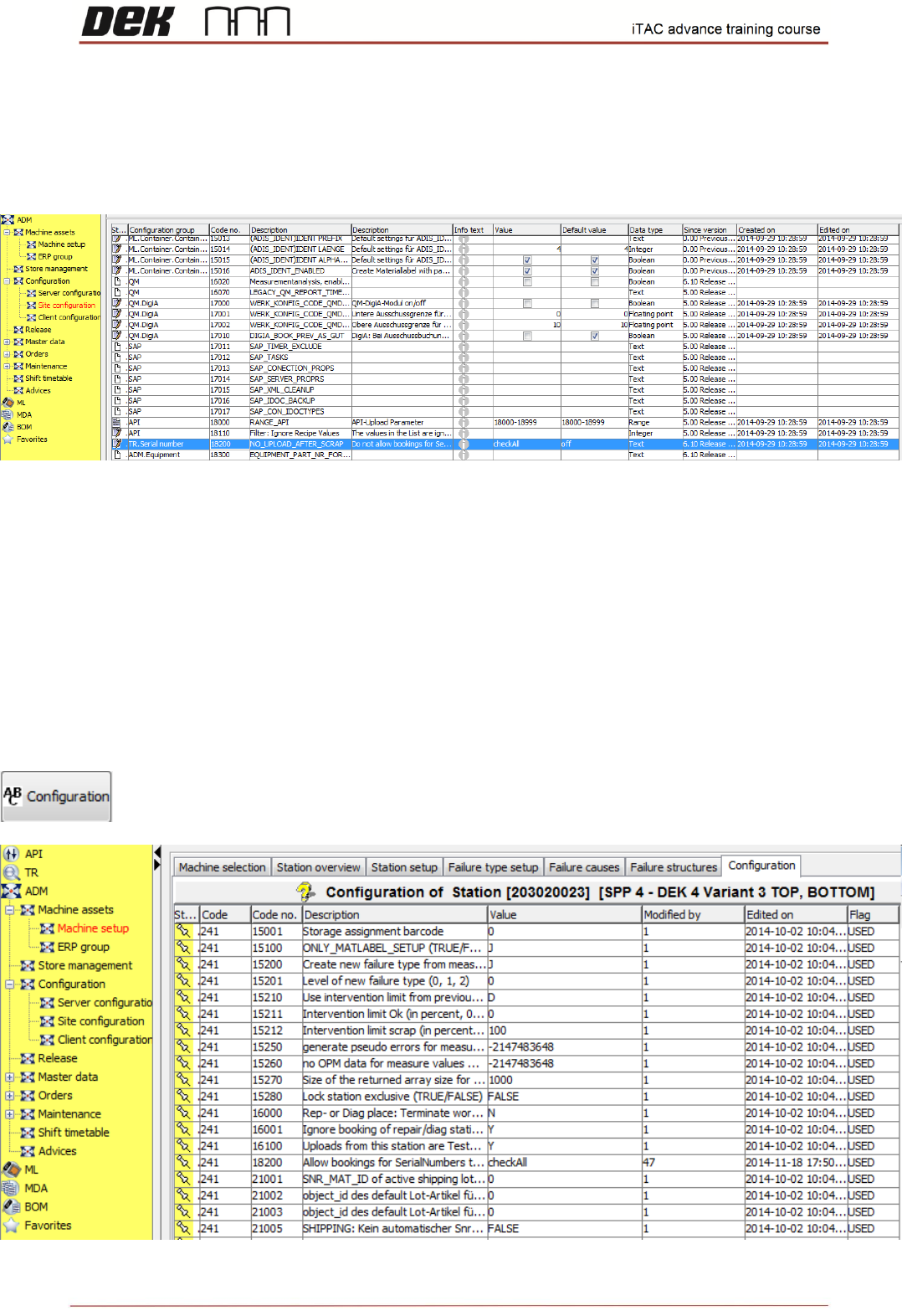
14 Issue 2 , Mar 18 Site parameters ❑ Go to ADM ❑ Click on Configuration\ Site configuration Station parameters ❑ Go to ADM ❑ Click on Machine Setup ❑ Click on Station Overview tab ❑ Select station, right click edit ❑ Se…

13
Issue 2, Mar 18
Important parameters for DEK printer in the table below
Code
no.
Status
Function
Paremeter type
Descripton
Comment
7027
Y
BOM check
with status
Station
parameter
Activates/deactivates (Y/N) the
monitoring of the container state
upon setup
creation at the (manual) setup
station. If the option is set (Y), only
valid containers
are accepted for setup creation.
7028
Y
BOM check
with quantity
Station
parameter
Activates/deactivates (Y/N) the
monitoring of the container
quantity upon setup
creation at the (manual) setup
station. If the option is set (Y), only
containers
for creating a setup are accepted
whose container quantity is > 0.
7134
Y
Check
expiration
Station
parameter
Activates/deactivates (Y/N) the
monitoring of the expiration date
(MSL) upon
setup creation at the (manual)
setup station. If the option is set
(Y), only valid
containers are accepted for setup
creation.
7400
TRUE
Update single
material
quantity
Station
parameter
Activates/deactivates the option
of automatically booking the
processed components for the
processing of an individual item by
quantity from the rigged
containers.
7401
FALSE
Update mat
qty for all
bookings
Station
parameter
In the event of multiple bookings
of a station to a serial number, this
activates/
deactivates whether the
consumed materials are booked
on all bookings
(TRUE) or whether this only occurs
for the first booking (FALSE).
To be set to TRUE during testing
13400
Y
Allow merge
multipanel
scrap
Station
parameter
Activates/deactivates (Y/N)
whether scrapped serial numbers
of a multiple
panel can be mounted in the next
integration level.
18200
checkAll
Allow
bookings for
SerialNumber
s that are
already set to
scrap
Site & Station
parameters
Parameter for controlling the
program behaviour for whether
serial numbers
may be processed further even if
they were booked once with
SCRAP at a
work step. To be initially set as site
parameter.
The program behaviour selected
here is initially valid for all stations
in
the site; if necessary, the
behaviour for individual stations
can be overridden (station
parameter code no. 18200)
14
Issue 2, Mar 18
Site parameters
❑ Go to ADM
❑ Click on Configuration\ Site configuration
Station parameters
❑ Go to ADM
❑ Click on Machine Setup
❑ Click on Station Overview tab
❑ Select station, right click edit
❑ Select ABC configuration
15
Issue 2, Mar 18
Note: The site/station parameters above should be checked if some of the features will not
work correctly.
NOTES:
BOM Module - Bill of Material
Bill of Material module is used for creating & editing of BOMs.
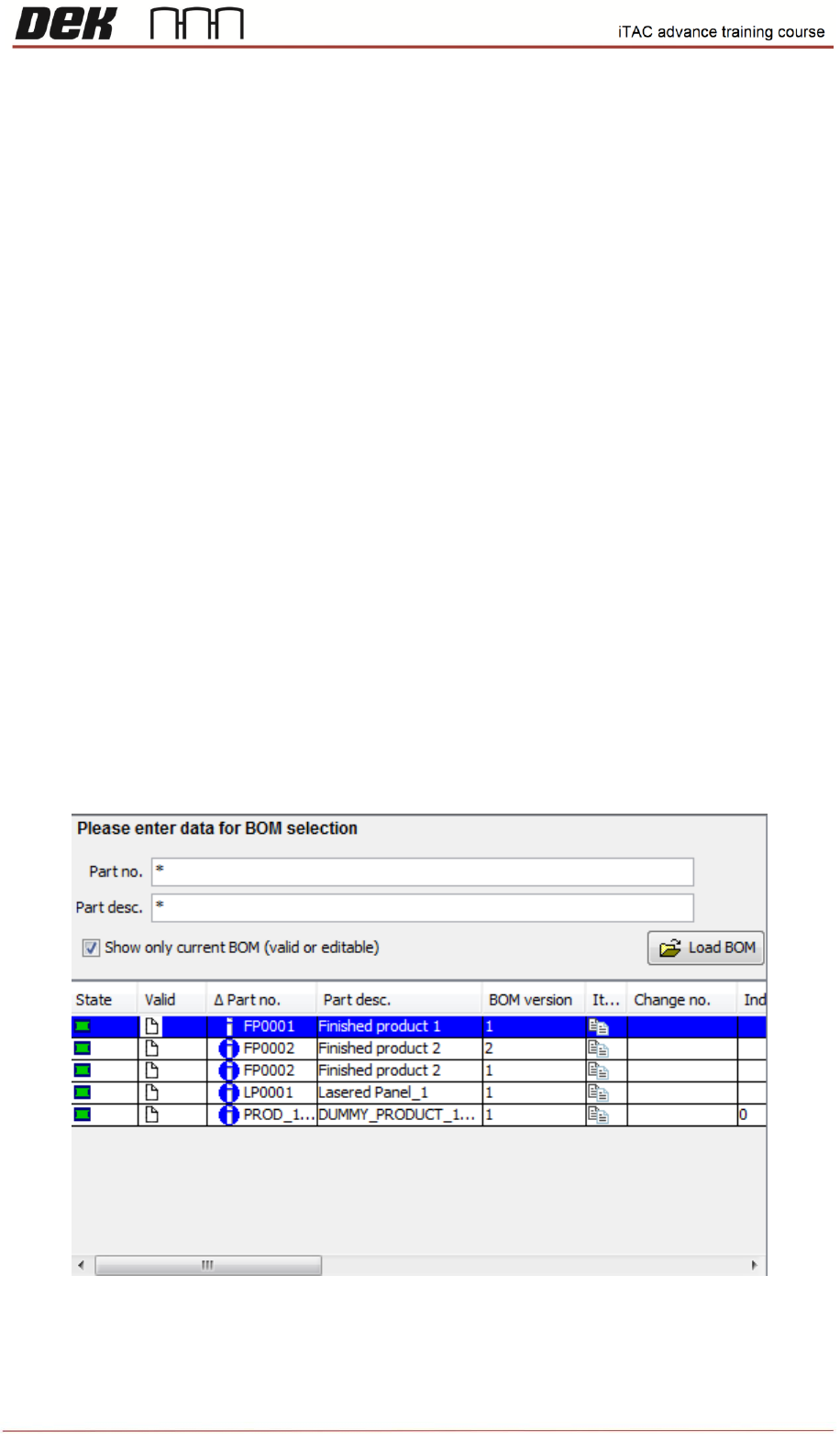
❑ Go to BOM
To load the BOMs click on any field and type ("*"), then click on Load BOM button, all BOMs should
be displayed.
To Display what contains the BOM right click, selection window will be displayed, then select Display
BOM.