iTAC Advance Issue 2, Mar 2018.pdf - 第58页
58 Issue 2 , Mar 18 Objective HO 16 : Use IMSApi-Description manual and find what the error code 1 means. Note: Some of the errors found in logs could be replicated in iTA C. The API function can be calculated manually, …

57
Issue 2, Mar 18
Printer log files
If something goes wrong, the iTAC log can be checked (open latest log file in
E:\Log\PluginData\iTAC7) and found which API function is causing issues.
See example below
; 2014/04/24 11:39:36.911 7220.213 CSetup->CheckSetup->Completed without error
; 2014/04/24 11:39:36.911 7220.213 SetupCheck Message
SerialNumberRef : -1
SerialNumberRefPos : 1
WorkOrderNumber : 23042014
Process Layer : ComponentSide
CheckMode : 1
ResultMode : 1
SetupCheck Message Output
WorkOrderNumber : 23042014
ProductNumber : FP0002
PlacementName :
SetupActive : 1
; 2014/04/24 11:40:49.715 7293.017 CTrace->GetStationSetting->Completed without error
; 2014/04/24 11:40:49.715 7293.017 Work Order Number: 23042014
; 2014/04/24 11:40:49.715 7293.017 Process Layer: ComponentSide
; 2014/04/24 11:40:49.715 7293.017 BOM Version: 4
; 2014/04/24 11:40:49.715 7293.017 Part Number: FP0002
; 2014/04/24 11:40:49.793 7293.095 Error calling CMaterial->GetMaterialBinData
2014/04/24 11:40:49.793 7293.095 E: Exception caught:
; 2014/04/24 11:40:49.809 7293.111 DEK.iTAC7.CResultWarning: Exception of type
'DEK.iTAC7.CResultWarning' was thrown.
; at DEK.iTAC7.CExceptionHelper.HandleResult(CiTAC7 theITAC7, IDebugLog theLogger, Object
theInstance, String theCaller, Int32 theResult)
; 2014/04/24 11:40:49.809 7293.111 Exception thrown in GetMaterialBinData, Error Code: 1
; 2014/04/24 11:40:49.809 7293.111 GetMaterialBinData Message
MaterialBinFilters
Key : MATERIAL_BIN_NUMBER
Value : barcode
Attribute: empty
MaterialBinResultKeys
MATERIAL_BIN_PART_NUMBER
MATERIAL_BIN_QTY_ACTUAL
MATERIAL_BIN_STATE
MaterialBinResultValues
From the log is visible that function “GetMaterialBinData” was thrown with error code 1.

58
Issue 2, Mar 18
Objective HO 16: Use IMSApi-Description manual and find what the error code 1 means.
Note: Some of the errors found in logs could be replicated in iTAC. The API function can be
calculated manually, if no error is returned then problem is very likely caused by DEK
software.
NOTES:
59
Issue 2, Mar 18
Material
Material is each physical part included in BOM. This means final product contains this part
which is used during manufacturing process (on the printer it is only print material)
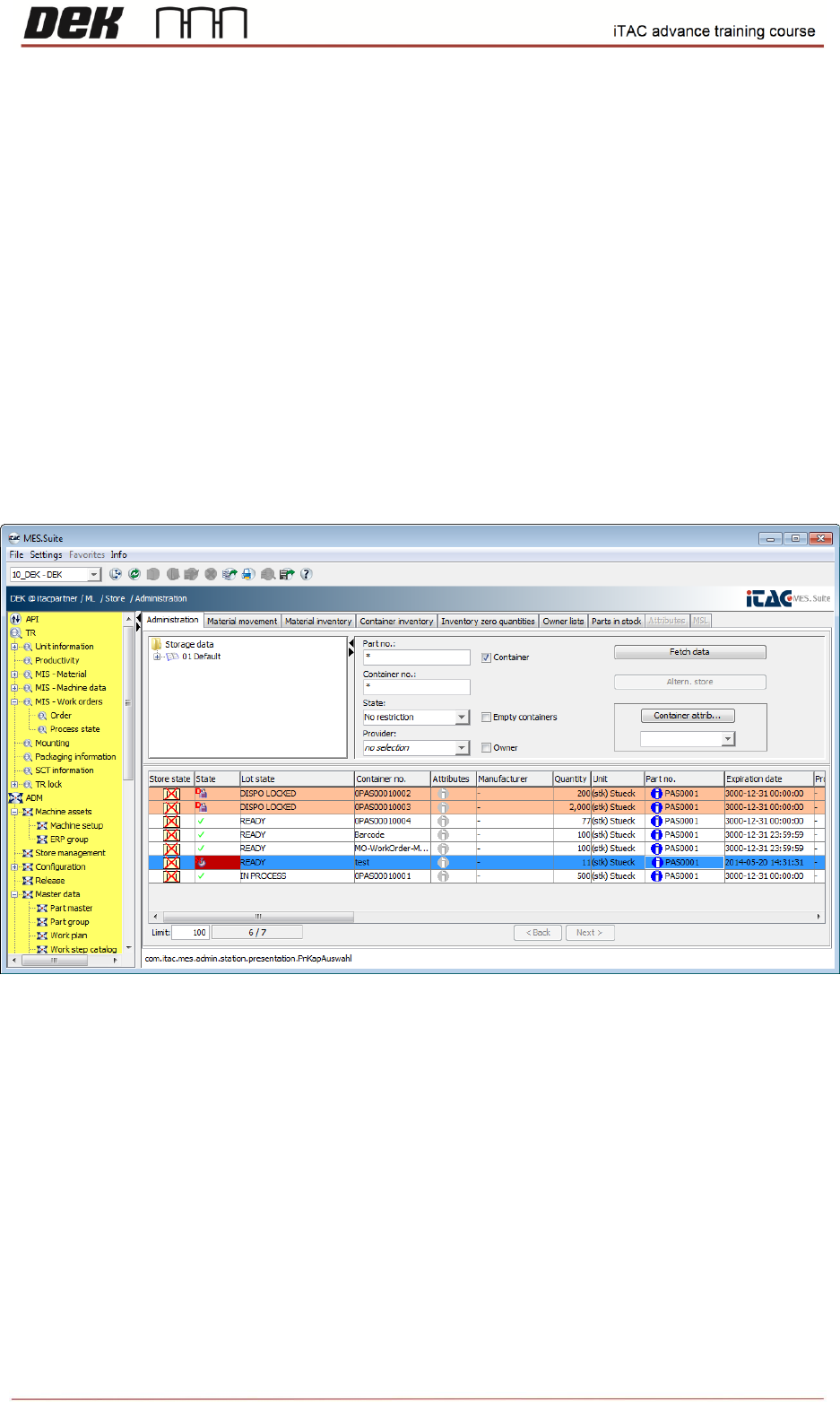
❑ Go to ML\Store\Administration.
In order to see all available containers, type asterisk ("*") into Part no. field, then click on fetch data.
Note: Container number usually consist part number + unique number (serial number/lot
number, etc.). Unique part is essential for later identification, e.g. will be found issue in
particular paste cartridge – Can be traced on which boards was used this paste cartridge.
In administration tab can be checked state/quantity/expiration date of all containers.
❑ Select appropriate container, right click then select MSL administration.