SIPLACE Line Computer UNIX.pdf - 第408页
13 Production Tools / Set-Up User Manual Line Compu ter UNIX 13.1 Set-Up E ditor (Feeder Part and WPC/MTC Editors) Software V ersion 502.xx 10/2000 Issue 406 I t I I - Divisions in X Number of divisions i n x-directio n …

User Manual Line Computer UNIX 13 Production Tools / Set-Up
Software Version 502.xx 10/2000 Issue 13.1 Set-Up Editor (Feeder Part and WPC/MTC Editors)
405
I
t I I
Menu Bar
The menu bar contains the menus "FILE", "EDIT" and "HELP".
NOTE
The functions and the operation of the menus "FILE" and "HELP" are similar to those in other application
programs of the line computer and are described in detail in chapt. 2 "General Information on Using the
Program".
EDIT Menu
The EDIT menu contains the following options:
- Reset data
The corrections are deleted from all editing fields. The factory-set default values are redisplayed.
- Delete comp.
The component is deleted from the feeder division. This is indicated by a minus sign in the identifica-
tion field.
Identification Field
The identification field contains the following data which cannot be edited:
- Station: Name of the current station including "Anlagen/line/subline/set-up/
station name"
- Location: Designation of the current waffle pack tray carriers
- Track: Number of the track or level on which the waffle pack tray carrier is set up
with the selected waffle pack tray
- Mach. opt: Waffle pack tray with information on the number of the divisions in X and
Y-directions (e.g. 1x1) and the components set up therein. A minus sign
signifies that no component has been defined.
- Div.: No entry
Editing Area
Corrections are entered in the editing area which are required for the accurate removal of the components.
When the Packaging Editor is opened, the factory-set default values or the values that were entered most
recently for a given component, are displayed in the editing fields.
The values in the editing area can be changed by clicking on the individual editing fields. The values are accepted
by pressing the Enter key after each correction made.
If the entries are not to be accepted, it is possible to reset the values on the EDIT menu to the default values
using the "Reset data" option.
13 Production Tools / Set-Up User Manual Line Computer UNIX
13.1 Set-Up Editor (Feeder Part and WPC/MTC Editors) Software Version 502.xx 10/2000 Issue
406
I
t I I
- Divisions in X
Number of divisions in x-direction (default value: 1)
- Divisions in Y
Number of divisions in y-direction (default value: 1)
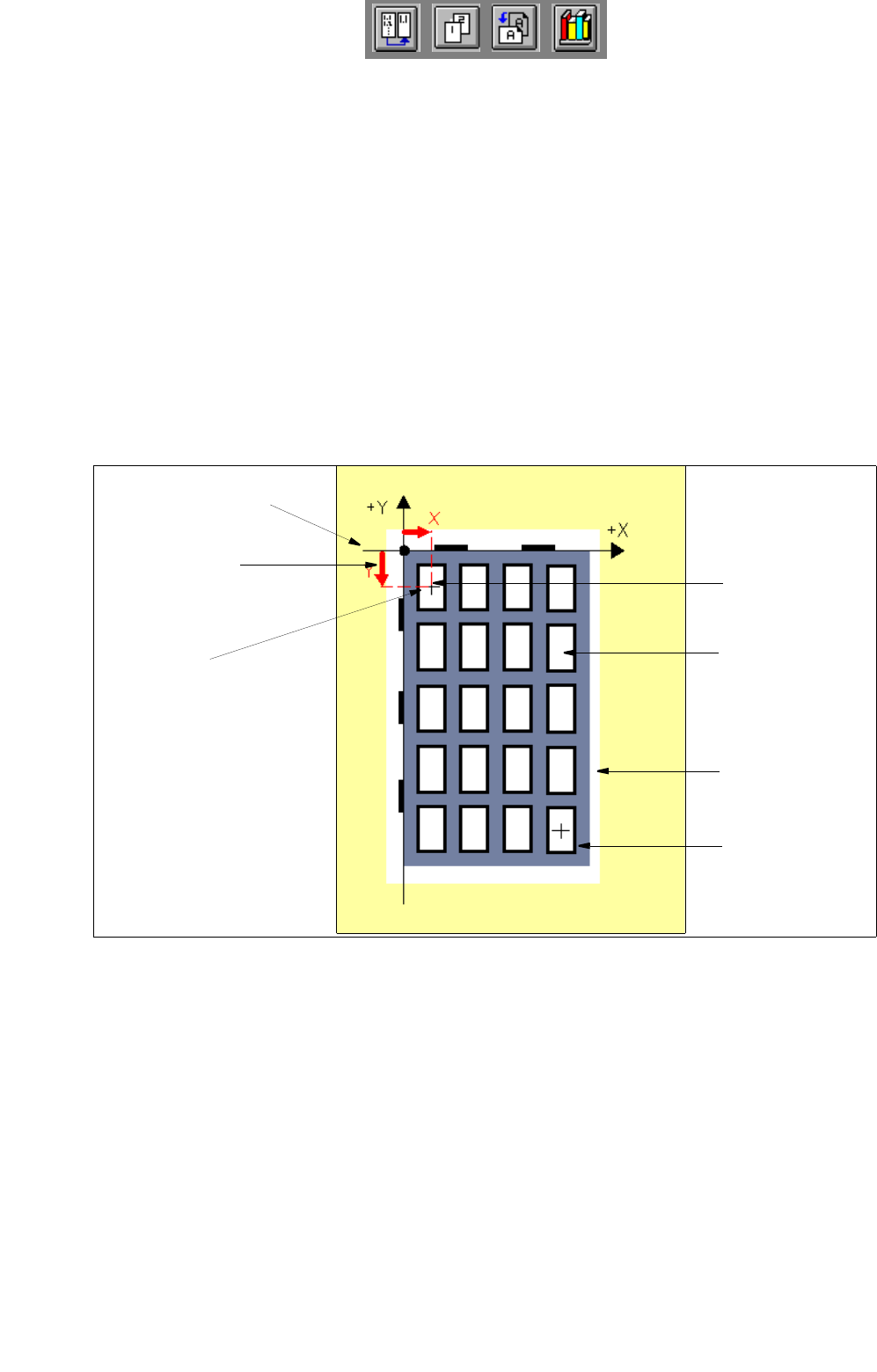
- First div. X [mm]
Offset from the zero point of the waffle pack tray carrier to the center of the first division in x-direction
(default value: 0.000). See Fig. 13.1.15.
- First div. Y [mm]
Offset from the zero point of the waffle pack tray carrier to the center of the first division in y-direction
(default value: 0.000). See
Fig. 13.1.15.
Fig. 13.1.15 X-Offset and Y-Offset to the First Division
division of the
waffle pack tray
first division
X [mm]
zero point of the
waffle pack tray
first division
Y [mm]
center of
first division
waffle pack tray
waffle pack tray
carrier
carrier
User Manual Line Computer UNIX 13 Production Tools / Set-Up
Software Version 502.xx 10/2000 Issue 13.1 Set-Up Editor (Feeder Part and WPC/MTC Editors)
407
I
t I I
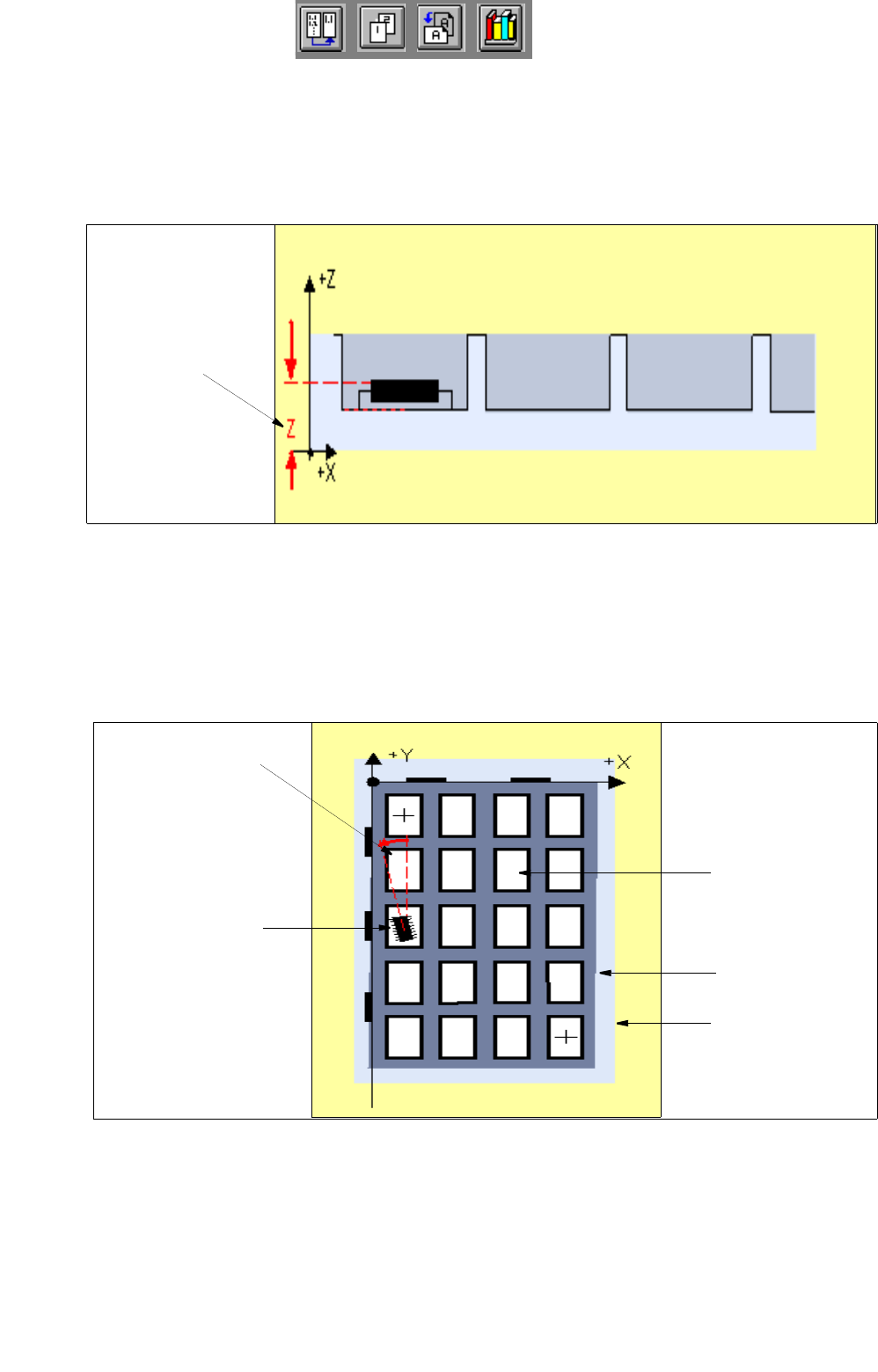
- Z [mm]
Pick-up height: Offset in Z-direction from the support surface of the waffle pack tray in the waffle pack
tray carrier to the bottom surface of the division of the waffle pack tray (default value: 0.000). Siehe
Fig. 13.1.16.
Fig. 13.1.16 Pick-Up Height: Offset in Z-Direction
- Pick-up ang. [degr]
Pick-up angle (rotational angle) of the component in the tray division
(default value: 0.00). See Fig. 13.1.17.
Fig. 13.1.17 Pick-Up Angle of the Component in the Division of the Waffle Pack Tray
pick-up height
Z (mm)
component
pick-up angle
[degree]
division of
waffle pack tray
waffle pack tray
waffle pack
tray carrier