SIPLACE Line Computer UNIX.pdf - 第537页
User Manual Line Computer UNIX 17 Practical Tips on Using the LC UNIX Software Version 502.xx 10/2000 Issue 17.3 Description of Components and PCBs 535 I t I I 17.2.2.1 Package Form Descripti on A) Descr iption of a PD C…
17 Practical Tips on Using the LC UNIX User Manual Line Computer UNIX
17.3 Description of Components and PCBs Software Version 502.xx 10/2000 Issue
534
I
t I I
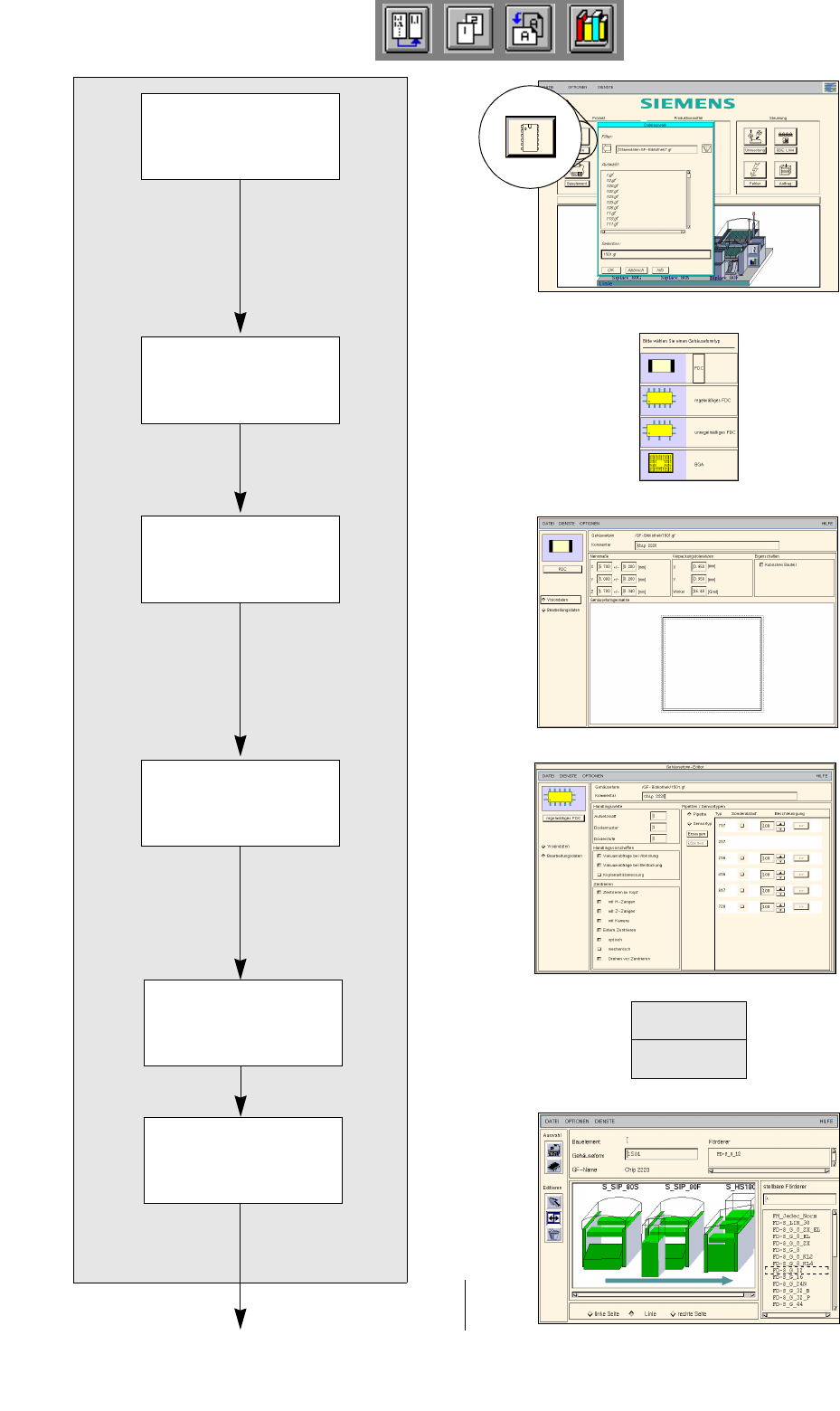
FILE
Save
Opening Package
Form Editor
Defining package
form type
Entering dimensions
Allocating package
form to a feeder
Entering handling
data
Package form description for package form 1501
continued on page 17-24
Saving
package form data
User Manual Line Computer UNIX 17 Practical Tips on Using the LC UNIX
Software Version 502.xx 10/2000 Issue 17.3 Description of Components and PCBs
535
I
t I I
17.2.2.1 Package Form Description
A) Description of a PDC using package form 1501 as an example
To open the Package Form Editor for package form 1501, proceed as follows:
1. On the desktop click on the icon of the Package Form Editor .
The file selection window is opened.
2. Click on the Selection editing field.
3. Enter the package form number, here: 1501.gf and click on the OK button.
The Package Form Editor with the package form type selection window is opened.
To define the package form type „PDC“ for package form 1501, proceed as follows:
4. In the package form type selection window click on the type PDC.
The selection window is closed.
5. In the Package Form Editor click on the Comment editing field, enter a unique comment, here: Chip
2220.
To enter the dimensions for package form 1501, proceed as follows:
6. In the Nominal Dimensions editing area enter the dimensions of the package form (click on the editing
field, enter value, confirm by pressing the Enter key), here: see chart:
The tolerances are entered automatically.
The package form is displayed with the tolerance range.
7. For this example the default values of the editing areas Packaging tolerances and Features are adopted,
no entries are required.
To enter the handling data for package form 1501, proceed as follows:
8. Activate the Handling data button.
The screen for entering the handling data is displayed.
9. Activate the Nozzle button in the command area.
10. Click on the Create button.
The Nozzle type selection window containing a list of the nozzle types is loaded.
11. Click on a nozzle, here: 615.
The selection window closes, the nozzle is transferred to the view area.
12. Select all other nozzles required accordingly, here: 618.
13. Activate the Sensor type button.
14. Click on the Create button.
The Sensor type selection window containing a list of the sensor types is opened.
15. Click on a sensor type, here: 9.
The selection window closes, the sensor type is transferred to the view area.
16. In the ’Handling values’ editing area, enter the applicable value in the Placement force field, here: 2.
17. In the ’Centering’ selection box, activate the applicable buttons, here: Centering in head.
18. In this example, the preselected settings for the handling values, the handling instructions and the ’Acce-
leration’ special handling option can be accepted as they are. No changes are required.
19. Click on the Save option on the FILE menu.
The data are now saved.
To allocate a feeder to package form 1501, proceed as follows:
20. Click on the Starting Feeder Editor option on the SERVICES menu.
The Feeder Editor is opened.
21. Activate the Allocate icon .
X
(Length l)
Y
(Width b)
Z
(Height s)
5.7 5 1.7
17 Practical Tips on Using the LC UNIX User Manual Line Computer UNIX
17.3 Description of Components and PCBs Software Version 502.xx 10/2000 Issue
536
I
t I I
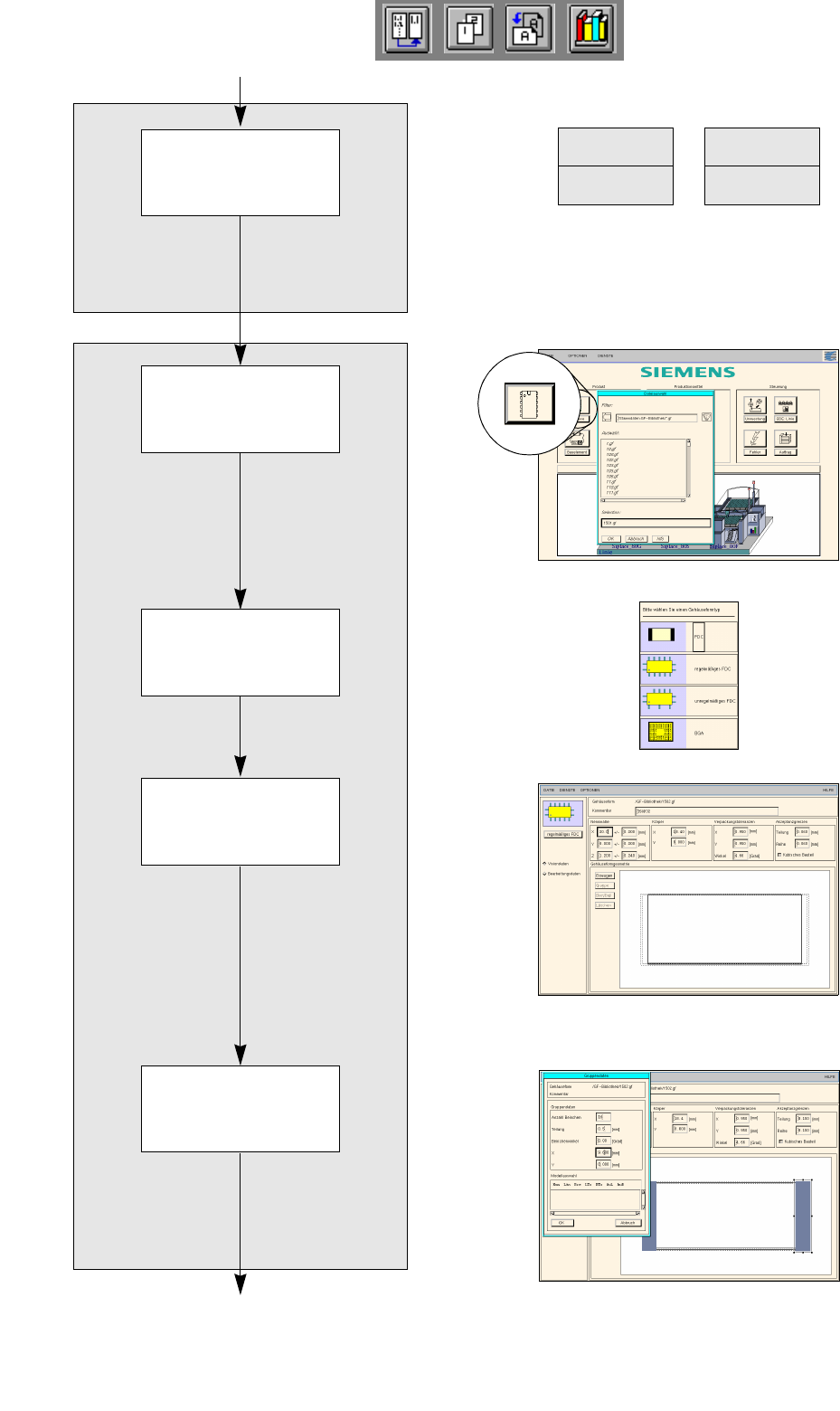
FILE
Save
FILE
Quit
Entering dimensions
Creating pin group
Package form description for package form 1502
continued on page 17-26
continued from page 17-22
Defining package
form type for
package form 1502
Opening Package
Form Editor for
package form 1502
Saving
feeder to package
form allocation