KE-2030使用说明书.pdf - 第244页
4 – 145 MTC /MTS T ray P riority Specify whether the same t ype of component s are to be assig ned to an MTC or MTS or assigned with giving the component s f eeding speed the hig hest prior ity . Figure 4.10.1.15 MTC/MTS…
4 – 144
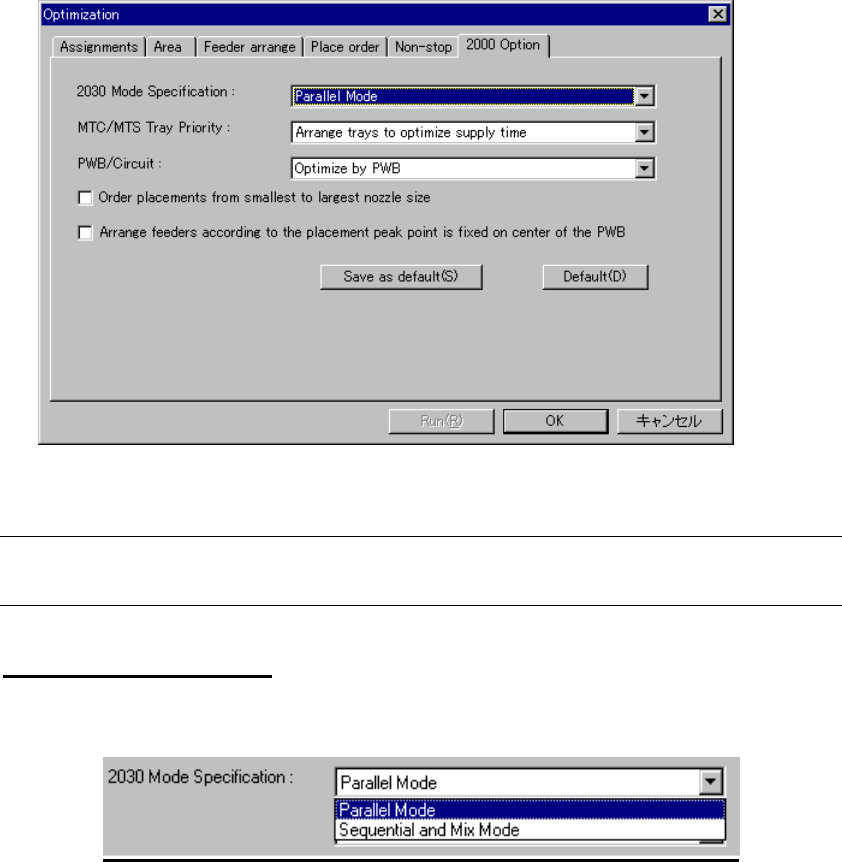
(6) 2000 Option
Specify KE-2000 series specific optimization option. Click the “2000 Option” tab to
display the following dialog box:
Figure 4.10.1.13 2000 Option
Note: The "2000 Option" is an option common to the KE-2000 series of products.
Therefore, this option is invalid for this model, but it provides selectable options
2030 Mode Specifications
Specify 2030 placement mode.
Figure 4.10.1.14 2030 Mode Specification
• Parallel Mode: simultaneously places components on two
boards (default setting)
• Sequential and Mix Mode The machine places component in Simultaneous
Placement mode, and then in Sequential
Placement mode (by using the left and right
heads to place components separately).
4 – 145
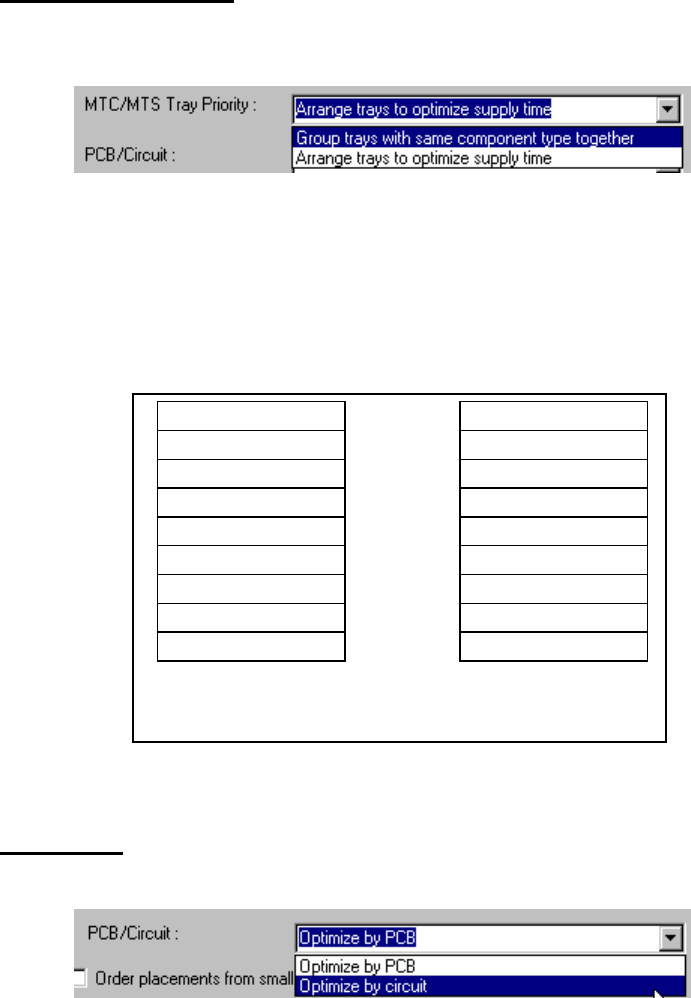
MTC/MTS Tray Priority
Specify whether the same type of components are to be assigned to an MTC or
MTS or assigned with giving the components feeding speed the highest priority.
Figure 4.10.1.15 MTC/MTS Tray Priority
• Group trays with same component type together:
Assigns the same type of components to an MTC or MTS.
• Arrange trays to optimize supply time:
Assigns components to an MTC or MTS with giving the component feeding
speed the highest priority.
Comp Type A
A
A
Comp Type B
B
B
Comp Type C
C
C
Comp Type A
Comp Type B
Comp Type C
A
B
C
A
B
C
When “Group trays with same
component type together” is selected
When “Arrange trays to optimize
supply time” is selected
Figure 4.10.1.16 Example of MTC/MTS Tray Priority
PCB/Circuit
Specify whether to optimize the entire board or a circuit.
Figure 4.10.1.17 PCB/Circuit
When you select “Optimize by circuit”, the system optimizes a circuit one by one.
When you select “Optimize by PCB”, the system optimizes each circuit as if
components are assigned on a single plane board.
• Order placements from smallest to largest nozzle size
Specify whether components are placed from ones which require the smallest
nozzle or not.
When this item is checked, the system optimizes the component placement order
so that components which use the smallest nozzle are placed first with ignoring the
priority specified with the “Place order” option.
4 – 146
• Arrange feeders according to the placement peak point is fixed on center of the
PWB
Specify the calculation method of the component placement peak point to assign
feeders.
When this option is checked, the system assigns feeders so that the center of a
board can be the component placement peak point.
When this option is not checked, the option selected in the “Placement peak”
pull-down box displayed in the “Feeder arrange” dialog box is activated.
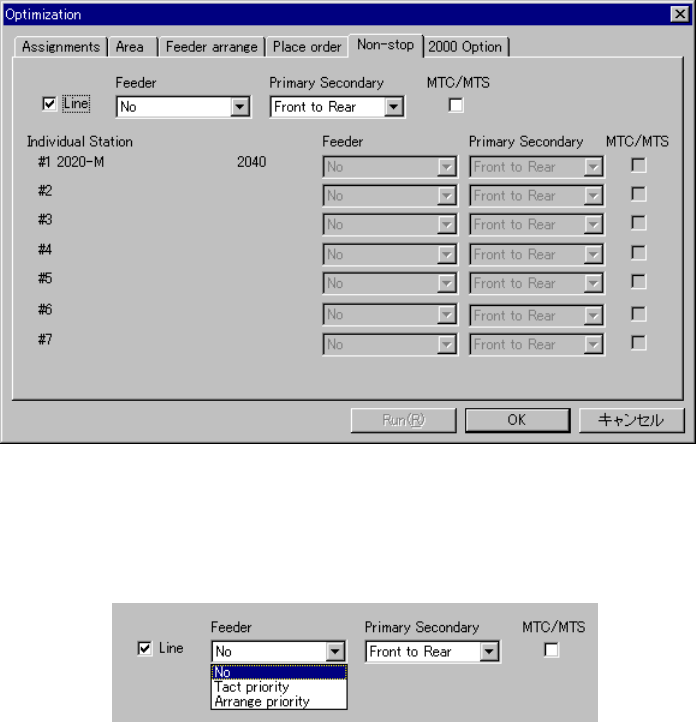
(7) Non-stop operation
You can use the Optimization function to specify a station that is to perform the
Non-stop operation. When you use this option, you can replace components
without stopping the current production.
When you select the “Non-stop” tab, the following dialog box appears on the
screen.
Figure 4.10.1.18 “Non-stop” option tab
◇ When you check the check box “Line”, you can specify the Non-stop operation.
Figure 4.10.1.19 Specifying the Non-stop operation