KE-2030使用说明书.pdf - 第595页
9 − 2 9.2 Warmi ng up 9.2.1 Warm-up initial screen W hen y ou select t he [W arming Up] com mand on the [Maintenance] m enu invoked fr om the menu bar of t he main menu, the f ollowing W arm-up initial screen appears. Fi…
9 − 1
CHAPTER 9 MAINTENANCE MODE
9.1 Overview
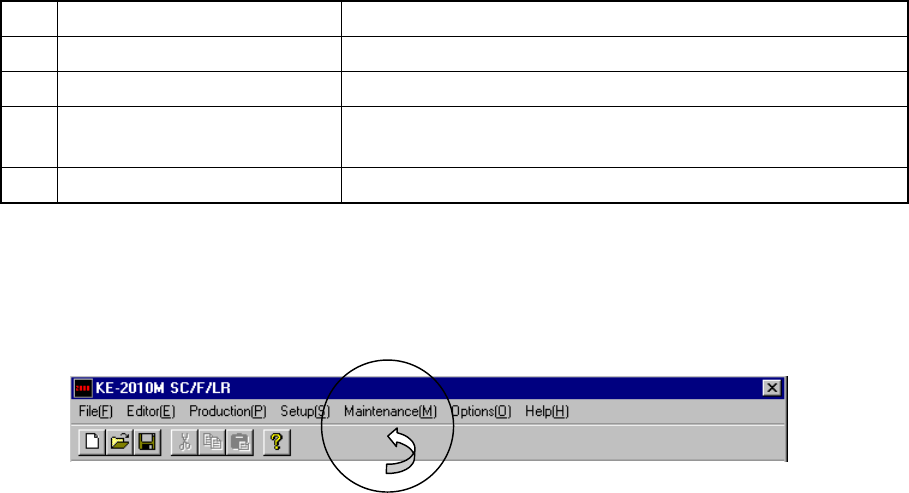
The setting items provided on the Maintenance menu are shown in Table below.
No. Maintenance command Description
1 Warming up Sets the time or number of times.
2 Idle Conveyor Sets when to use the machine as a PWB transportation buffer.
3
Machine Management
information
Displays the entire machine operation information.
4 Self-Calibration See Chapter 10 "SELF CALIBRATION".
●
After selecting the[Maintenance] command on the menu bar displayed on the
Main screen, invoke each screen.
9 − 2
9.2 Warming up
9.2.1 Warm-up initial screen
When you select the [Warming Up] command on the [Maintenance] menu invoked
from the menu bar of the main menu, the following Warm-up initial screen appears.
Figure 9.2.1 Warm-up dialog box
When you press the <START> switch, the warm-up operation starts.
9.2.2 Setting the conditions for warming-up operation
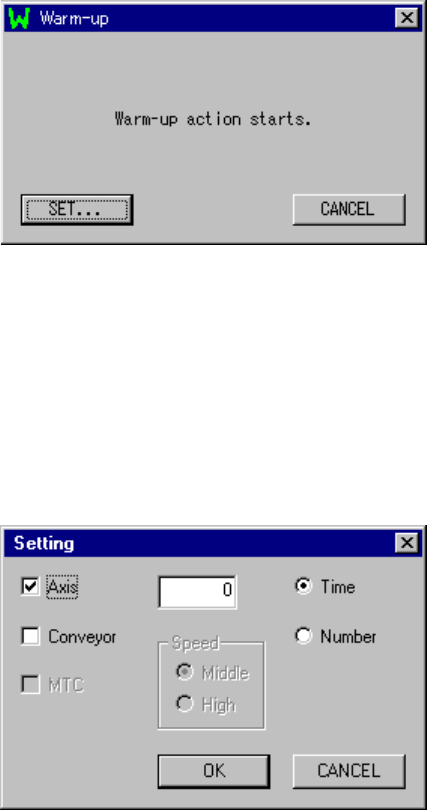
When you click the <SET> button, the following "Setting" dialog box appears on the
screen.
Figure 9.2.2.1 Setting dialog box
(1) Device to be warmed up
Select the device to be warmed up: Axis, Cnvr. (Conveyor) and/or MTC.
If the MTC is not checked on the "Device enable" menu invoked from the Machine
Setup menu, the item "MTC" is disabled, and you cannot select it.
Any of these devices is not selected, the <OK> button is disabled.
Initial setting: Axi

9 − 3
(2) Setting the pause time and number of times
- Set the time spent for stopping warming-up operation and the number of times
you are to perform warming-up operations.
- The available values vary depending on the warming-up operation terminating
conditions.
- Time: 0 to 9999 (minutes)
Note: When "0" is set, warming-up operation will not finish until you suspend it.
- Number: 1 to 999999
●
Initial value: 0
(3) Setting the condition for terminating warming-up operation
- Select the condition for terminating warming-up operation: Time or Number.
●
Initial setting: Time
(4) Setting the speed
- Set the speed of an axis.
- You can select high speed (High) or middle speed (Middle).
●
Initial setting: Middle
Note: The axis speed is fixed to “Middle” for the standard specifications
(see Figure 10.2.2.1.)
Contact us or your dealer for the details on the speed setting (variable).