KE-2030使用说明书.pdf - 第658页
11 − 10 11.4.3 Setting the Production (Function) options W hen y ou select the [ Options] com mand on the menu bar , then [ Option Sett ing] command on the O ptions menu, t he Operation opt ion setting dialog box appears…
11 − 9
− When you do not check this check box, the radio button “Produce after
PWB re-clamp.” is selected.
When you validate the selected item(s), click the <OK> button. If you do not want to
set any option, click the <CANCEL> button.
☞
11 − 10
11.4.3 Setting the Production (Function) options
When you select the [Options] command on the menu bar, then [Option Setting]
command on the Options menu, the Operation option setting dialog box appears on
the screen.
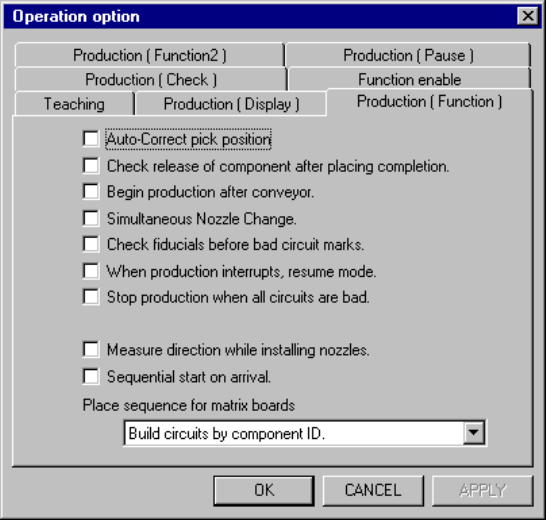
When you select the <Production (Function)> tag, the <Production (Function)> option
setting screen appears as shown in Figure 11.4.3.
Figure 11.4.3 Production (Function) option setting screen
(Screen example when a KE-2030 is used)
(1) How to set the item
① Auto-correct pick position.
− Using the check box, perform the pick up position correction.
− When this option is checked, the pick point is corrected based on the
centered position.
− When this option is not checked, the "pick up position correction" setting of
the "Component Data" is ignored, then the correction is not performed.
② Check release of component after placing completion.
− Using the check box, check to see if a component is apart from the nozzle
when it is placed.
− When this option is checked, using the laser, the system checks if there is
no component on the nozzle when the Z axis moves up after a component
is placed.
− When this option is not checked, the setting "Component release check" of
"Component Data" is ignored, then the system does not check whether a
component is released.
11 − 11
③ Begin production after conveyor.
− Using the check box, allow the system to start production only after a
board is transferred.
− When this option is checked, production does not start until a board is
clamped completely.
− When this option is not checked, production starts before a board is
clamped completely.
④ Simultaneous Nozzle Change.
− Using the check box, allow the nozzles to be replaced simultaneously.
− When this option is checked, the nozzles are replaced simultaneously.
− When this option is not checked, the nozzles are not replaced
simultaneously.
⑤ Check fiducials before bad circuit marks.
− Using the check box, specify whether to recognize a BOC mark prior to a
bad mark.
− When you check the check box of this item, the machine recognizes a
BOC mark prior to a bad mark.
⑥ When production interrupts, resume mode.
- When the current production is aborted due to an asynchronous event (an
asynchronous event occurs or production error occurs), the system always
creates a continuous production file.
- When you check this check box, the system creates a continuous
production file when the current production is interrupted.
- See Section 6.4.9 (for a KE-2010), 6.4.10 (for a KE-2030) or 7.4.10 (for a
KE-2020/2040) “Continuous Production” for the procedure for resuming the
suspended production.
⑦ Measure direction while installing nozzles
− Check the “Measure direction while installing nozzles” check box to
measure the nozzle direction when it is attached on a head.
− When you check this check box, the system measures the nozzle
attachment direction when you attaches a nozzle to a head, then corrects
the component angle by the measured angle when the system picks up,
recognizes or places a component.
⑧ Sequential start on arrival [displayed on a KE-2030 only]
− Check the check box “Sequential start on arrival”.
− When you check this check box, the system places components in order
they are sent in the system to produce a PWB.