KE-2030使用说明书.pdf - 第437页
6 − 91 ⑨ If production is int errupted dur ing product ion with the IN station while a board located on the eject ing side waits f or being ej ected in “Seq uential and Mix” mode (A continuous product ion file is used an…
6 − 90
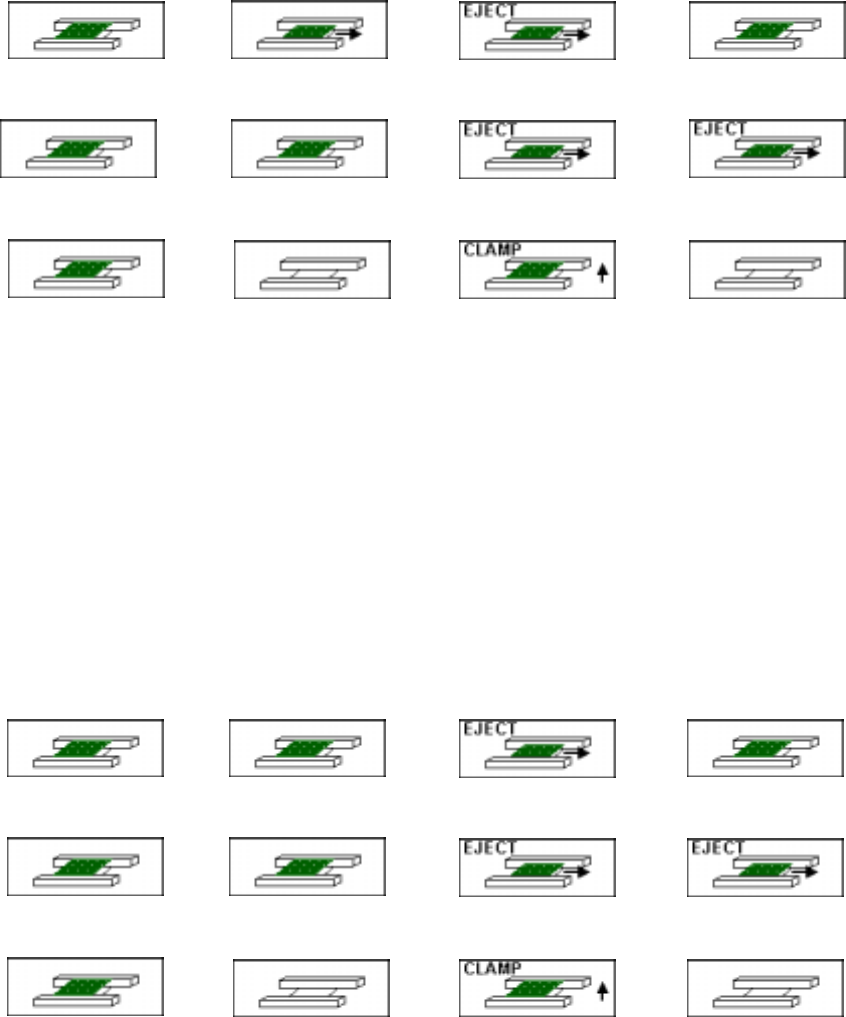
◇ If a board is ejected when you select to re-clamp a board
⑦ If a board waits for being ejected in “Sequential and Mix” mode and it causes a
board eject error
(When a continuous production file is used, and board re-clamping is selected)
Loading side (waiting) IN station (waiting) OUT station (error) Ejecting side (waiting)
↓
Loading side IN station
OUT station
(ejecting a board)
Ejecting side
(ejecting a board)
↓
Loading side IN station
OUT station
(board re-clamping)
Ejecting side
◇ In this case, you have to feed a board located on the ejecting side to the next
process, a board located on the OUT station to the ejecting side, and a board
located on the IN station to the OUT station to clamp it.
Note that after ejecting boards located on the OUT station and ejecting station,
the system re-clamps a board located on the IN station with the OUT station to
start the continuous production.
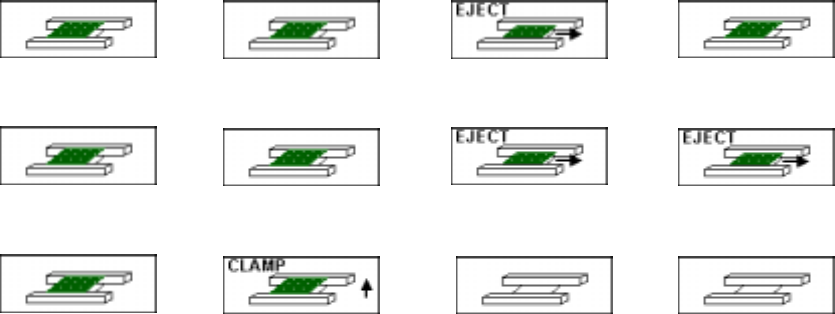
⑧ If a board ejecting error occurs while a board located on the ejecting side waits for
being ejected during production with the OUT station
(when you select to re-clamp a board on the “Processing before production
begins” (when there is no continuous file) dialog box)
Loading side (waiting) IN station (waiting) OUT station (error) Ejecting side (waiting)
↓
Loading side IN station
OUT station
(ejecting a board)
Ejecting side
(ejecting a board)
↓
Loading side IN station
OUT station
(board re-clamping)
Ejecting side
◇ In this case, you have to feed a board located on the ejecting side to the next
process, a board on the OUT station to the ejecting side, and a board on the IN
station to the OUT station to re-clamp it.
Note that after ejecting boards located on the OUT station and ejecting station,
the system re-clamps a board located on the IN station with the OUT station to
start production (new production or the suspended production).
IN →
→→
→OUT
6 − 91
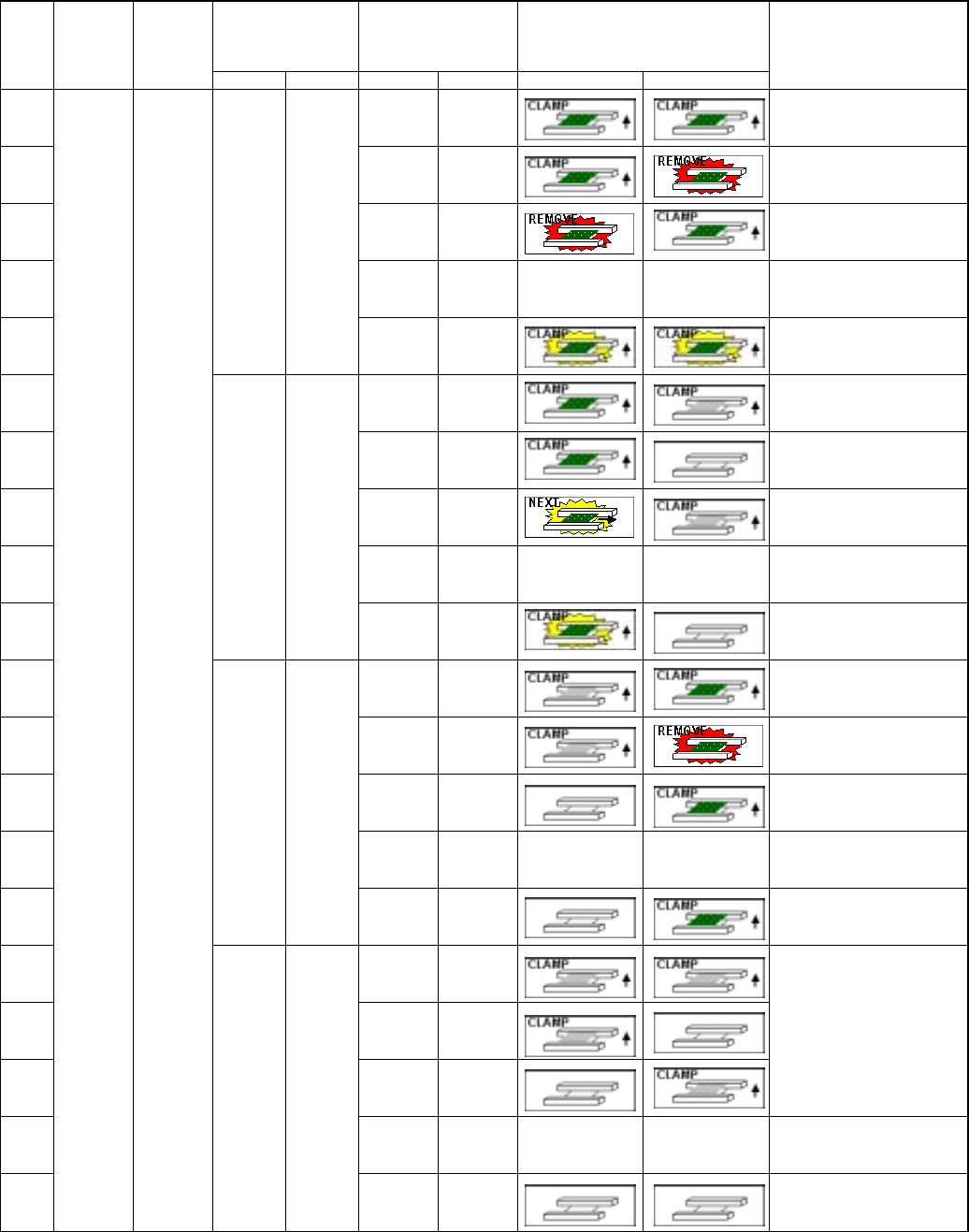
⑨ If production is interrupted during production with the IN station while a board
located on the ejecting side waits for being ejected in “Sequential and Mix” mode
(A continuous production file is used and you select to re-clamp a board.)
Loading side (waiting)
IN station
(during production)
OUT station (waiting) Ejecting side (waiting)
↓
Loading side IN station
OUT station (ejecting a
board)
Ejecting side(ejecting a
board)
↓
Loading side
IN station
(board re-clamping)
OUT station Ejecting side
◇ In this case, you have to feed a board located on the ejecting side to the next
process, a board located on the OUT station to the ejecting side, and a board
located on the IN station to the OUT station to clamp it.
Note that after ejecting boards located on the OUT station and ejecting station,
the system re-clamps a board located on the IN station to perform the continuous
production.
6 − 92
■
■■
■ When the system performs the continuous production and starts production after
re-clamping a board
Information on the
PWB transport path
obtained when
production was
interrupted
Whether there is a board
on the PWB transport
path
Image of the PWB transport condition
Step
No.
Whether to
resume
production
Production
operation
Left Right Left Right Left Right
Operation after you press
the <START> key
①
Yes
Yes
After a board is clamped again, the
system resumes the production
without loading a board before
starting production
②
Yes
None
Error
③
None
Yes
Error
④
None
None
Not selectable
⑤
Yes Yes
No
information
No
information
After re-clamping a board, the
system performs the continuous
production without loading any
board (Be careful).
⑥
Yes
Yes
Error
⑦
Yes
None
After a board is clamped again, the
system resumes the production
without loading a board before
starting production
⑧
None
Yes
Error
⑨
None
None
Not selectable
⑩
Yes None
No
information
No
information
After re-clamping a board, the
system performs the continuous
production without loading any
board (Be careful).
⑪
Yes
Yes
Error
⑫
Yes
None
Error
⑬
None
Yes
After a board is clamped again, the
system resumes the production
without loading a board before
starting production
⑭
None
None
Not selectable
⑮
None Yes
No
information
No
information
After re-clamping a board, the
system performs the continuous
production without loading any
board (Be careful).
⑯
Yes
Yes
⑰
Yes
None
⑱
None
Yes
Error (No board)
⑲
None
None
Not selectable
⑳
Yes
Production
after a
board is
clamped
(when you
select
“Re-clamp
current
PWB”)
None None
No
information
No
information
Error (No board)